


Copy link to clipboard
Copied
Hi
I am new to PDF scripts and am trying to create one for a form, but getting a little confused with other examples.
Here is what I require.
1. Simple calculation Value 1 + Value 2 = Value 3 (This bit I can do 🙂 )
2. This is the bit I need help on.
Value 3 will sit in Band, named A to I. So I need a script that displays the Band value 3 fits in?
example Value 3 = 10000.
Band A is up to 1000
Band B is between 1000 & 5000
Band C is between 5000 & 15000,
so Value 3, sits in Band C, so I display a C
I hope this is clear?
Mark




Copy link to clipboard
Copied
Hi,
on the validate of the Value 3 you should be able to do something like
var bandValue = "";
if ( event.value < 1000){
  bandValue = "A";
} else if (( event.value >= 1000) && ( event.value < 5000)){
  bandValue = "B";
} else if ((event.value >=5000) && ( event.value < 15000)){
  bandValue = "C";
} else {
  //catch all in case the value is not any of above
  bandValue = "ERROR"
}
// change "BandValue" to the name of your field.
this.getField("BandValue").value = bandValue; 10
Replies
10
10
Replies
10


Copy link to clipboard
Copied
Hi,
on the validate of the Value 3 you should be able to do something like
var bandValue = "";
if ( event.value < 1000){
  bandValue = "A";
} else if (( event.value >= 1000) && ( event.value < 5000)){
  bandValue = "B";
} else if ((event.value >=5000) && ( event.value < 15000)){
  bandValue = "C";
} else {
  //catch all in case the value is not any of above
  bandValue = "ERROR"
}
// change "BandValue" to the name of your field.
this.getField("BandValue").value = bandValue;Copy link to clipboard
Copied
Hi
Thank you for the help. This is great. Unfortunately, I just keep getting an error.
How does the code know it is working with Value 3?
Thanks
Mark

Copy link to clipboard
Copied
Because it's associated with it via the event that it triggers.
What does the error you're getting say, exactly?
Copy link to clipboard
Copied
I just says error

Do i need to change all BandValues to Value D or just the last one?
Sorry, I really don't know what I am doing.
Copy link to clipboard
Copied
Ah, the field itself says "ERROR", I see. Where did you place the code, exactly?
Copy link to clipboard
Copied
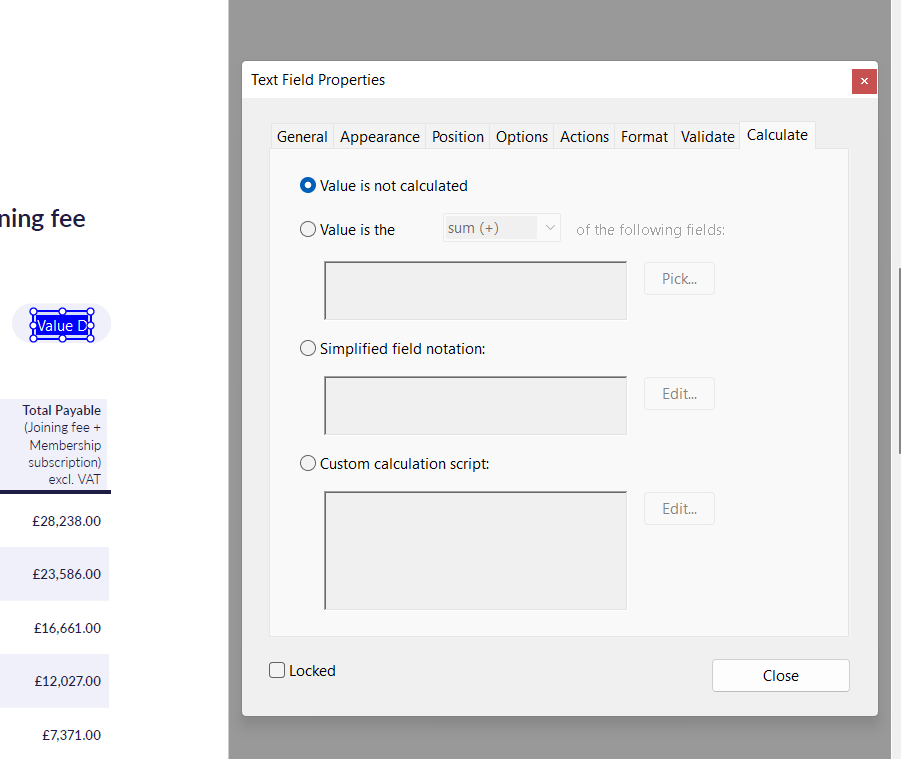
I put it in the custom script box, though it wont work now!
Copy link to clipboard
Copied
It's the wrong field and the wrong event. Read the original reply more carefully.
Copy link to clipboard
Copied
Sorry. I don't understand.
Copy link to clipboard
Copied
To quote:
on the validate of the Value 3

Copy link to clipboard
Copied
I'm sorry. I'm a fool. Thank you for your help. It works now. 🙂


Get ready! An upgraded Adobe Community experience is coming in January.
Learn more
 AdChoices