
Exit
  • Global community
    • Language:
      • Deutsch
      • English
      • Español
      • Français
      • Português
  • 日本語コミュニティ
  • 한국 커뮤니티
0

Acrobat X Pro- Error while opening

Participant ,
Feb 25, 2023 Feb 25, 2023

I have a registered copy, with CD, and installed on new computer, Win10x64.

Now will not work...right hand corner shows account open with avatar. the this loads also.

Wont work nor will Acrobat Readr. Quits right away.
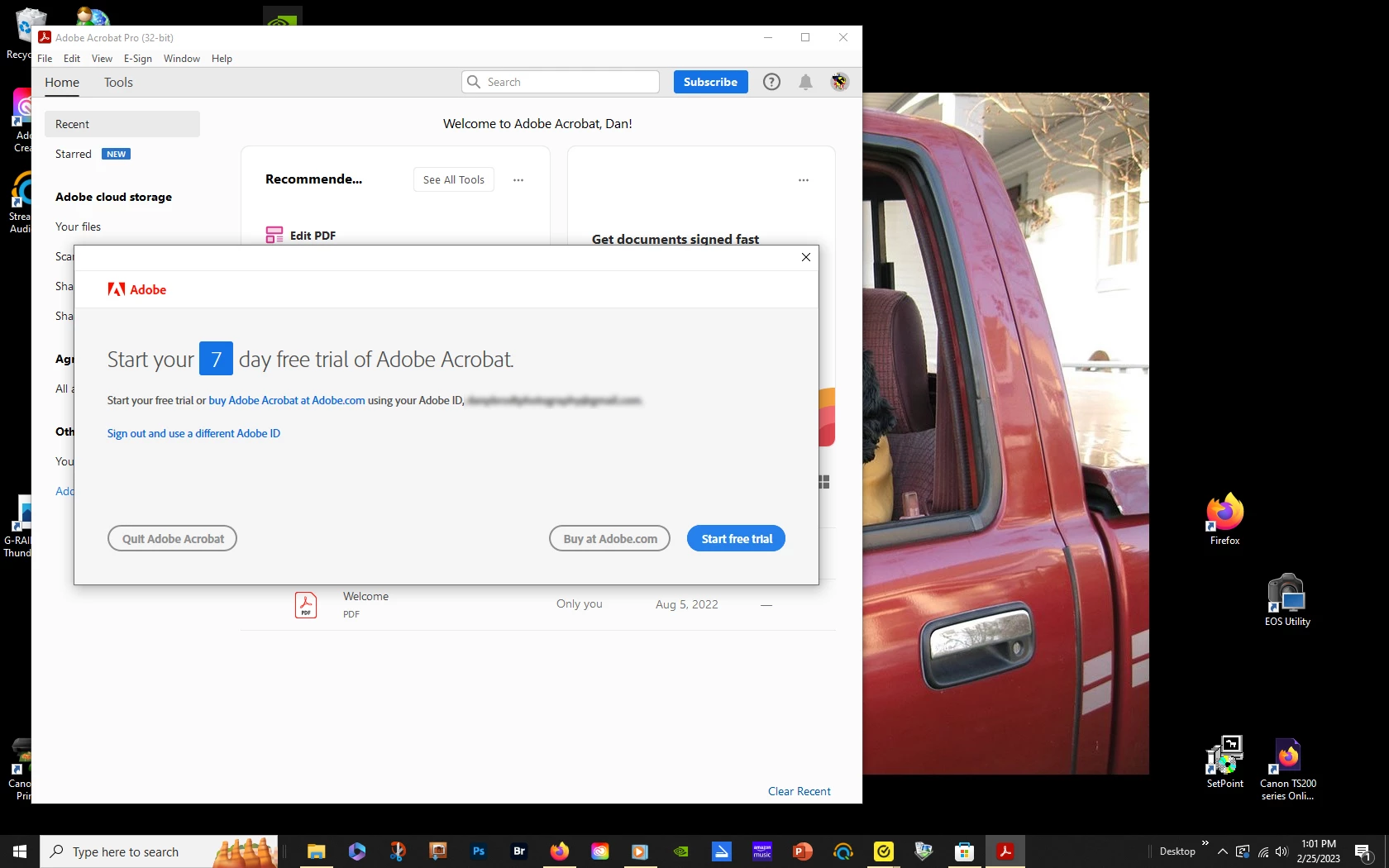
 

Adobe Acrobat X Pro.jpg

[Moderator deleted private information. Please do not post private information like e-mails and phone numbers]

TOPICS
General troubleshooting , Install update and subscribe to Acrobat
5.0K
Translate
Report
Community guidelines
Be kind and respectful, give credit to the original source of content, and search for duplicates before posting. Learn more
community guidelines
Community Expert ,
Feb 25, 2023 Feb 25, 2023

Acrobat X is an old and unsupported version, and is not officially compatible with any current OS.
To increase the chances of it working properly make sure you have all updates installed (up to 10.1.16) and run it in Compatibility Mode with an earlier OS, like Windows 7.

Also, you can't have Acrobat X and Reader installed at the same time.

Updates are available here:
ftp://ftp.adobe.com/pub/adobe/acrobat/win/10.x/
You must use a dedicated FTP client to open the link, it won't work in most browsers.

Translate
Report
Community guidelines
Be kind and respectful, give credit to the original source of content, and search for duplicates before posting. Learn more
community guidelines
Participant ,
Feb 26, 2023 Feb 26, 2023
Thank you for your response.

I wont get into a negative discussion about the compatibility of Windows10,
AAcXPro and Adobe Reader. It worked for years, together on 2 of my
computers.

I have Adobe CC for my photography and ALL the updates are installed.

It worked last week fine for my 2022 taxes.

It STILL works fine on my other Win10 along with Reader.

I will check a few other settings and see if I can respond with another
screenshot.
Thanks very much!
Dan
Translate
Report
Community guidelines
Be kind and respectful, give credit to the original source of content, and search for duplicates before posting. Learn more
community guidelines
LEGEND ,
Feb 26, 2023 Feb 26, 2023

That's not Acrobat X. It's the current Acrobat DC. 
you can no longer use both Acrobat Pro and Acrobat Reader. Uninstall fully and start again. 

Translate
Report
Community guidelines
Be kind and respectful, give credit to the original source of content, and search for duplicates before posting. Learn more
community guidelines
Participant ,
Mar 05, 2023 Mar 05, 2023

That is not what the box sez.Screenshot 2023-03-05 at 11.36.57 AM.png

Translate
Report
Community guidelines
Be kind and respectful, give credit to the original source of content, and search for duplicates before posting. Learn more
community guidelines
Community Expert ,
Mar 05, 2023 Mar 05, 2023

This looks very suspect. Acrobat X has been discontinued by Adobe years ago. Anyone still selling it now as a brand-new application is most likely scamming you, or selling you illegal software. Where did you buy it from, exactly?

Translate
Report
Community guidelines
Be kind and respectful, give credit to the original source of content, and search for duplicates before posting. Learn more
community guidelines
LEGEND ,
Mar 05, 2023 Mar 05, 2023

It is indeed not what it says on the box. But it IS what it says on your screen.

We know this because you posted a screen shot.

TestScreenName_0-1678040044527.png


You can choose which one to believe - I know which one I'm going with, since it not only says Acrobat Pro DC, it also has all the other things that I see in Acrobat DC, that never were in Acrobat X. Still, it's a very tempting box.

Translate
Report
Community guidelines
Be kind and respectful, give credit to the original source of content, and search for duplicates before posting. Learn more
community guidelines
Community Expert ,
Mar 05, 2023 Mar 05, 2023

It doesn't actually say in that screenshot it's Acrobat DC, only "Adobe Acrobat Pro (32-bit)", but it's certainly not Acrobat X, going by the UI.

Translate
Report
Community guidelines
Be kind and respectful, give credit to the original source of content, and search for duplicates before posting. Learn more
community guidelines
Participant ,
Mar 06, 2023 Mar 06, 2023
Bought from Adobe
Translate
Report
Community guidelines
Be kind and respectful, give credit to the original source of content, and search for duplicates before posting. Learn more
community guidelines
LEGEND ,
Mar 06, 2023 Mar 06, 2023

Bought from Adobe, over 10 years ago? Ok, well someone has installed Acrobat DC (the current product) on the computer too, and it's wiped out Acrobat X. Now you need to pay for Acrobat DC subscription, or completely uninstall it, then try reinstalling Acrobat X.  On no account try to also install Acrobat READER DC as well, that will really mess up things.

Translate
Report
Community guidelines
Be kind and respectful, give credit to the original source of content, and search for duplicates before posting. Learn more
community guidelines
Participant ,
Mar 06, 2023 Mar 06, 2023
Ok it seems I may have been a "free" use of this old version until now.
Here is what I get on my 2023 Adobe CC.

It was bought from Adobe. And YES it is old.....

Adobe CC shows the screen shot..but obviously it is wrong. The "Open" box
is grayed out!

See here:

Thanks for all the input...
Dan
Translate
Report
Community guidelines
Be kind and respectful, give credit to the original source of content, and search for duplicates before posting. Learn more
community guidelines
LEGEND ,
Mar 06, 2023 Mar 06, 2023

Ok, you have an "all apps" subscriptio, I guess. Well, somewhere between Acrobat and CC things have got messed up. What you can try quickly is to sign out from Acrobat (from the Trial license box in your screen shot), and sign in again with the same Adobe ID you are using in CC. That might be enough to get it to play ball.

Translate
Report
Community guidelines
Be kind and respectful, give credit to the original source of content, and search for duplicates before posting. Learn more
community guidelines
Participant ,
Mar 07, 2023 Mar 07, 2023
LATEST
As the song sings, "If it wasn't for bad luck, I'd have NO luck at all"!
AS I stated...I need Acrobat so I guess I will have to buy a new copy!
Thanks!
Dan
Translate
Report
Community guidelines
Be kind and respectful, give credit to the original source of content, and search for duplicates before posting. Learn more
community guidelines
Participant ,
Mar 06, 2023 Mar 06, 2023

AdobeAcrobatX-2023.jpg

Translate
Report
Community guidelines
Be kind and respectful, give credit to the original source of content, and search for duplicates before posting. Learn more
community guidelines
Community Expert ,
Mar 05, 2023 Mar 05, 2023

You can easily check that by starting Acrobat on your other computer and going to Help→About…

You will see what version it shows.


You can report back with the screen shot.


ABAMBO | Hard- and Software Engineer | Photographer
Translate
Report
Community guidelines
Be kind and respectful, give credit to the original source of content, and search for duplicates before posting. Learn more
community guidelines
Participant ,
Mar 06, 2023 Mar 06, 2023

Thanks everyone!

All I want is a standalone Acrobat to create and, edit and read pdf's. If it costs me ok...I am not a "free-be-er"

Translate
Report
Community guidelines
Be kind and respectful, give credit to the original source of content, and search for duplicates before posting. Learn more
community guidelines