Exit
  • Global community
    • Language:
      • Deutsch
      • English
      • Español
      • Français
      • Português
  • 日本語コミュニティ
  • 한국 커뮤니티
0

Add a detectable text field?

New Here ,
Feb 05, 2021 Feb 05, 2021

I'm new to using Fill and Sign.  I converted a .pdf but the auto field detect didn't pick up the last two date fields.  How do I add those in?

1.1K
Translate
Report
Community guidelines
Be kind and respectful, give credit to the original source of content, and search for duplicates before posting. Learn more
community guidelines
Community Expert ,
Feb 05, 2021 Feb 05, 2021

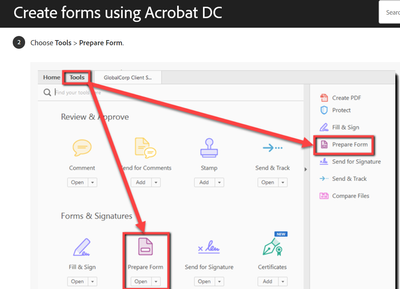
Use Tools > Prepare Form and add the fields.

Translate
Report
Community guidelines
Be kind and respectful, give credit to the original source of content, and search for duplicates before posting. Learn more
community guidelines
New Here ,
Feb 05, 2021 Feb 05, 2021

I saw that in a video but can't find how to get to the page that has the choice to Prepare Form.

Translate
Report
Community guidelines
Be kind and respectful, give credit to the original source of content, and search for duplicates before posting. Learn more
community guidelines
New Here ,
Feb 05, 2021 Feb 05, 2021

Lori5E37_0-1612544070029.png


Translate
Report
Community guidelines
Be kind and respectful, give credit to the original source of content, and search for duplicates before posting. Learn more
community guidelines
New Here ,
Feb 05, 2021 Feb 05, 2021

Lori5E37_0-1612544207496.png


Translate
Report
Community guidelines
Be kind and respectful, give credit to the original source of content, and search for duplicates before posting. Learn more
community guidelines
Community Expert ,
Feb 05, 2021 Feb 05, 2021

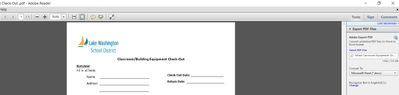
This is not available in Acrobat Reader!

Translate
Report
Community guidelines
Be kind and respectful, give credit to the original source of content, and search for duplicates before posting. Learn more
community guidelines
New Here ,
Feb 05, 2021 Feb 05, 2021

Ohhhh.  That's helpful.  Which platform is it in?  

Translate
Report
Community guidelines
Be kind and respectful, give credit to the original source of content, and search for duplicates before posting. Learn more
community guidelines
Community Expert ,
Feb 05, 2021 Feb 05, 2021

Adobe Acrobat Standard or Pro.

Translate
Report
Community guidelines
Be kind and respectful, give credit to the original source of content, and search for duplicates before posting. Learn more
community guidelines
New Here ,
Feb 05, 2021 Feb 05, 2021

Thank you so much.  I'll check with our district and see if I have access to those.  I've been trying to figure this out on my own for a couple of days now, off and on, with no luck.  I appreciate folks like you taking time to answer questions!

Translate
Report
Community guidelines
Be kind and respectful, give credit to the original source of content, and search for duplicates before posting. Learn more
community guidelines
New Here ,
Feb 05, 2021 Feb 05, 2021

Our tech department said we have Adobe DC but no support is available.  Would Adobe CD fall under either Standard or Pro?

Translate
Report
Community guidelines
Be kind and respectful, give credit to the original source of content, and search for duplicates before posting. Learn more
community guidelines
New Here ,
Feb 05, 2021 Feb 05, 2021

Sorry, meant DC

Translate
Report
Community guidelines
Be kind and respectful, give credit to the original source of content, and search for duplicates before posting. Learn more
community guidelines
Community Expert ,
Feb 05, 2021 Feb 05, 2021
LATEST

DC is the version. 

Translate
Report
Community guidelines
Be kind and respectful, give credit to the original source of content, and search for duplicates before posting. Learn more
community guidelines