


Add button in VBA
I am struggling to add a button using IAC code.
Using these references I can't find all the properties to set for a button.
https://opensource.adobe.com/dc-acrobat-sdk-docs/library/interapp
https://opensource.adobe.com/dc-acrobat-sdk-docs/library/jsapiref
I did just find
https://opensource.adobe.com/dc-acrobat-sdk-docs/library/jsdevguide/JS_Dev_AcrobatForms.html
but still having issues.
With this code snip, the button is added, but does nothing.
btn = jso.addField("Submit_btn","button", 0, aBtnRect)
'properties
btn.buttonSetCaption("Submit Form")
btn.borderStyle = "border.b" 'beveled edges. but what I want is rounded corners.
btn.textColor = "color.black" 'error <<<<<<<<<<
btn.lineWidth = 1 'Thin Border
btn.setAction("MouseUp", "mailto:test@abc.com")
I get an error on textColor.
Also a problem setting button action.
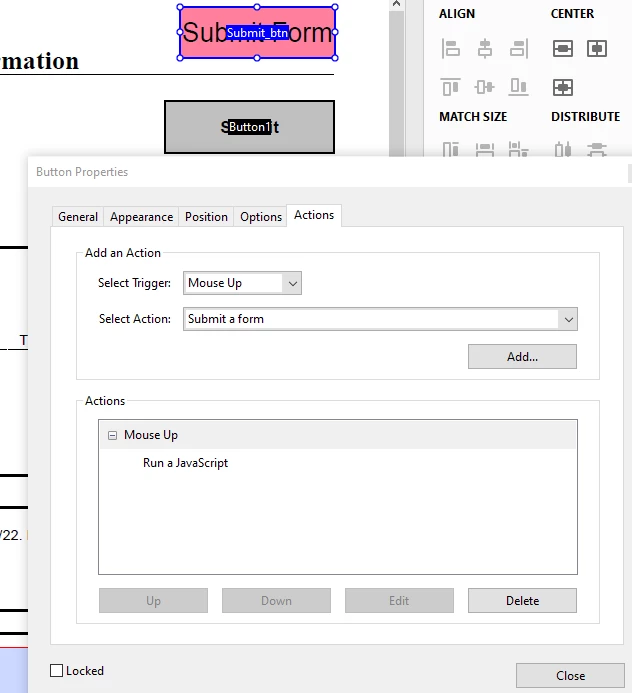
The actions window says 'Run a javascript'. But if I add a button in the UI, both the Actions window and Select Action field say Submit a form. The button added by code does not do anything.
 AdChoices