Exit
  • Global community
    • Language:
      • Deutsch
      • English
      • Español
      • Français
      • Português
  • 日本語コミュニティ
  • 한국 커뮤니티
0

Adding a URL to a Submit button

Explorer ,
Jan 15, 2018 Jan 15, 2018

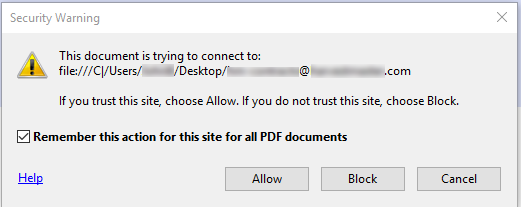
I am trying to add a URL to a Submit button on a PDF form. I can add it fine in the Properties box, but when I go to test it (and when the form's owner tests it) an error box pops up saying it is trying to connect with my desktop.

This is what I put in:

Capture2.PNG

This is what I see:

Capture.PNG

I have tried all the various export formats, and they all do the same thing.

Can someone please tell me what is going on, and how do I fix this? Thanks.

TOPICS
PDF forms
1.3K
Translate
Report
Community guidelines
Be kind and respectful, give credit to the original source of content, and search for duplicates before posting. Learn more
community guidelines
1 ACCEPTED SOLUTION
Community Expert ,
Jan 15, 2018 Jan 15, 2018

Assuming this is an email address, add "mailto:" (without the quotes) before it.

View solution in original post

Translate
Report
Community guidelines
Be kind and respectful, give credit to the original source of content, and search for duplicates before posting. Learn more
community guidelines
Community Expert ,
Jan 15, 2018 Jan 15, 2018

Assuming this is an email address, add "mailto:" (without the quotes) before it.

Translate
Report
Community guidelines
Be kind and respectful, give credit to the original source of content, and search for duplicates before posting. Learn more
community guidelines
Explorer ,
Jan 15, 2018 Jan 15, 2018
LATEST

Thanks!

Translate
Report
Community guidelines
Be kind and respectful, give credit to the original source of content, and search for duplicates before posting. Learn more
community guidelines