Exit
  • Global community
    • Language:
      • Deutsch
      • English
      • Español
      • Français
      • Português
  • 日本語コミュニティ
  • 한국 커뮤니티
0

Adobe Acrobat Standard 2020 Javascript issue

New Here ,
Dec 11, 2024 Dec 11, 2024

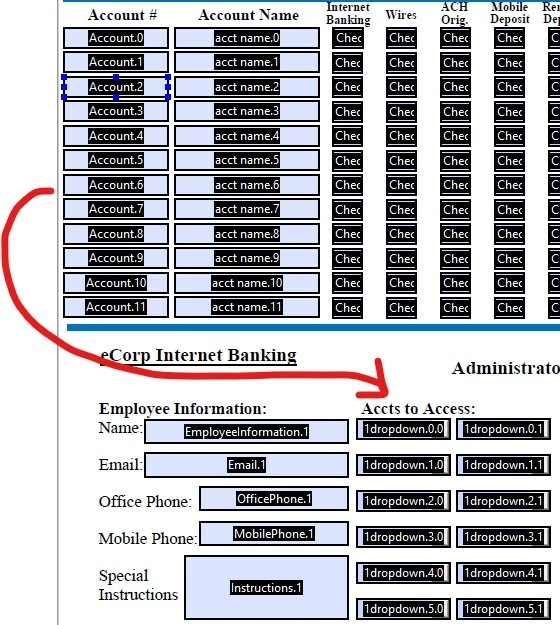
Hi there, I am hoping someone can help me, on top of PDF I have text fields, that I enabled via a script to be available in a dropdown. I am having an issue that when an additional text field is entered at the top, it wipes out the dropdown selections already made and you have to go through and select the drop downs again.

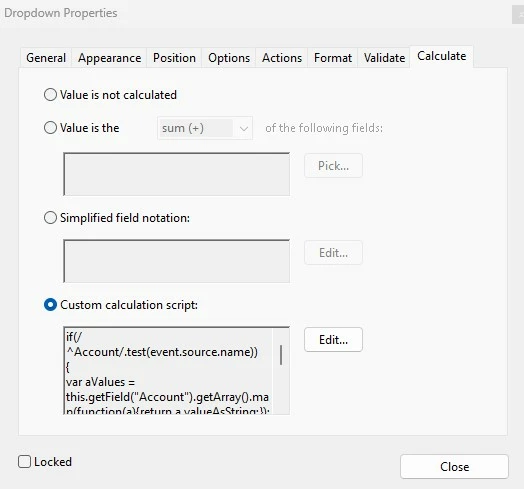
Below is the script I have, I got this one from the Community here. Can you let me know if this a bug within Adobe or is something wrong with the script and how to fix it?


if(/^Account/.test(event.source.name))
{
var aValues = this.getField("Account").getArray().map(function(a){return a.valueAsString;});

var aList = aValues.filter(function(a){return (a.length > 0);});

aList.unshift(" ");

event.target.setItems(aList);
}
PDF screenshot.jpgscreenshot of script.jpg


TOPICS
JavaScript
206
Translate
Report
Community guidelines
Be kind and respectful, give credit to the original source of content, and search for duplicates before posting. Learn more
community guidelines
Community Expert ,
Dec 11, 2024 Dec 11, 2024
LATEST

This is not a bug. Calculation scripts execute when the value of any field in the file is changed.

If you don't want that to happen then you need to use a different event, or add a condition to your code that will only execute it when specific fields are edited (you can do that by examining the event.source.name property, which will contain that field's name).

Another option is to compare the new items list to the current one, and if they are the same, not update it.

Or you could save the currently selected value before the code runs, and re-apply it afterwards (if it's still a part of the list), but I wouldn't recommend that.

Translate
Report
Community guidelines
Be kind and respectful, give credit to the original source of content, and search for duplicates before posting. Learn more
community guidelines