Exit
  • Global community
    • Language:
      • Deutsch
      • English
      • Español
      • Français
      • Português
  • 日本語コミュニティ
  • 한국 커뮤니티
0

Adobe DC Sign - unknown error message

New Here ,
May 28, 2018 May 28, 2018

What is the unknown error which is stopping me from being able to save a document I have signed? I have signed loads of documents in the past but now I cant, I have uninstalled and re-installed already.
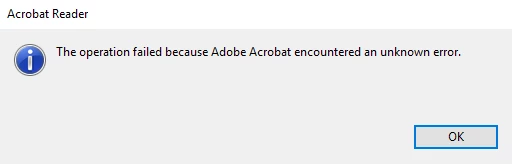

error.png

TOPICS
General troubleshooting
827
Translate
Report
Community guidelines
Be kind and respectful, give credit to the original source of content, and search for duplicates before posting. Learn more
community guidelines
1 ACCEPTED SOLUTION
Adobe Employee ,
May 28, 2018 May 28, 2018
LATEST

Hello Janet,

We apologize for the inconvenience caused, as per the description above, you are getting an error message "An Unknown error occurred" while saving a PDF file which you have signed, Is that correct?

Please check for any pending updates of Adobe Reader from help>check for updates, reboot the machine after installing any updates and see if this brings any difference.

Try repairing Adobe Reader from help>repari installation, reboot the machine and try again.

Have you tried saving another PDF file? Is it specific to one PDF file or with all the PDF files?

Also, check the document properties of the PDF. Open PDF and go to File menu > Properties > Security.Let us know the security settings on the PDF.

This generally happens in a corrupt PDF file. Please share the following piece of information so that we can assist you in a better manner:

  • Is it a Mac or Windows machine and what is the version of operating system installed?
  • What is the dot version of current Adobe Reader installed? To identify refer to Identify the product and its version for Acrobat and Reader DC
  • If the issue is specific to one PDF file, is it possible to share the PDF file with us so that we can try it at our end? To share the file, please use Adobe Send feature, upload the file, share the link to files via private message only, How Do I Send Private Message

Let us know how it goes and share your findings.

Regards,

Anand Sri.

View solution in original post

Translate
Report
Community guidelines
Be kind and respectful, give credit to the original source of content, and search for duplicates before posting. Learn more
community guidelines
Adobe Employee ,
May 28, 2018 May 28, 2018
LATEST

Hello Janet,

We apologize for the inconvenience caused, as per the description above, you are getting an error message "An Unknown error occurred" while saving a PDF file which you have signed, Is that correct?

Please check for any pending updates of Adobe Reader from help>check for updates, reboot the machine after installing any updates and see if this brings any difference.

Try repairing Adobe Reader from help>repari installation, reboot the machine and try again.

Have you tried saving another PDF file? Is it specific to one PDF file or with all the PDF files?

Also, check the document properties of the PDF. Open PDF and go to File menu > Properties > Security.Let us know the security settings on the PDF.

This generally happens in a corrupt PDF file. Please share the following piece of information so that we can assist you in a better manner:

  • Is it a Mac or Windows machine and what is the version of operating system installed?
  • What is the dot version of current Adobe Reader installed? To identify refer to Identify the product and its version for Acrobat and Reader DC
  • If the issue is specific to one PDF file, is it possible to share the PDF file with us so that we can try it at our end? To share the file, please use Adobe Send feature, upload the file, share the link to files via private message only, How Do I Send Private Message

Let us know how it goes and share your findings.

Regards,

Anand Sri.

Translate
Report
Community guidelines
Be kind and respectful, give credit to the original source of content, and search for duplicates before posting. Learn more
community guidelines