
Known Participant
March 17, 2020
Question

Adobe Fillable Form question

  • March 17, 2020
  • 3 replies
  • 1141 views

I have created an Adobe Fillable form of a job application that is filled out by the applicant. 


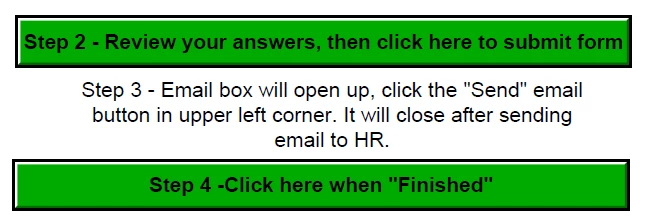
I have two buttons at the bottom of the form. First button is a "Submit Form" button, which email the completed job application to HR. The second button is a Finish button, which clear the data and return to the first page.


Problem is, if you someone click the "Finish" button before the "Submit Form" button. The data is cleared and the job application never got emails.


Is there a way to either keep someone from clicking on the "Finish" button until the "Submit Form" button has been pressed.


For example, if Finish is pressed before Submit, display a message to do the Submit Form button first.


Or maybe the Finish button is not active till the Submit form button has been pressed.


Does anybody have any idea how to do this? Thanks!!!


Here is what the bottom of the form look like.
This topic has been closed for replies.

3 replies

Bernd Alheit
Community Expert
Community Expert
March 23, 2020

You can change the property with Javascript

randyd69Author
Known Participant
March 23, 2020

I am sorry, but that my problem I don't know how. If there is a manual somewhere I be more than happy to look it up. Thank you sir.

Thom Parker
Community Expert
Community Expert
March 23, 2020

The two steps you need are submitting data and hiding/showing fields.

Here are articles that explain how to do both in a Script.

https://acrobatusers.com/tutorials/submitting-data/

https://www.acrobatusers.com/tutorials/dynamically-setting-submit-e-mail-address/

https://acrobatusers.com/tutorials/show_hide_fields/


Also, it's not documented, but the "doc.submitForm" function returns "false" if any required fields are empty. So you don't need separate code to test the required fields.


Thom Parker - Software Developer at PDFScriptingUse the Acrobat JavaScript Reference early and often
JR Boulay
Community Expert
Community Expert
March 17, 2020

Show the second button after the first one is clicked.


Acrobate du PDF, InDesigner et Photoshopographe
randyd69Author
Known Participant
March 18, 2020

That is great. Here is my current properties. The problem now is, that I have required fields that needs to be filled and if the applicant forget to fill one out when they click the button.


They will get this dialog box. When the applicant clicks the OK button. The Step 4 buttons shows. We don't want it to show until after they fixed the missing required fields. Any suggestions to get around this?


Thanks again for your help.

Bernd Alheit
Community Expert
Community Expert
March 18, 2020

You must use both actions in one action. You must use Javascript for this.

Inspiring
March 17, 2020

There is, but consider prompting the user instead, as in the following tutorial: https://acrobatusers.com/tutorials/popup_windows_part1/