


Exit
  • Global community
    • Language:
      • Deutsch
      • English
      • Español
      • Français
      • Português
  • 日本語コミュニティ
  • 한국 커뮤니티
0

Adobe Forms - distribute and response

New Here ,
Mar 08, 2022 Mar 08, 2022

Hello,

I have created an Adobe Form that I will send to 2 people. These 2 people will enter data for multiple clients (with each form being a new client). They will then send (or submit) the form back to me and I would like to extract this data into an excel file. I have played around with the distribute and response options and see how the response items are available and I can export to a .csv, but I'm a bit unclear as to how to do this for multiple forms from the same person, but representing different clients (responses).  An additional layer is that when they email the form back to me, they will have to do it through a secure email share system. Can anyone help with how best to set up the process flow to ultimately be able to record each response and export it?


Thank you!
TOPICS
PDF forms
765
Translate
Report
Community guidelines
Be kind and respectful, give credit to the original source of content, and search for duplicates before posting. Learn more
community guidelines
1 ACCEPTED SOLUTION
Community Expert ,
Mar 08, 2022 Mar 08, 2022

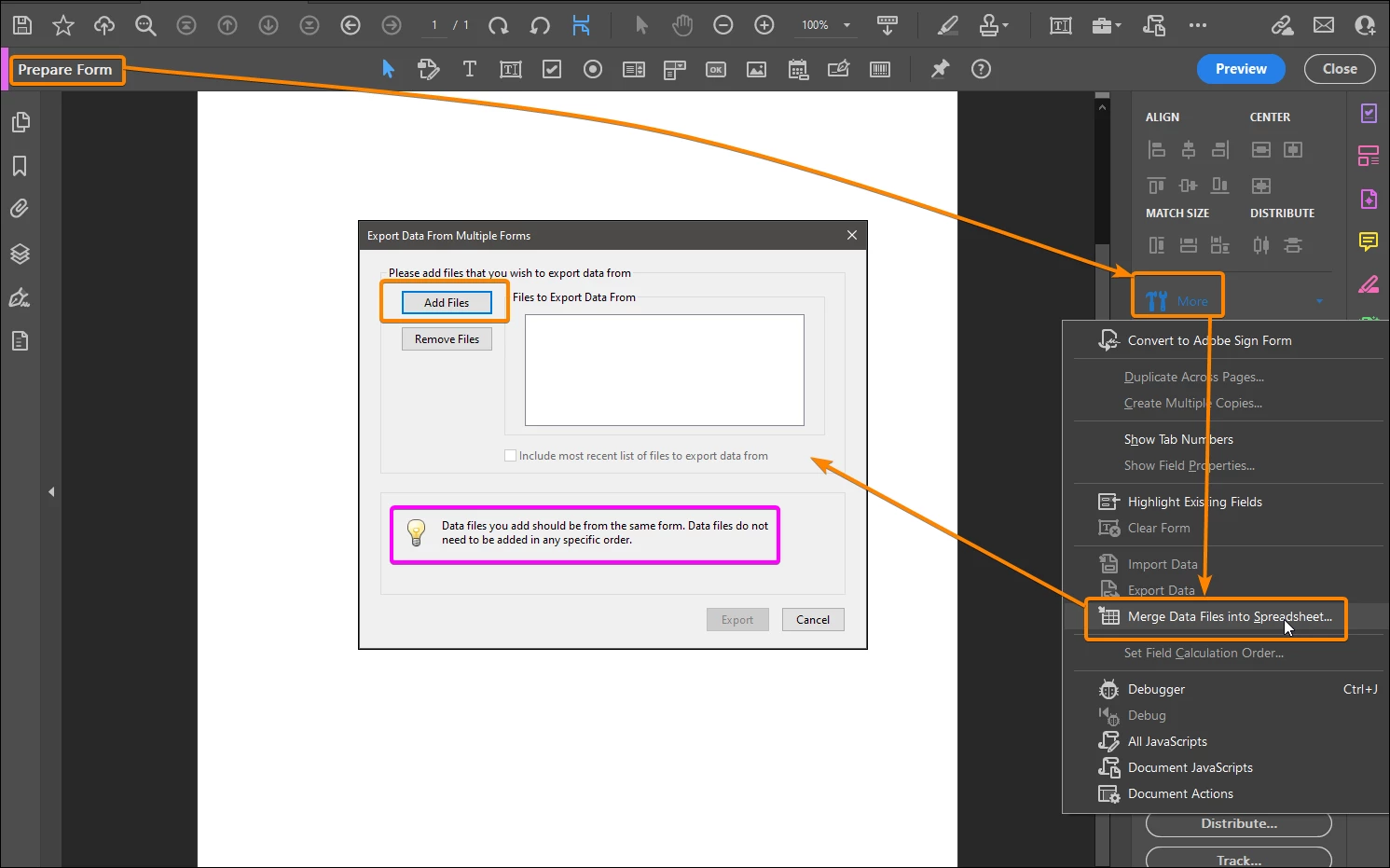
You should use the "Merge Data…" feature:


Capture_208.png


Acrobate du PDF, InDesigner et Photoshopographe

View solution in original post

Translate
Report
Community guidelines
Be kind and respectful, give credit to the original source of content, and search for duplicates before posting. Learn more
community guidelines
Community Expert ,
Mar 08, 2022 Mar 08, 2022

You should use the "Merge Data…" feature:


Capture_208.png


Acrobate du PDF, InDesigner et Photoshopographe
Translate
Report
Community guidelines
Be kind and respectful, give credit to the original source of content, and search for duplicates before posting. Learn more
community guidelines
New Here ,
Mar 08, 2022 Mar 08, 2022
LATEST

That was so straightforward! Thank you so much. I'm loving the form features and accessibility. 

Translate
Report
Community guidelines
Be kind and respectful, give credit to the original source of content, and search for duplicates before posting. Learn more
community guidelines