Exit
  • Global community
    • Language:
      • Deutsch
      • English
      • Español
      • Français
      • Português
  • 日本語コミュニティ
  • 한국 커뮤니티
0

Application user interface: Dialog box scaling

New Here ,
Mar 22, 2017 Mar 22, 2017

Hi all,

I run Acrobat DC on a Surface Pro 4, with a multi-screen set up where the desktop monitors run at a lower resolution that the Surface Pro's own screen.

I've been able to adjust the interface scaling via Preferences > General > Scale for screen resolution set to No Scaling.

However, the application dialog boxes fail to scale effectively (especially when it comes to checkboxes and radio buttons). The example below show the Print dialog, but this is replicated in others such as the Preferences dialog.

Is there a way to fix this?
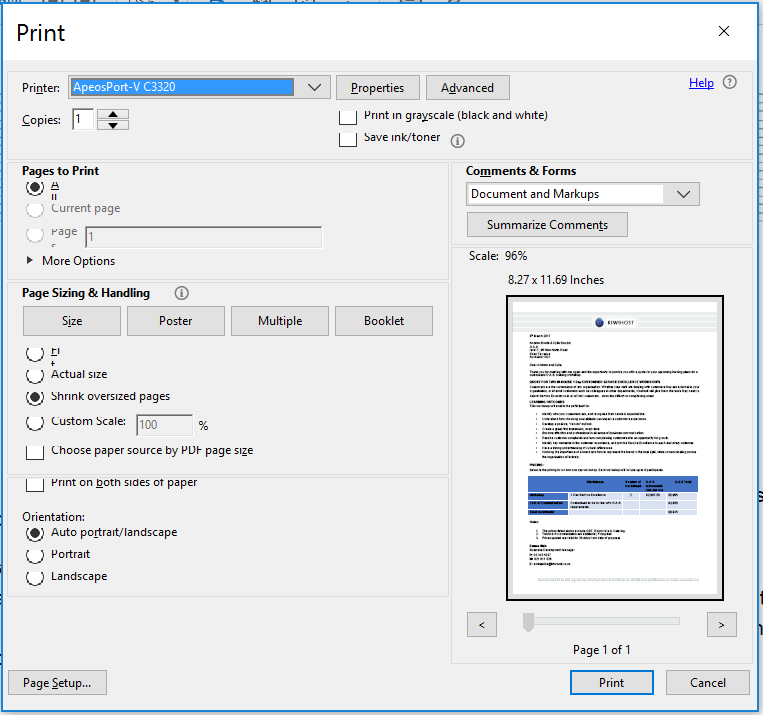
PrintDialog.PNG

TOPICS
Install update and subscribe to Acrobat
572
Translate
Report
Community guidelines
Be kind and respectful, give credit to the original source of content, and search for duplicates before posting. Learn more
community guidelines
Adobe Employee ,
Apr 17, 2017 Apr 17, 2017

Hi agmbowie,

Sorry for the delay in response. 

Would you please let us know the resolution your Surface Pro4 supports and at which resolution is that set to?

Will be waiting for your response.

-Tariq Dar

Translate
Report
Community guidelines
Be kind and respectful, give credit to the original source of content, and search for duplicates before posting. Learn more
community guidelines
New Here ,
Apr 18, 2017 Apr 18, 2017
LATEST

Thanks Tariq,

It's set to the default resolution: 2736 x 1824

The extended screens (two of them) are each set to 1680 x 1050. When the extended screens are connected, one of them is set as the 'main display'. I.e. the Surface Pro no longer remains the 'main display'.

I've noticed that this issue is inconsistent (e.g. today it's working fine). Sometimes the dialog boxes display as expected and I have yet to figure out what else is common to the times they fail. I'll repost to this question if I can identify other commonalities.

Translate
Report
Community guidelines
Be kind and respectful, give credit to the original source of content, and search for duplicates before posting. Learn more
community guidelines


