


- Home
- Acrobat
- Discussions
- Auto tagging for accessibility adds links to numbe...
- Auto tagging for accessibility adds links to numbe...
Auto tagging for accessibility adds links to numbers (that shouldn't be links)

Copy link to clipboard
Copied
When starting with an un-tagged PDF and I either auto-tag though the accessibility tool or add tags to document using the tag tool, Acrobat is adding links and annotations to financial numbers where no links should exist. The links do not exist before the tagging occurs. I can't figure out how to stop this from happening. Any help is appreciated.
Here is a hover on the link created:

Here is the tag that was created:



 5
Replies
5
5
Replies
5


Copy link to clipboard
Copied
Something under the hood in the PDF has a link to something else.
It could have come into the PDF from the original spreadsheet or other source document (Word, InDesign, an accounting program) based on a leftover formula there.
Try this to get rid of that hidden junk with this method we use in our remediation shop:
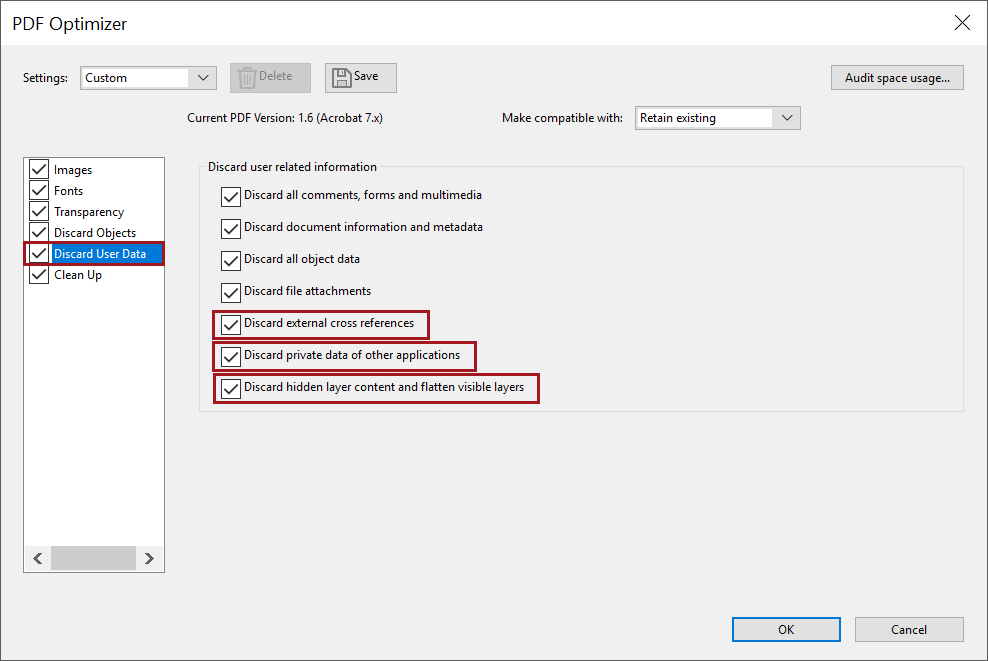
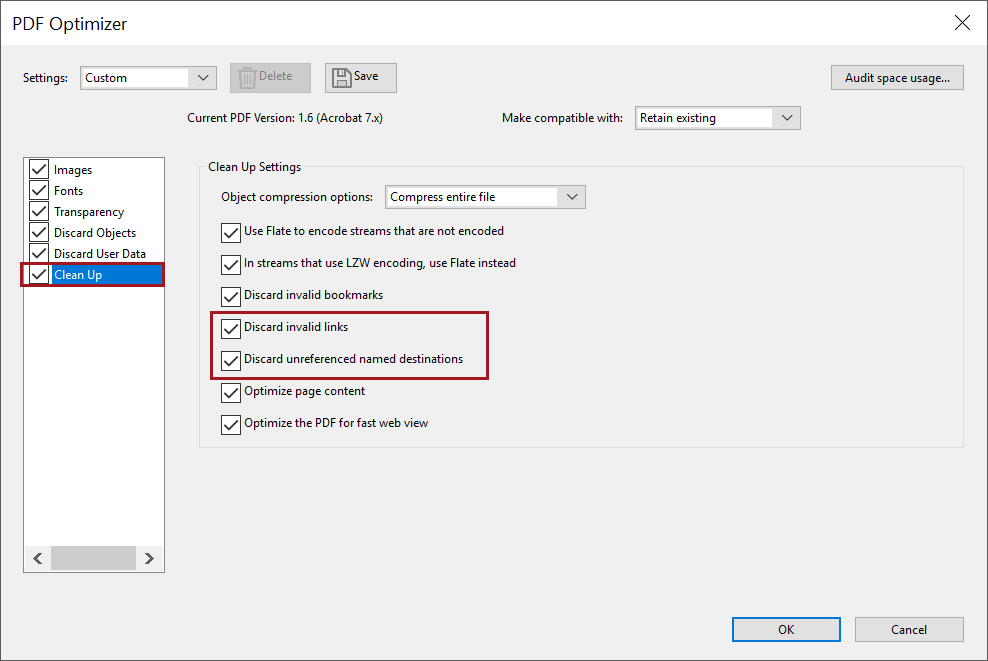
- From Acrobat Pro, select File / Save As Other / Optimized PDF.
- From the Discard User Data section, check the items highlighted in red in the screen capture below.
- From the Clean Up section, also check the highlighted items.
- Save the file with a new name.
- Run the AutoTag utility on the new file.
Whether you leave the other items checked or not, is up to you, but because you're making an accessible PDF you might want to keep that information.
Let us know if this works.
| PubCom | Classes & Books for Accessible InDesign, PDFs & MS Office |
Copy link to clipboard
Copied
Thank you for the response. I followed the steps and got the same result. After the autotag step, the links appeared. I then created a text file in notepad with a single number, printed to PDF, no link. But autotagged it and a link appeared on that number too. I'm at a loss.

Copy link to clipboard
Copied
Holy canoli.
I just replicated what you did in Notepad and got the same result.
This is definitely a bug.
I'll write it up and send it to the folks at Adobe that can correct it.
Thank you for your patience; we're all volunteers here, but on the accessibility team, we're working to make everything seamless <grin>.
In the meantime, you have a PDF to remediate. There are a few choices I can recommend:
- Manual removal of the hyperlinks. I'd do this in the Content panel and check it in the Tags and Order panels.
- Try another software tool, such as CommonLook Global Access or Nuance's Phantom PDF. Both have tools that autotag PDFs.
- Go back to the source document and try to rectify it there, if it's available.
Best to you,
--Bevi Chagnon
PubCom.com | accessibility experts
| PubCom | Classes & Books for Accessible InDesign, PDFs & MS Office |
Copy link to clipboard
Copied
Thank you so much for your assistance. I use CommonLook Global but it doesn't have tagging ability. I'll check out the other. I've been untagging all the links but the annotations remain and get flagged as untagged annotations in compliance reports.

I've been getting this across all sorts of documents, Exel, Word, etc. It only happens when you autotag or apply tags with the tag tool. If you convert a source doc to pdf, it doesn't happen, it's only with an existing untagged PDF that you tag. For instance, if you go Tools, Create PDF, and pull in that same text file it creates and tags with no links as shown here.

I don't always have the luxury of having the source files though and get many untagged PDFs for remediation that have to be autotagged. I'll go check out some other tagging tools until a solution is found. Thanks again for your help, that cleanup process you posted earlier will be very useful with some crazy excel tables I get sometimes.
Copy link to clipboard
Copied
Just log a bug for this in Acrobat.UserVoice.com https://acrobat.uservoice.com/forums/914680-acrobat-reader-for-ios/suggestions/37864486-bug-autotag-...
Visit it and Vote it up!
| PubCom | Classes & Books for Accessible InDesign, PDFs & MS Office |


Find more inspiration, events, and resources on the new Adobe Community
Explore Now
 AdChoices