
Participant
February 11, 2022
Answered

Autofill Dates
  • February 11, 2022
  • 2 replies
  • 1930 views

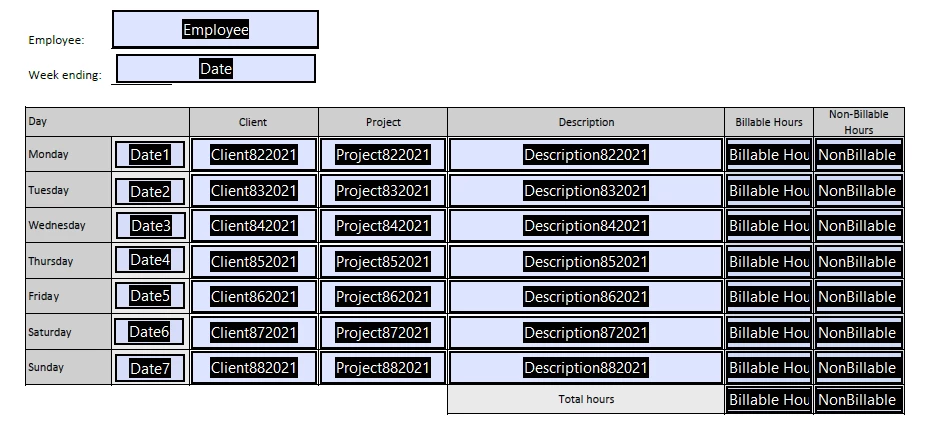
Hello! I am creating a time sheet for my law firm that was previously an Excel. The clerks would just make a copy every week and fill it out. We are switching over to Adobe Form. How can I design it to where when someone puts the Sunday date at the top as the "Week Ending", it will autofill the other dates. I've tried a couple of solutions I found on here but nothing has worked. Thank you in advance!

This topic has been closed for replies.
Correct answer Nesa Nurani

So the last date "Date7" (Sunday) is same date as the one you fill on top?

Try this script as 'Validation' script of "Date" field and see if it needs to change anything:

var date = util.scand("mm/dd/yyyy", event.value);
for( var i=6; i>0; i--){
if(event.value == "")
this.getField("Date"+i).value = "";
else {
date.setDate(date.getDate() -1);
this.getField("Date"+i).value = util.printd("mm/dd/yyyy", date);}}
this.getField("Date7").value = event.value;


Also you didn't say what date format you used so I used "mm/dd/yyyy" you can change it to whatever you need.

2 replies

Participant
July 14, 2022

Hi, Nesa! 

I just sent you a message. This is the similar situation I was referring to in my message. I am needing to start at the top (Monday) and it auto fill moving ahead in sequential order through 7 days - Monday-Sunday.

Monday = 04/01/2022

Tuesday = 04/02/2022

Wednesday = 04/03/2022


Participant
January 11, 2024

i have same question here

hope she reply

Nesa Nurani
Community Expert
Community Expert
January 11, 2024

To populate fields with increment days, you can use this as validation script of "Date1" field:

var date = util.scand("mm/dd/yyyy", event.value);
for( var i=2; i<=7; i++){
if(event.value == "")
this.getField("Date"+i).value = "";
else {
date.setDate(date.getDate() +1);
this.getField("Date"+i).value = util.printd("mm/dd/yyyy", date);}}


Nesa Nurani
Community Expert
Community Expert
February 11, 2022

What date format you are using?

Should it fill for next week or previous week?

Participant
February 11, 2022

So I have them input Sunday at the top (which is the last day of our pay period) so it should fill in the previous week!

Nesa Nurani
Community Expert
Nesa NuraniCommunity ExpertCorrect answer
Community Expert
February 11, 2022

So the last date "Date7" (Sunday) is same date as the one you fill on top?

Try this script as 'Validation' script of "Date" field and see if it needs to change anything:

var date = util.scand("mm/dd/yyyy", event.value);
for( var i=6; i>0; i--){
if(event.value == "")
this.getField("Date"+i).value = "";
else {
date.setDate(date.getDate() -1);
this.getField("Date"+i).value = util.printd("mm/dd/yyyy", date);}}
this.getField("Date7").value = event.value;


Also you didn't say what date format you used so I used "mm/dd/yyyy" you can change it to whatever you need.