
Exit
  • Global community
    • Language:
      • Deutsch
      • English
      • Español
      • Français
      • Português
  • 日本語コミュニティ
  • 한국 커뮤니티
0

Calculation

New Here ,
Mar 03, 2023 Mar 03, 2023

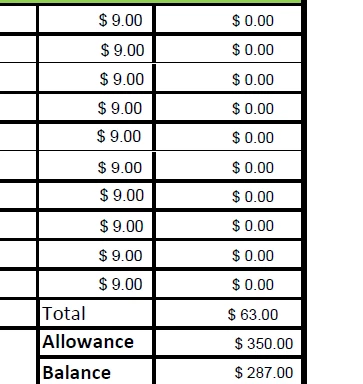
I hope I can explain this clearly.  Column A is quantity, Column B is price, and Column C is the total for the quantity*price.  Field A is the total of all entries in Column C.  When testing each field I put a quantity in each box then I removed these quantites.  However, my Total in Field A is not resetting back to zero even though all the amounts in Column A (price) and Column C (total) are zero.  How do I get the Total field to reset (the spot that shows $63.00) to zero if all entries are blank?
jennifer28461489ef3d_1-1677854510193.png


TOPICS
General troubleshooting , How to
3.2K
Translate
Report
Community guidelines
Be kind and respectful, give credit to the original source of content, and search for duplicates before posting. Learn more
community guidelines
Community Expert ,
Mar 03, 2023 Mar 03, 2023

Did you use scripts or built in calculations?

Can you share file with us?

Translate
Report
Community guidelines
Be kind and respectful, give credit to the original source of content, and search for duplicates before posting. Learn more
community guidelines
New Here ,
Mar 03, 2023 Mar 03, 2023

Yes, provide me with an email.

Translate
Report
Community guidelines
Be kind and respectful, give credit to the original source of content, and search for duplicates before posting. Learn more
community guidelines
New Here ,
Mar 03, 2023 Mar 03, 2023

For that field I used Value is + with Total1, Total10, Total11, Total12, Total13, Total14, Total15, Total16, Total17, Total18, Total19, Total2, Total20, Total21, Total22, Total23, Total24, Total25, Total26, Total27, Total28, Total29, Total3, Total30, Total31, Total32, Total33, Total34, Total35, Total36, Total37, Total38, Total4, Total5, Total6, Total7, Total8, Total9

Translate
Report
Community guidelines
Be kind and respectful, give credit to the original source of content, and search for duplicates before posting. Learn more
community guidelines
Community Expert ,
Mar 03, 2023 Mar 03, 2023

Change the field calculation order.

Translate
Report
Community guidelines
Be kind and respectful, give credit to the original source of content, and search for duplicates before posting. Learn more
community guidelines
New Here ,
Mar 03, 2023 Mar 03, 2023

To what?  Why does that matter?

Translate
Report
Community guidelines
Be kind and respectful, give credit to the original source of content, and search for duplicates before posting. Learn more
community guidelines
Community Expert ,
Mar 03, 2023 Mar 03, 2023

Put the total field at the end of the order.

Translate
Report
Community guidelines
Be kind and respectful, give credit to the original source of content, and search for duplicates before posting. Learn more
community guidelines
New Here ,
Mar 03, 2023 Mar 03, 2023

I am not understanding.  Can you provide an example of what it should look like?

Translate
Report
Community guidelines
Be kind and respectful, give credit to the original source of content, and search for duplicates before posting. Learn more
community guidelines
Community Expert ,
Mar 03, 2023 Mar 03, 2023

At Prepare Form use the dropdown More at the right side. There you can set the calculation order.

Translate
Report
Community guidelines
Be kind and respectful, give credit to the original source of content, and search for duplicates before posting. Learn more
community guidelines
New Here ,
Mar 03, 2023 Mar 03, 2023
LATEST

Thank you.

Translate
Report
Community guidelines
Be kind and respectful, give credit to the original source of content, and search for duplicates before posting. Learn more
community guidelines
Community Expert ,
Mar 03, 2023 Mar 03, 2023

In PDF files (unlike in Excel, for example) the order in which fields are calculated is not automatic. It's determined by a list. So if you have field C which is A+B and field D which is C*2, for example, you have to make sure that D is calculated after C (meaning it appears lower than it in the list), or the results will always be "delayed" by one step, and therefore incorrect.

Translate
Report
Community guidelines
Be kind and respectful, give credit to the original source of content, and search for duplicates before posting. Learn more
community guidelines