Exit
  • Global community
    • Language:
      • Deutsch
      • English
      • Español
      • Français
      • Português
  • 日本語コミュニティ
  • 한국 커뮤니티
0

Custom TAX Calculation Script: universal tax rate calculation

Community Beginner ,
Apr 26, 2020 Apr 26, 2020

Okay! Maybe this question has been asked a million times but I've done my scouring and have exhausted all my efforts! So here it goes...


I have created a unversial invoice with calculations, subtotal, tax and final total. The tax calculation script is this: 


event.value = this.getField("SUB TOTAL").value * this.getField("TAX").value / 100.0;


It works famously! However, I did not take into consideration those users who may have a tax percentage that is not rounded off; eg. 7.5% or 8.25%. Without the user rounding it off to eg. 8% or 9%, is there a calcuation to alleviate this issue??


Any help will be greatly appreciated!! 🙂 

TOPICS
Create PDFs , General troubleshooting , How to , PDF forms
4.8K
Translate
Report
Community guidelines
Be kind and respectful, give credit to the original source of content, and search for duplicates before posting. Learn more
community guidelines
1 ACCEPTED SOLUTION
Community Expert ,
Apr 29, 2020 Apr 29, 2020

Awesome!


I apologize about my initial reply. I made mistakes and below I will explain and illustrate what worked on my end:


  • For example: if the tax is 7.5% you cannot add the decimal. It simply rounds it of to the 100th at 7500%! This calculates too much.   EG: say your item is $2.00 plus the 7.5% tax should be $0.15 and grand total of $2.15. However, with the invoice if you input 75 (as you cannot put a decimal) it is 7500% making the tax at $1.50 (too much). 


I believe that we all failed to explain to you that this is due to how javascript handles floating points , decimal math, and the two types of numbers in modern JavaScript. Refer to links below to get acquainted with these considerations:

  1. https://modernweb.com/what-every-javascript-developer-should-know-about-floating-points/
  2. http://adripofjavascript.com/blog/drips/avoiding-problems-with-decimal-math-in-javascript.html
  3. https://javascript.info/number


And yes you can include a decimal,  but it has to be done using a custom format script for that field using util.printf and some parameters.


  • Okay! So here is my issue now! The script above, Is_rbls did not work but my orginal one does now... ( see post above) I had missed the decimal placement step in configuring. Now however, the amount shows up in the tax percentage?? What's with that?   Example: shown with 7.5% tax; It will now allow to type "7.5" but immediately shows the calcualte tax; not 7.5? 


  • My settings...is there something I'm missing? I'm assuming this is a hopeful easy fix; just been staring at it too long!


Like I said earlier I apologize. I made numerous mistakes, I did not documented myself properly before submitting my reply and was multi-tasking very gullibly answering other threads in the support forums. 


The same answer as the first bullet above applies to these questions except that Adobe Acrobat clearly lets the user know that it will multiply by 100 as shown in your slides below your comment.


Try67 explained: 

The value of fields with the Percentage option selected under the Format tab is between 0 (0%) and 1 (100%).

So if you want it to show 7.5% you have to enter it as "0.075" (without the quotes).


This, however, shouldn't be the case because your initial inquiry was based on why you can't use the period, and your second inquiry why it was rounding and bumping very high numbers.


These are the scripts that I used:


// THIS IS A CUSTOM FORMAT SCRIPT TO WORK AROUND THE DECIMAL ISSUE

var a = +getField("TAX").value;
event.value = util.printf("%.2s", event.value)+"%";


//THIS A CUSTOM CALCULATION SCRIPT FOR THE SUB TOTAL FIELD

var total= this.getField("SUB TOTAL").value
var tax = this.getField("TAX").value;
event.value = (Math.ceil(total*tax)/100);


//THIS IS A CUSTOM CALCULATION SCRIPT FOR THE GRAND TOTAL FIELD

var subT = this.getField("SUB TOTAL").value
var tax = this.getField("tax").value;
event.value = subT+tax;


NOTE: In the first script I corrected this part "%1.f %";  to "%.2s", event.value)+"%"


The "f" denotes using a  floating point number so I switched "s" to print out the format of this number as a string. Doing so eliminates all the troubles in this entire discussion , plus you can add the "%" symbol in the equation and it won't affect the remainder of the other calculated fields that depend on the valu displayed in the Tax field (very valuable discussion by the way!)


So like I said before, this is something I learned from Try67 in a similar thread that he answered for another user not so long ago. I just couldn't find it to post it back here for you to use.


Anyway,  I prepared a slide for your consideration. If you decide to use it you're more than welcome.


See below:
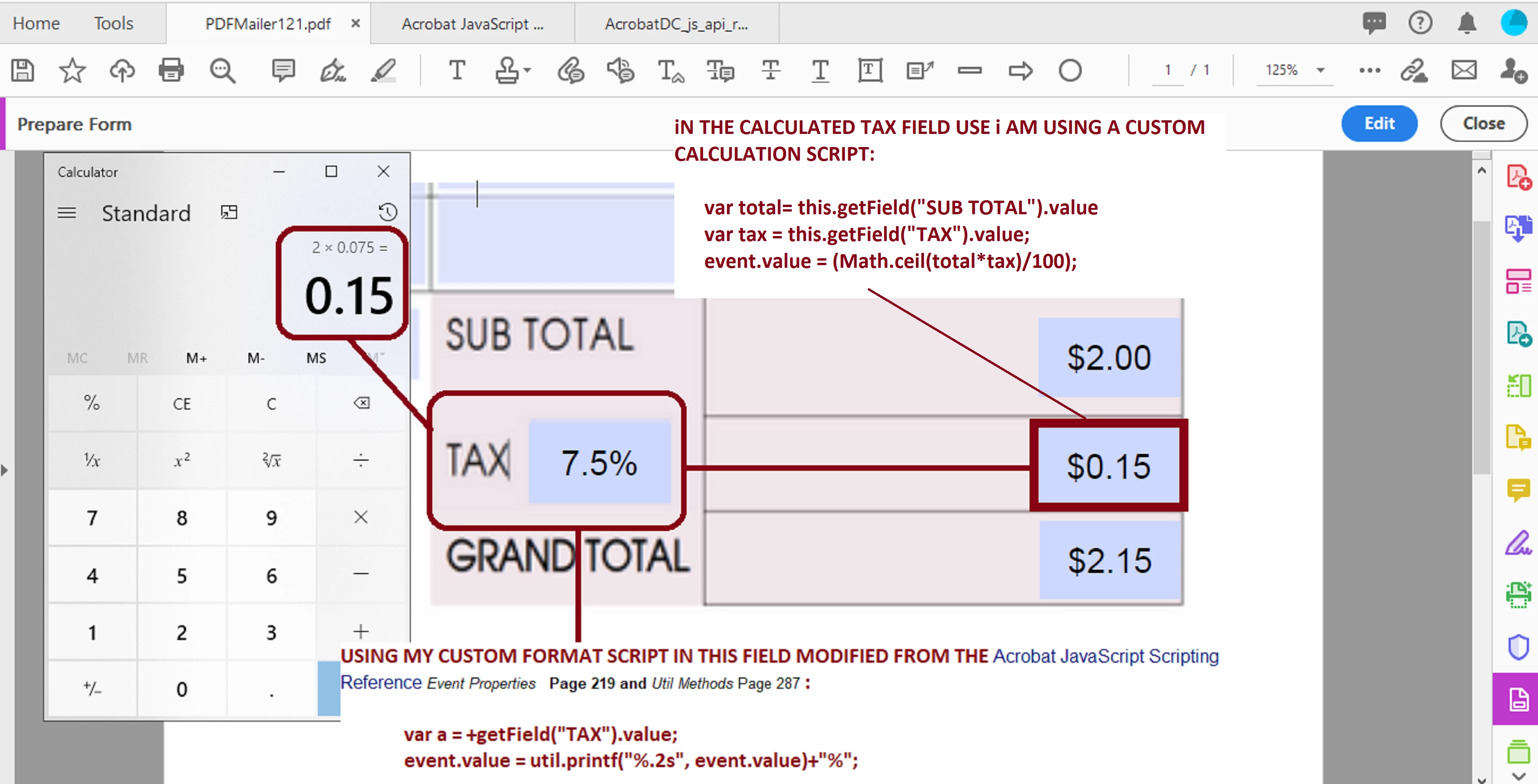
 

universal tax.png


One more observation, though, you didn't share with the team how did you resolved the issue.


In my opinion, the work that I just presented is the correct answer to your questions. But I am learning JavaScript and getting used to being somewhat ignored when I join the big boys of Acrobat support forums.


It would mean a world to me if this answer is marked as correct answer.



View solution in original post

Translate
Report
Community guidelines
Be kind and respectful, give credit to the original source of content, and search for duplicates before posting. Learn more
community guidelines
Community Expert ,
Apr 26, 2020 Apr 26, 2020

I don't follow what's the issue... Your code should work with any value, integer or not, doesn't matter.

Translate
Report
Community guidelines
Be kind and respectful, give credit to the original source of content, and search for duplicates before posting. Learn more
community guidelines
Community Beginner ,
Apr 26, 2020 Apr 26, 2020

I thought so too. I did a test. As I have created an invoice template with calculations in hopes to work with whatever tax bracket the user is in. 

For example: if the tax is 7.5% you cannot add the decimal. It simply rounds it of to the 100th at 7500%! This calculates too much. 


EG: say your item is $2.00 plus the 7.5% tax should be $0.15 and grand total of $2.15. However, with the invoice if you input 75 (as you cannot put a decimal) it is 7500% making the tax at $1.50 (too much). Screen Shot 2020-04-26 at 6.06.31 PM.png If you round if off to 8% tax this will make the tax $0.01 over. See screenshot.


Screen Shot 2020-04-26 at 6.09.17 PM.png

Translate
Report
Community guidelines
Be kind and respectful, give credit to the original source of content, and search for duplicates before posting. Learn more
community guidelines
Community Expert ,
Apr 26, 2020 Apr 26, 2020

What format does you use for the field "TAX" ?

Translate
Report
Community guidelines
Be kind and respectful, give credit to the original source of content, and search for duplicates before posting. Learn more
community guidelines
Community Expert ,
Apr 27, 2020 Apr 27, 2020

The value of fields with the Percentage option selected under the Format tab is between 0 (0%) and 1 (100%).

So if you want it to show 7.5% you have to enter it as "0.075" (without the quotes).

Translate
Report
Community guidelines
Be kind and respectful, give credit to the original source of content, and search for duplicates before posting. Learn more
community guidelines
Community Beginner ,
Apr 27, 2020 Apr 27, 2020

try67....I thought of this exaxt same solution, prior to posting a question! It did not work. See screenshot. 

Screen Shot 2020-04-27 at 6.27.24 PM.png


Like mentioned before...it does not allow the typing of a "." (decimal). The error sound on the computer alerts of this. 

Thoughts?

Translate
Report
Community guidelines
Be kind and respectful, give credit to the original source of content, and search for duplicates before posting. Learn more
community guidelines
Community Expert ,
Apr 28, 2020 Apr 28, 2020

This was answered before by Try67 in a nother thread not so long ago, and also by George Kaiser in acrobatusers.com "Decimal to Percent Conversion"


Try the following code as a Custom Fomat Script in your tax field: 

var a = Number(this.getField('Tax').value);
var nValue = a / 100;
var cRound = "%1.f %";
event.value = util.printf(cRound, nValue);


The key to this answer is in this line : "%1.f %";


Translate
Report
Community guidelines
Be kind and respectful, give credit to the original source of content, and search for duplicates before posting. Learn more
community guidelines
Community Beginner ,
Apr 28, 2020 Apr 28, 2020

Screen Shot 2020-04-28 at 11.26.23 AM.pngOkay! So here is my issue now! The script above, Is_rbls did not work but my orginal one does now... ( see post above) I had missed the decimal placement step in configuring. Now however, the amount shows up in the tax percentage?? What's with that?  

Example: shown with 7.5% tax; It will now allow to type "7.5" but immediately shows the calcualte tax; not 7.5? 

Translate
Report
Community guidelines
Be kind and respectful, give credit to the original source of content, and search for duplicates before posting. Learn more
community guidelines
Community Beginner ,
Apr 28, 2020 Apr 28, 2020

My settings...is there something I'm missing? I'm assuming this is a hopeful easy fix; just been staring at it too long!


Screen Shot 2020-04-28 at 11.36.10 AM.pngScreen Shot 2020-04-28 at 11.35.57 AM.png


Translate
Report
Community guidelines
Be kind and respectful, give credit to the original source of content, and search for duplicates before posting. Learn more
community guidelines
Community Expert ,
Apr 28, 2020 Apr 28, 2020

Why does you use decimal places 0 ?

Translate
Report
Community guidelines
Be kind and respectful, give credit to the original source of content, and search for duplicates before posting. Learn more
community guidelines
Community Beginner ,
Apr 28, 2020 Apr 28, 2020

Some taxes are 7.5% or 8.5%; this needs to be a universal invoice for Canada and US. Not all tax brackets are the same. 

Translate
Report
Community guidelines
Be kind and respectful, give credit to the original source of content, and search for duplicates before posting. Learn more
community guidelines
Community Expert ,
Apr 28, 2020 Apr 28, 2020

That doesn't answer the question. If you select not to show any decimals then it won't show 7.5, only "7" or "8", although the underlying value will still be 7.5 ...

Translate
Report
Community guidelines
Be kind and respectful, give credit to the original source of content, and search for duplicates before posting. Learn more
community guidelines
Community Expert ,
Apr 27, 2020 Apr 27, 2020

Can you share the form?

Translate
Report
Community guidelines
Be kind and respectful, give credit to the original source of content, and search for duplicates before posting. Learn more
community guidelines
Community Beginner ,
Apr 28, 2020 Apr 28, 2020

 I don't see an option to attach a document?

Translate
Report
Community guidelines
Be kind and respectful, give credit to the original source of content, and search for duplicates before posting. Learn more
community guidelines
Community Expert ,
Apr 28, 2020 Apr 28, 2020

Click on the Share button in Acrobat. Follow the wizard instructions.


It will generate a link to the file in the document file and will ask you to copy the link.


Copy the link and share it here  by by clicking on the paper clip icon of the reply message box that you're using here in the forum.


Translate
Report
Community guidelines
Be kind and respectful, give credit to the original source of content, and search for duplicates before posting. Learn more
community guidelines
Community Beginner ,
Apr 28, 2020 Apr 28, 2020

Okay!! Problem solved! Troubleshooted some more...


I took out the script entirely. Used the decimal setting and now it is working. 


Thank you everyone for all the input. Sometimes it just takes a community of peeps to solve the problem! Took all your consideration into account which led me to a solution! Will definitely use Adobe community for help in the future! : )

Translate
Report
Community guidelines
Be kind and respectful, give credit to the original source of content, and search for duplicates before posting. Learn more
community guidelines
Community Expert ,
Apr 29, 2020 Apr 29, 2020

Awesome!


I apologize about my initial reply. I made mistakes and below I will explain and illustrate what worked on my end:


  • For example: if the tax is 7.5% you cannot add the decimal. It simply rounds it of to the 100th at 7500%! This calculates too much.   EG: say your item is $2.00 plus the 7.5% tax should be $0.15 and grand total of $2.15. However, with the invoice if you input 75 (as you cannot put a decimal) it is 7500% making the tax at $1.50 (too much). 


I believe that we all failed to explain to you that this is due to how javascript handles floating points , decimal math, and the two types of numbers in modern JavaScript. Refer to links below to get acquainted with these considerations:

  1. https://modernweb.com/what-every-javascript-developer-should-know-about-floating-points/
  2. http://adripofjavascript.com/blog/drips/avoiding-problems-with-decimal-math-in-javascript.html
  3. https://javascript.info/number


And yes you can include a decimal,  but it has to be done using a custom format script for that field using util.printf and some parameters.


  • Okay! So here is my issue now! The script above, Is_rbls did not work but my orginal one does now... ( see post above) I had missed the decimal placement step in configuring. Now however, the amount shows up in the tax percentage?? What's with that?   Example: shown with 7.5% tax; It will now allow to type "7.5" but immediately shows the calcualte tax; not 7.5? 


  • My settings...is there something I'm missing? I'm assuming this is a hopeful easy fix; just been staring at it too long!


Like I said earlier I apologize. I made numerous mistakes, I did not documented myself properly before submitting my reply and was multi-tasking very gullibly answering other threads in the support forums. 


The same answer as the first bullet above applies to these questions except that Adobe Acrobat clearly lets the user know that it will multiply by 100 as shown in your slides below your comment.


Try67 explained: 

The value of fields with the Percentage option selected under the Format tab is between 0 (0%) and 1 (100%).

So if you want it to show 7.5% you have to enter it as "0.075" (without the quotes).


This, however, shouldn't be the case because your initial inquiry was based on why you can't use the period, and your second inquiry why it was rounding and bumping very high numbers.


These are the scripts that I used:


// THIS IS A CUSTOM FORMAT SCRIPT TO WORK AROUND THE DECIMAL ISSUE

var a = +getField("TAX").value;
event.value = util.printf("%.2s", event.value)+"%";


//THIS A CUSTOM CALCULATION SCRIPT FOR THE SUB TOTAL FIELD

var total= this.getField("SUB TOTAL").value
var tax = this.getField("TAX").value;
event.value = (Math.ceil(total*tax)/100);


//THIS IS A CUSTOM CALCULATION SCRIPT FOR THE GRAND TOTAL FIELD

var subT = this.getField("SUB TOTAL").value
var tax = this.getField("tax").value;
event.value = subT+tax;


NOTE: In the first script I corrected this part "%1.f %";  to "%.2s", event.value)+"%"


The "f" denotes using a  floating point number so I switched "s" to print out the format of this number as a string. Doing so eliminates all the troubles in this entire discussion , plus you can add the "%" symbol in the equation and it won't affect the remainder of the other calculated fields that depend on the valu displayed in the Tax field (very valuable discussion by the way!)


So like I said before, this is something I learned from Try67 in a similar thread that he answered for another user not so long ago. I just couldn't find it to post it back here for you to use.


Anyway,  I prepared a slide for your consideration. If you decide to use it you're more than welcome.


See below:


universal tax.png


One more observation, though, you didn't share with the team how did you resolved the issue.


In my opinion, the work that I just presented is the correct answer to your questions. But I am learning JavaScript and getting used to being somewhat ignored when I join the big boys of Acrobat support forums.


It would mean a world to me if this answer is marked as correct answer.



Translate
Report
Community guidelines
Be kind and respectful, give credit to the original source of content, and search for duplicates before posting. Learn more
community guidelines
Community Beginner ,
Apr 29, 2020 Apr 29, 2020
LATEST

Is_rbls!!!! Thank you so much for a thorough reply! Virtual High-Five ( or elbow bump these days)?!! This is the solve. I did a simple solve but I knew it just wasn't right! 


No more scouring the web! Will have this answer to refer to from now on!! Yay! : )

Translate
Report
Community guidelines
Be kind and respectful, give credit to the original source of content, and search for duplicates before posting. Learn more
community guidelines