Copy link to clipboard
Copied
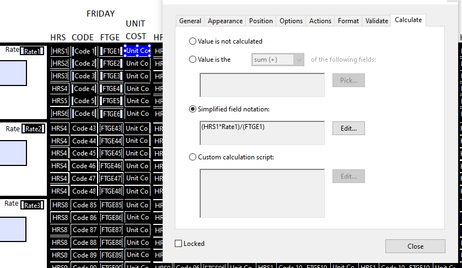
Im trying to figure out how to put in a calculation to round a number. This is what i have in the cell now (HRS1*Rate1)/(FTGE1) but the result always comes out as an infinunt number like
0.09642871645882162. What do i need to add for it to round to the nearest 100th? Not sure if i explanied it well enough im just learing this.
Copy link to clipboard
Copied
This is caused by the difficulty computers have with floating numbers precision.
You can solve it by using a script to perform the calculation, and then rounding the value to the nearest 2nd decimal, like this:
var v1 = Number(this.getField("HRS1").valueAsString);
var v2 = Number(this.getField("Rate1").valueAsString);
var v3 = Number(this.getField("FTGE1").valueAsString);
if (v3==0) event.value = "";
else event.value = ((v1*v2)/v3).toFixed(2);
This also solves another problem you have, in case the FTGE1 field is empty (or zero), because division by zero is not a valid operation.

Copy link to clipboard
Copied
This is caused by the difficulty computers have with floating numbers precision.
You can solve it by using a script to perform the calculation, and then rounding the value to the nearest 2nd decimal, like this:
var v1 = Number(this.getField("HRS1").valueAsString);
var v2 = Number(this.getField("Rate1").valueAsString);
var v3 = Number(this.getField("FTGE1").valueAsString);
if (v3==0) event.value = "";
else event.value = ((v1*v2)/v3).toFixed(2);
This also solves another problem you have, in case the FTGE1 field is empty (or zero), because division by zero is not a valid operation.
Copy link to clipboard
Copied
Thank you soooo much that did it!! I was searching everywhere!!
Get ready! An upgraded Adobe Community experience is coming in January.
Learn more