Exit
  • Global community
    • Language:
      • Deutsch
      • English
      • Español
      • Français
      • Português
  • 日本語コミュニティ
  • 한국 커뮤니티
0

Export to doc or txt with action wizard

New Here ,
Aug 17, 2020 Aug 17, 2020

Hi,

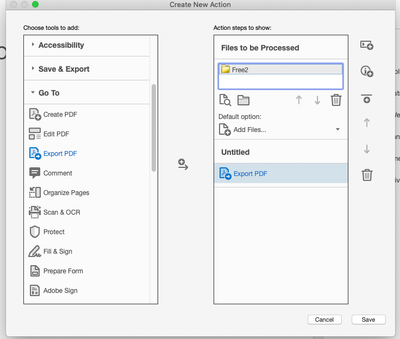
I am trying to create a new action to export to txt. But I cannot add the preference to the action, i.e. the application loads the file one by one and prompts me for action.

I would like to have it fully automated.

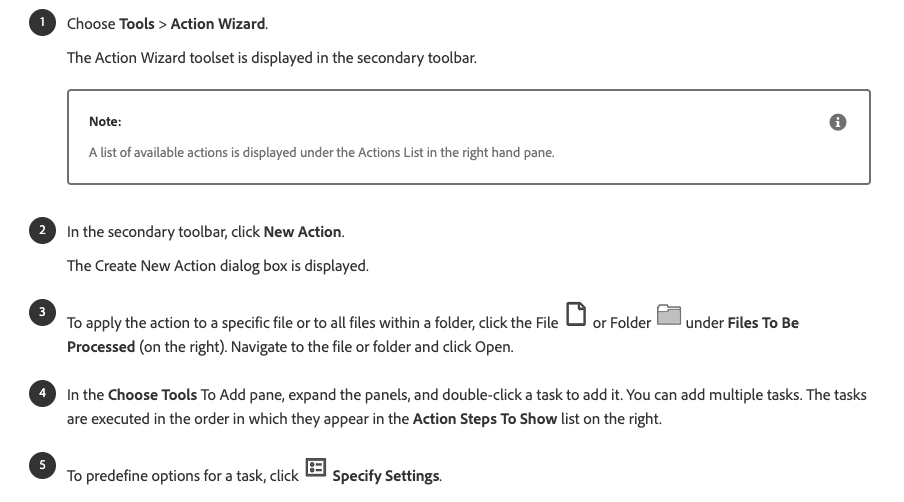
I have read the help page

https://helpx.adobe.com/acrobat/using/action-wizard-acrobat-pro.html

but I cannot find the icon for setting the preferences (specify settings)
Screen Shot 2020-08-17 at 8.20.03 PM.png

Screen Shot 2020-08-17 at 8.18.20 PM.png


thank you

vittorio

TOPICS
Edit and convert PDFs
365
Translate
Report
Community guidelines
Be kind and respectful, give credit to the original source of content, and search for duplicates before posting. Learn more
community guidelines
Community Expert ,
Aug 17, 2020 Aug 17, 2020
LATEST

You need to add a Save command, not an Export PDF one. There you will find the settings and the option to export the files to a different format.

Translate
Report
Community guidelines
Be kind and respectful, give credit to the original source of content, and search for duplicates before posting. Learn more
community guidelines