
Font size auto in Acrobat Reader malfunctioning
I've been struggling with an issue I think stems from a miscommunication between Adobe Acrobat DC and Acrobat Reader.
I created a form on my desktop with Adobe Acrobat DC. Many of the text boxes are set with font size: auto with the multi-line option checked. On my desktop, this works perfectly and the text changes size so it can fit in the box. However, when other people fill out the form (often on ipads) with what I assume is Adobe Reader, the text does not change size- it doesn't even show the little + sign in the bottom corner to indicate there's more text.
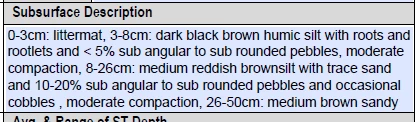
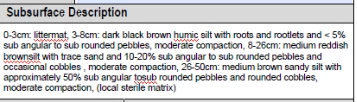
Other people then send the form back to me. When I click in the box where I know there is more text, I can see it perfectly, and then when I click out the text gets smaller again. I messed around with the properties of the form a bit, but can't find a solution. Interestingly, when I look at the form that's been filled out and change the font size via Prepare Form, then change it back to auto, it works again, which is why I think this could be a coding issue. Does anyone have any insight on this? I just don't know where to go from here- it can be a problem because sometimes other people send forms back to me as a flattened, unfillable form so I can't recapture that missing text.
What I see when I've clicked outside the box:
What I see when I've clicked inside the box:
Thanks!
 AdChoices