


- Home
- Acrobat
- Discussions
- GST calculation in Acrobat DC not working
- GST calculation in Acrobat DC not working

Copy link to clipboard
Copied
I have a form with GST calculation.
The problem is that the GST doesn't calculate for the first instance when you input a sum field – it ignores it, but works for subsequent entries.
The calculation is done in Javascript here:
var f = this.getField("Sum exl GST");
event.value = Math.round(f.value * 10) /100;
The form looks like this
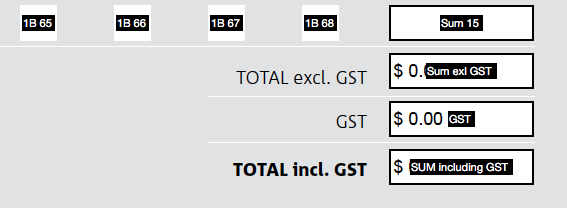
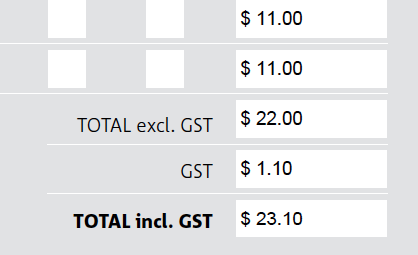
Here is an example of the form not working. You can see that the Total fields are adding correctly, but the GST field is only counting subsequent GST calculations, and skipping the first instance.
I'm on a Mac by the way. Hoping someone can help – my client urgently needs this, so getting stressed!




Copy link to clipboard
Copied
After you click on "Tools > Prepare Form" (or you can select the Open option) you will be in form editing mode. In the right-hand panel, you should see a "More" dropdown the includes a hammer and wrench icon. Click "More" and select "Set Field Calculation Order" from the list of options.
 11
Replies
11
11
Replies
11




Copy link to clipboard
Copied
Check the fields calculation order.
Copy link to clipboard
Copied
Hi try67
I played around with it and changed the tab order, read only etc. Not sure which one worked, but now the GST calculation is working - but the field under it – TOTAL including GST is now not working properly, aggh!
Any thoughts?
Copy link to clipboard
Copied
The field calculation order is not related to the tab order. To set it in Acrobat DC, select:
Tools > Prepare Form
and then:
More > Set Field Calculation Order
and arrange the fields in the list according to what makes sense for the form.
Copy link to clipboard
Copied
I don’t have that option – all that comes up in Prepare form is: open, remove shortcut and learn more
warm regards,
Vanessa
Copy link to clipboard
Copied
Sorry – can you be more specific? (I'm new to using the Calculate function)
And thanks for answering!
Copy link to clipboard
Copied
After you click on "Tools > Prepare Form" (or you can select the Open option) you will be in form editing mode. In the right-hand panel, you should see a "More" dropdown the includes a hammer and wrench icon. Click "More" and select "Set Field Calculation Order" from the list of options.
Copy link to clipboard
Copied
IT’S WORKING!!!!
Thank you so much – never even noticed that More menu was there!
Really appreciate your help.
warm regards,

Copy link to clipboard
Copied
Thank you, thank you, thank you! I found this thread because I was having the same problem. Once I put the fields in the right order everything worked!!

Copy link to clipboard
Copied
Hi,
Can some one please help me.
I need GST added as only 10%
So I have these fields -
Sales Amount:
Freight:
GST:
Total:
I need the GST field to show only the 10% of the total of "Sales Amount + Freight"
Can someone tell me the java script for this please? I have tried several ways but cant get it

Copy link to clipboard
Copied
I'm kinda new to this and I HOPE you have this solved by now but if anyone else sees this thread try:
event.value = this.getField("Subtotal").value * 0.10

Copy link to clipboard
Copied

I have a form with GST calculation.
The problem is that the GST doesn't calculate for the first instance when you input a sum field – it ignores it, but works for subsequent entries.
The calculation is done in Javascript here:
var f = this.getField("Sum exl GST");
event.value = Math.round(f.value * 10) /100;
The form looks like this
Here is an example of the form not working. You can see that the Total fields are adding correctly, but the GST field is only counting subsequent GST calculations, and skipping the first instance.
I'm on a Mac by the way. Hoping someone can help – my client urgently needs this, so getting stressed!
By @vanessaross3


Get ready! An upgraded Adobe Community experience is coming in January.
Learn more
 AdChoices