Known Participant
August 7, 2022
Answered

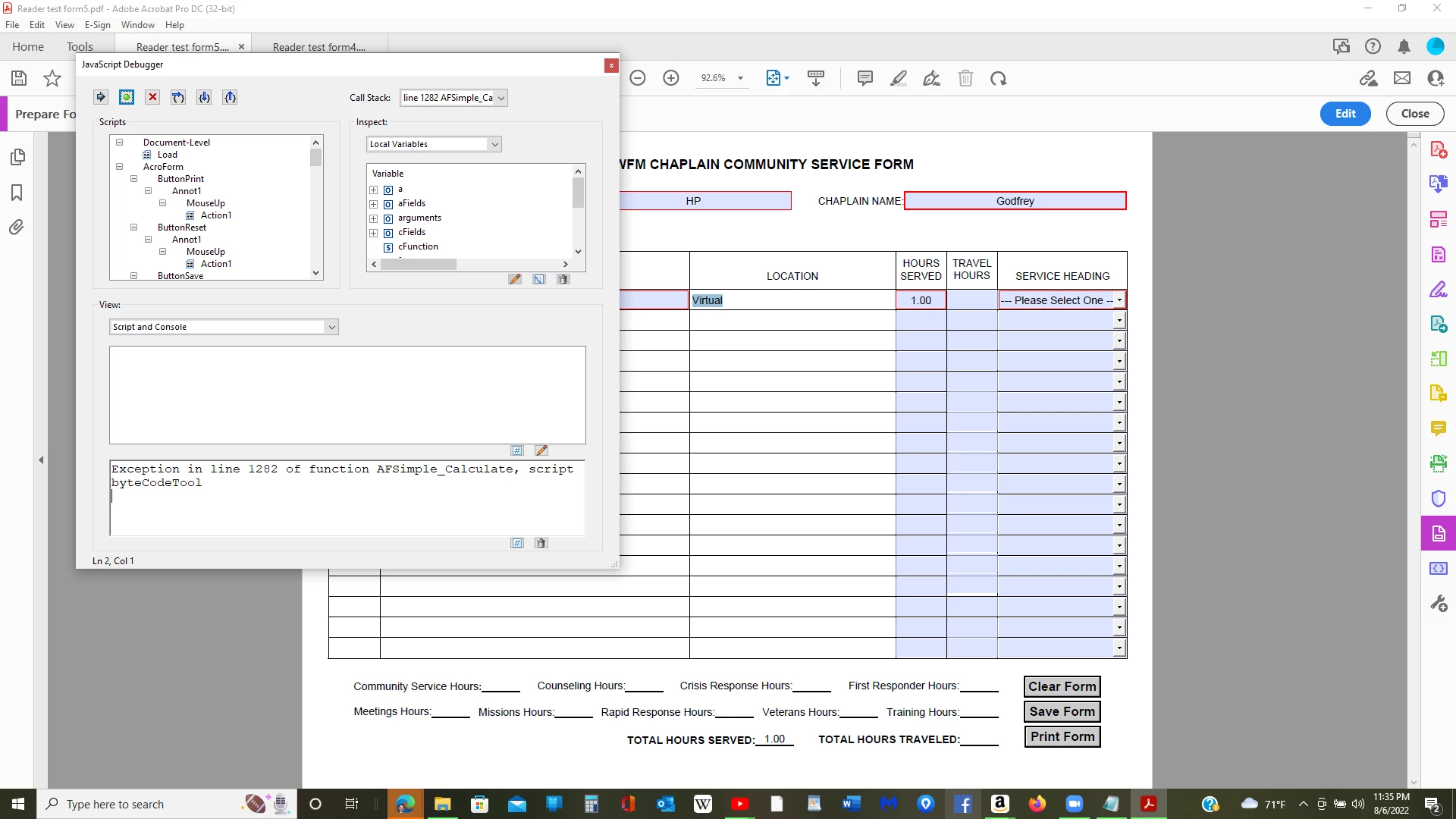
Help with exception error

  • August 7, 2022
  • 2 replies
  • 2026 views

Cann somebody help me locate and fix this error?
This topic has been closed for replies.
Correct answer Nesa Nurani
Reader_test_form5.pdf

Problem is in script "TotalTravelHours" after you picked fields you renamed them, they are now named "TravelHours1.1" not "TravelHours1". So just re-pick them again.

2 replies

try67
Community Expert
Community Expert
August 7, 2022

This error message could indicate an error in the installation of the application. Try running a Repair Installation from the Help menu.

Known Participant
August 7, 2022

Here is the whole list of errors after uninstalling Acrobat Pro DC 32-bit and installing 64-bit. I even tried doing a repair on the new install which is latest version:


Exception in line 1282 of function AFSimple_Calculate, script byteCodeTool
Exception in line 1 of function top_level, script Field:Calculate
Exception in line 1282 of function AFSimple_Calculate, script byteCodeTool
Exception in line 1 of function top_level, script Field:Calculate

TypeError: f is null
1282:byteCodeToolException in line 1282 of function AFSimple_Calculate, script byteCodeTool
Exception in line 1 of function top_level, script Field:Calculate

TypeError: f is null
1282:byteCodeTool

ls_rbls
Community Expert
Community Expert
August 7, 2022

Please be more descriptive about the issue?


Does it happen when you click on any of the buttons? 


If yes, which button (Reset, Print, Save)? and share the code (if any).


Also, is any calculated field on that form dependent on what is supposed to be selected on the dropdown menus (under the column Service Heading)?


You have Service Heading dropdown marked as a required field but nothing is selected on it.


Do you get the same error if you make a selection on any of the "Service Heading" dropdown menus and then execute any of the button actions?

Known Participant
August 7, 2022

I thought the reset button was causing the issue, after I changed some of the code, but when I went back to original code


// A MouseUp action

var nButton1 = app.alert({

cTitle: "CLEAR FORM WARNING",

cMsg: "STOP! DO NOT CLEAR THIS FORM UNLESS YOU SAVE IT FIRST. \r\rIf you have not saved this document yet, go ahead and click NO to save now, otherwise click YES to clear this form. \r\rWould you like to proceed and clear this form now?",

nIcon: 1, nType: 2

});

//if user clicks on YES button it will alert the user that it will reset and ask YES or NO to proceed

if ( nButton1 == 4 ) {

// clear and reset all the fields objects in this document

this.resetForm();

, still getting the error and also f is null error:

As for the rest of your question, it seems to be the location dropdown that is failing, but I have this code in the Service Heading field validation:

event.target.required = event.value == "--- Please Select One ---" ? true : false;

Maybe I'm not handling the validation correctly?

The code for the Location dropdown is:

if (event.value) {
var f = event.target;
var found = false;
for (var i=0; i<f.numItems; i++) {
if (f.getItemAt(i, false)==event.value) {found = true; break;}
}
if (!found) {
f.insertItemAt({nIdx: -1, cName: event.value});
f.defaultValue = f.getItemAt(0, false);
}
}

This is also on the validation tab.

On the Action script:

// Display alert box
app.alert({cMsg:"Please choose an Existing Location or enter a New Location (the new location will be saved in the dropdown list).",
cTitle:"Location Information Request",
nIcon:3,
});
