Exit
  • Global community
    • Language:
      • Deutsch
      • English
      • Español
      • Français
      • Português
  • 日本語コミュニティ
  • 한국 커뮤니티
0

How does Acrobat decide what is default resolution?

New Here ,
Dec 20, 2021 Dec 20, 2021

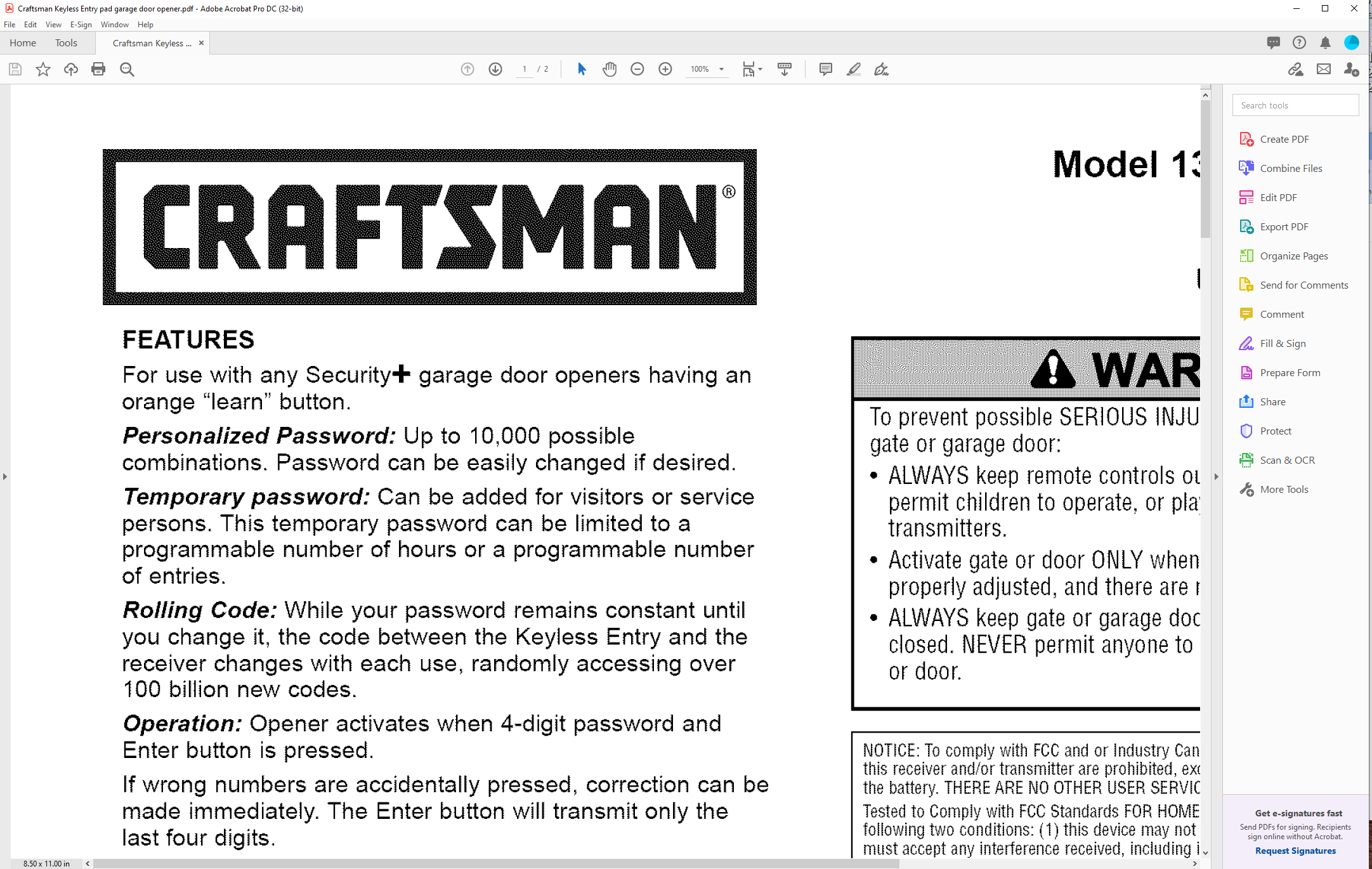
I scanned a 6"x9" book at 600 dpi using Abbyy Fine Reader. When I open the PDF in Acrobat it's freakin' humongous on the screen. I have to set the view at about 30% to get a reasonable display. The properties show Acrobat knows it's 6"x9". Why the humongous display?


(It's legal, the book is copyright 1927, self-published by my great grandfather.) 

TOPICS
Create PDFs , Scan documents and OCR
3.2K
Translate
Report
Community guidelines
Be kind and respectful, give credit to the original source of content, and search for duplicates before posting. Learn more
community guidelines
Guide ,
Dec 21, 2021 Dec 21, 2021

I am thinking that 600dpi would be too dense a resolution for both screen and even high quality printing.  If you scan at 300 dpi, your file would certainly be smaller, screens would display smaller, and perhaps would fit your needs still.


Dave

Translate
Report
Community guidelines
Be kind and respectful, give credit to the original source of content, and search for duplicates before posting. Learn more
community guidelines
New Here ,
Dec 22, 2021 Dec 22, 2021

Hm, I replied from my tablet but it doesn't show.


I'm going to submit it to the Internet Archive. They request 600.

Translate
Report
Community guidelines
Be kind and respectful, give credit to the original source of content, and search for duplicates before posting. Learn more
community guidelines
Community Expert ,
Dec 21, 2021 Dec 21, 2021

You can also change the initial zoom settings of the PDF in the properties dialog you can open via [Ctrl]+[D].

Translate
Report
Community guidelines
Be kind and respectful, give credit to the original source of content, and search for duplicates before posting. Learn more
community guidelines
New Here ,
Dec 22, 2021 Dec 22, 2021

Yes, I did that. 35-40% is good. But it seems inelegant and why is it necessary?

Translate
Report
Community guidelines
Be kind and respectful, give credit to the original source of content, and search for duplicates before posting. Learn more
community guidelines
Community Expert ,
Dec 21, 2021 Dec 21, 2021

I guess that Fine Reader scan at 300 dpi but embed images in the PDF using 72 dpi as setting.

So they appear huge.


Acrobate du PDF, InDesigner et Photoshopographe
Translate
Report
Community guidelines
Be kind and respectful, give credit to the original source of content, and search for duplicates before posting. Learn more
community guidelines
New Here ,
Dec 22, 2021 Dec 22, 2021

Interesting theory. But it scanned at 600 dpi, so 72/600=0.12 but at 12% the displya is way too small. Even at 25% its too small.

Translate
Report
Community guidelines
Be kind and respectful, give credit to the original source of content, and search for duplicates before posting. Learn more
community guidelines
Community Expert ,
Dec 22, 2021 Dec 22, 2021

Can you share 1 page of this document?


Acrobate du PDF, InDesigner et Photoshopographe
Translate
Report
Community guidelines
Be kind and respectful, give credit to the original source of content, and search for duplicates before posting. Learn more
community guidelines
New Here ,
Dec 22, 2021 Dec 22, 2021

Sure. The first page now is the cover which I scanned seperately. Yes, I checked whether deleting it made any difference.

Translate
Report
Community guidelines
Be kind and respectful, give credit to the original source of content, and search for duplicates before posting. Learn more
community guidelines
Community Expert ,
Jan 19, 2022 Jan 19, 2022

Both covers are displayed correctly by my Acrobat…


Capture_90.png


Acrobate du PDF, InDesigner et Photoshopographe
Translate
Report
Community guidelines
Be kind and respectful, give credit to the original source of content, and search for duplicates before posting. Learn more
community guidelines
New Here ,
Jan 20, 2022 Jan 20, 2022

I believe you. Somehow Acrobat has decided that 100% = humongous and displays all PDFs without a defined initial view gigantically. It's not the PDF, it's Acrobat.

Translate
Report
Community guidelines
Be kind and respectful, give credit to the original source of content, and search for duplicates before posting. Learn more
community guidelines
Community Expert ,
Jan 21, 2022 Jan 21, 2022
LATEST

Try to play with these settings:

Preferences : Page Display : Resolution

Preferences : Accessibility


Acrobate du PDF, InDesigner et Photoshopographe
Translate
Report
Community guidelines
Be kind and respectful, give credit to the original source of content, and search for duplicates before posting. Learn more
community guidelines