


- Home
- Acrobat
- Discussions
- How I can program a Document Close Event
- How I can program a Document Close Event

Copy link to clipboard
Copied
I had to set some condition when opening an pdf Dokument. Following is the JavaScript on the field JavaScript for Dokument.
function OpenDocument()
{
app.runtimeHighlight = false;
}
OpenDocument();
How I can set this back. I need to handle the Document close event. But I don't know how to write this condition.
finally I would like to write.
app.runtimeHighlight = true;





Copy link to clipboard
Copied
Ah OK, you were translating it back from German to English... Anyway, it's the last command in that list where you'll find the various Document events.
 11
Replies
11
11
Replies
11


Copy link to clipboard
Copied
Look at Tools > JavaScript > Document Actions
Copy link to clipboard
Copied
I would only do that if the runtimeHighlight property is originally set as true. Otherwise, you might be inadvertently reversing the user-selected value, when in fact you're trying to preserve it.
Something like this should work:
var originalRuntimeHighlight = app.runtimeHighlight;
function OpenDocument() {
if (app.runtimeHighlight)
app.runtimeHighlight = false;
}
function CloseDocument() {
app.runtimeHighlight = originalRuntimeHighlight;
}
OpenDocument();
And then from the document's Document Will Close event call CloseDocument.
Copy link to clipboard
Copied
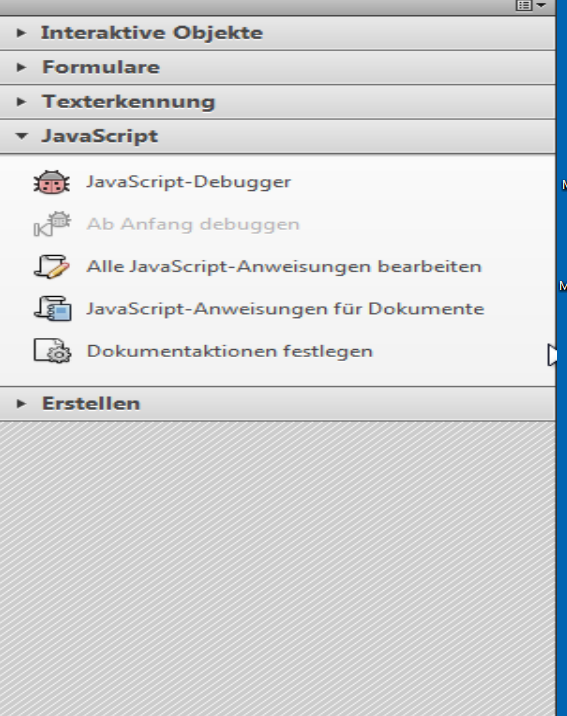
Thanks for the code. But I don't really find the close document. I have on my toolbox for javascript following items..
javascript debugger
debugging from beginning
edit all javascript statements
javascript statement for document
define documentation
where I have to put the close statement.
Thanks
Copy link to clipboard
Copied
What version of Adobe Acrobat do you use?
Copy link to clipboard
Copied
Acrobat Professional XI
Copy link to clipboard
Copied
Can you post a screenshot? What you described is not at all what you would find in Acrobat Pro XI...
Copy link to clipboard
Copied
Code for the open Document is following as try67 recommanded.
//<Document-Level>
//<ACRO_source>OpenDocument</ACRO_source>
//<ACRO_script>
/*********** gehört zu: Document-Level:OpenDocument ***********/
var originalRuntimeHighlight = app.runtimeHighlight;
function OpenDocument() {
if (app.runtimeHighlight)
app.runtimeHighlight = false;
}
function CloseDocument() {
app.runtimeHighlight = originalRuntimeHighlight;
}
OpenDocument();
//</ACRO_script>
//</Document-Level>
Screenshot of my JavaScript toolbox is following
Copy link to clipboard
Copied
Ah OK, you were translating it back from German to English... Anyway, it's the last command in that list where you'll find the various Document events.
Copy link to clipboard
Copied
Thanks try67 it works. Thanks Bernd Alheit for the info.
Copy link to clipboard
Copied
Thanks try67 also for the code. it speaks a lot of expierence out to consider the settings of the user. and not to change it randomly.
Copy link to clipboard
Copied
Info: You can use the english UI in the german Acrobat.


Get ready! An upgraded Adobe Community experience is coming in January.
Learn more
 AdChoices