
how to change page size to standard letters size for the purpose of uploading to online platform
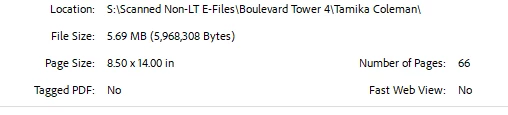
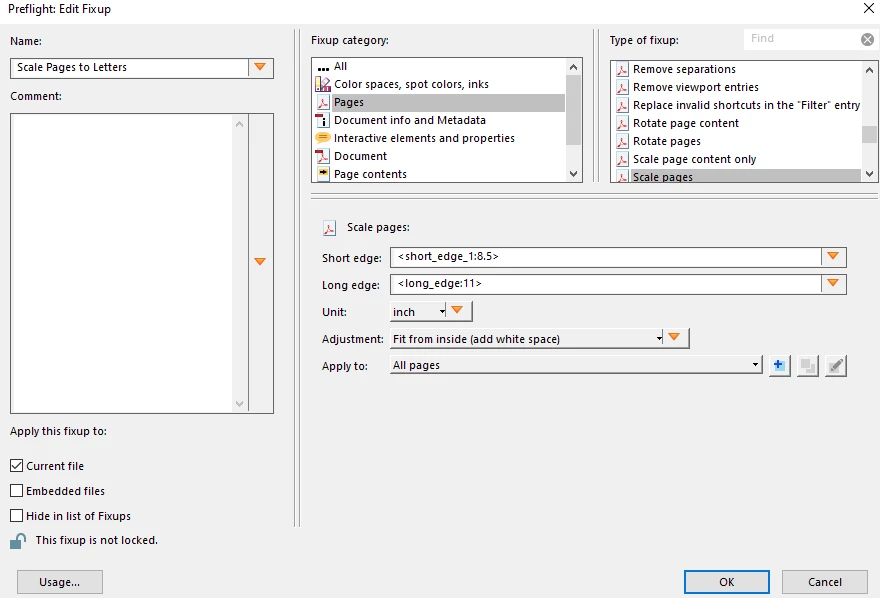
I am looking for assistance in how to scale down the page size of a pdf I have recieved from a client so that it may be uploaded to a online platform with both a page size and data limit. Normally I would be able to reduce the page size solely by printing to pdf but this is then dramatically increasing the file size from 5.69 MB to 52.5 MB which then makes it so the document is well over the document data limit for the platform. I have tried to optimize the document through adobe but it does not bring the file size under the date thresehold which is 10 MB. I have also tried to create a preflight profile to scale the document without printing to pdf but the program is consitently crashing when I attempt to apply the below preflight scaling fix. Not sure if there is a simple way to scale down the document to the necessary sizing within adobe and idealy to create a process which allows my office staff to either scale any documents they recieve automatically or by clicking a preset option. Also not sure if I set up the below preflight profile incorrectly resulting in the crashes I am experiencing.
 AdChoices