Hello,
As you are trying to add the container in tags, please refer to the steps provided below:
- Launch the PDF in Acrobat application
- Open the PDF and go to the navigation pane
- Select "Content Panel option"
- Then click on options menu at the top of the content panel
- Select add container from the options or you can right-click on any tag and select New container.
Check the screenshot below:
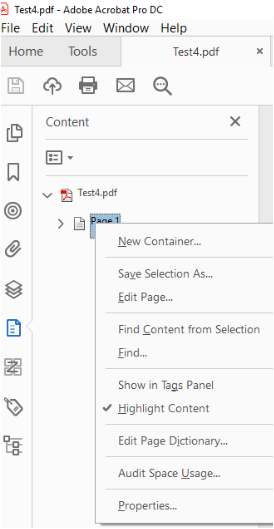
Please refer to the following help document for more details.
- Edit document structure with the Content and Tags panels (Adobe Acrobat Pro)
Let us know if you are referring to something else or need any help.
Regards,
Meenakshi






 2
Replies
2
Replies







 AdChoices