


- Home
- Acrobat
- Discussions
- How to create a fillable form from an excel spread...
- How to create a fillable form from an excel spread...
How to create a fillable form from an excel spreadsheet document?

Copy link to clipboard
Copied
How to create a fillable form from an excel spreadsheet document?


 7
Replies
7
7
Replies
7


Copy link to clipboard
Copied
There is no automated way to do that. You will have to convert your spread sheet to PDF and then add the form fields and calculation scripts manually.
Copy link to clipboard
Copied

So I got help up unto this point. I can fill in some places but I cannot fill in the days of the week with numbers. How do I make the days of the week fillable?
Copy link to clipboard
Copied
It looks like you've let Acrobat detect form fields. This does not always work correctly - sometimes it recognizes fields where there are none, and sometimes it does not recognize field where it should. You will have to add the missing fields manually with the form editor.
Copy link to clipboard
Copied
Where is the "form editor"?
Copy link to clipboard
Copied
Which version of Acrobat are you using?
Copy link to clipboard
Copied
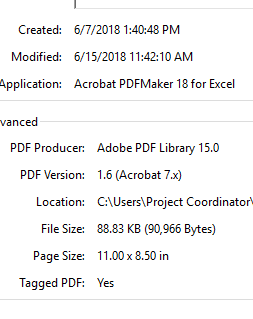
Does this help?


Copy link to clipboard
Copied
Hi Jessn,
Sorry for the delay in response.
To check the application version, please take help of the steps mentioned here Identify the product and its version for Acrobat and Reader DC .
As you are trying to create the PDF form, you may try the steps provided in this help link Convert existing forms to fillable PDFs | once you convert the Excel file to PDF.
Hope that helps.
Let us know if you experience any issue or need any help.
Regards,
Meenakshi


Get ready! An upgraded Adobe Community experience is coming in January.
Learn more
 AdChoices