

Copy link to clipboard
Copied
I'm trying to add a drop shadow to my text in a pdf document

Copy link to clipboard
Copied
Acrobat cannot do that, but Illustor can:
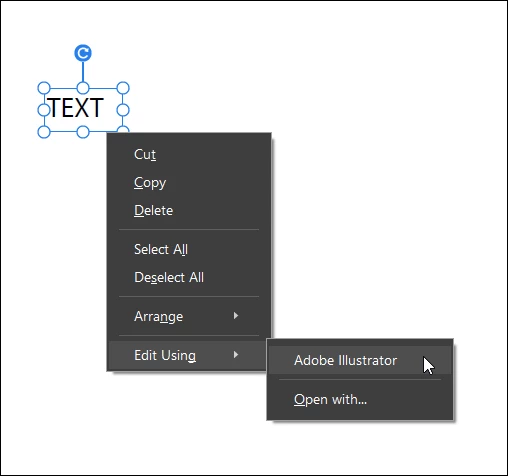
Open the PDF with Acrobat Pro, select the text block using the "Edit" tool, right-click: Edit using : Illustrator.
After making changes in Illustrator: Save: Close.
The changes are reflected immediately in the PDF document opened in Acrobat Pro.
Copy link to clipboard
Copied
Please post the exact name of the Adobe program you use so a Moderator may move this message to that forum
Copy link to clipboard
Copied
Copy link to clipboard
Copied
Your post was moved to a better forum, Acrobat.
Copy link to clipboard
Copied
You can't do that in Acrobat. You should do it in the application used to create the original file, such as InDesign, and then create a new PDF file from it.
Copy link to clipboard
Copied
What program did you use to create the PDF document?
Copy link to clipboard
Copied
Acrobat cannot do that, but Illustor can:
Open the PDF with Acrobat Pro, select the text block using the "Edit" tool, right-click: Edit using : Illustrator.
After making changes in Illustrator: Save: Close.
The changes are reflected immediately in the PDF document opened in Acrobat Pro.
Get ready! An upgraded Adobe Community experience is coming in January.
Learn more