Participant
January 14, 2023
Answered

Insert blank page automatically

  • January 14, 2023
  • 2 replies
  • 3713 views

Hi

I have several documents in one document, there are 3923 pages, some documents have one page each and some have 3 pages.
How could i insert an empty page automatically after pag. 1 of 1 and pag. 3 of 3.
I want to print the documents 2 sides.

This topic has been closed for replies.
Correct answer bebarth

Hi,

Try the action wizard included in the attached file or directly this script from the console:

d0=new Date();
starting=util.printd("mm/dd/yy – hh:MM:ss tt",d0);
var addBlankPageAfter=[];
for (var p=0; p<this.numPages-1; p++) {
	console.clear();
	console.println("Process starting: "+starting);
	console.println("Processing the page #"+(p+1)+"/"+this.numPages);
	var numWords=this.getPageNumWords(p);
	for (var i=0; i<numWords; i++) {
		var ckWord=this.getPageNthWord(p, i, true);
		if (this.getPageNthWord(p, i, false)=="pag. " && ((this.getPageNthWord(p, i+1, true)=="1" && this.getPageNthWord(p, i+2, true)=="of" && this.getPageNthWord(p, i+3, true)=="1") || (this.getPageNthWord(p, i+1, true)=="3" && this.getPageNthWord(p, i+2, true)=="of" && this.getPageNthWord(p, i+3, true)=="3"))) {
			addBlankPageAfter.push(p);
			break;
		}
	}
}
var pageBox=this.getPageBox("Crop",0);
if (addBlankPageAfter.length) {
	for (var i=addBlankPageAfter.length-1; i>=0; i--) {
		console.clear();
		console.println("Process starting: "+starting);
		console.println("Adding a blank page after page #"+(addBlankPageAfter[i]+1));
		this.newPage(addBlankPageAfter[i]+1, pageBox[2], pageBox[1]);
	}
	this.saveAs(this.path.replace(/.pdf$/i," & Blank Pages.pdf"));
	this.pageNum=0;
	this.viewState={overViewMode:2};
	var plurial=(addBlankPageAfter.length>1)?"s":"";
	var txt=addBlankPageAfter.length+" blank page"+plurial+" added.\r\r";
} else var txt="No page found in this document.\r\r";
df=new Date();
ending=util.printd("mm/dd/yy – hh:MM:ss tt",df);
console.println("\rProcess ending: "+ending);
temps=(df.valueOf()-d0.valueOf())/1000/60;
var theMinutes=parseInt(temps);
var theSeconds=(temps-theMinutes)*60;
var theSeconds=parseInt(theSeconds*10)/10;
var theTime="";
if (theMinutes>0) {
	if (theMinutes==1) var theTime="1 minute";
	else var theTime=theMinutes+" minutes";
}
if (theSeconds>0) {
	if (theSeconds<2) var theTime=theTime+" "+theSeconds+" second";
	else var theTime=theTime+" "+theSeconds+" seconds";
}
var theTime=theTime.replace(/^\s+|\s+$/gm,"");
txt+="Process starting: "+starting+"\rProcess ending: "+ending+"\rProcess duration: "+theTime;
console.clear(); console.show();
console.println(txt);
app.alert(txt,3);

Here is the result of a test I did:
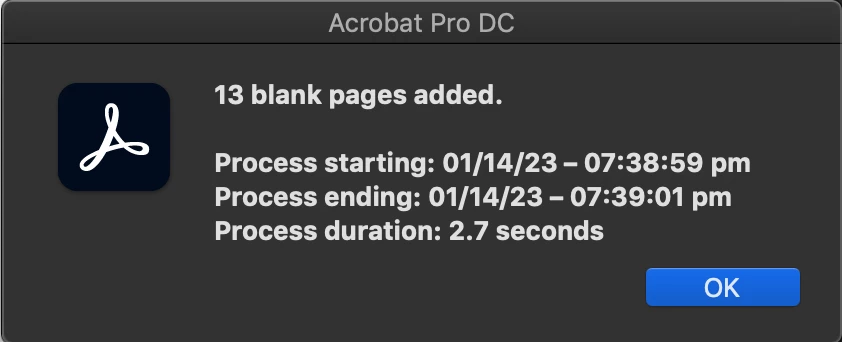
@+

 

2 replies

bebarth
Community Expert
bebarthCommunity ExpertCorrect answer
Community Expert
January 14, 2023

Hi,

Try the action wizard included in the attached file or directly this script from the console:

d0=new Date();
starting=util.printd("mm/dd/yy – hh:MM:ss tt",d0);
var addBlankPageAfter=[];
for (var p=0; p<this.numPages-1; p++) {
	console.clear();
	console.println("Process starting: "+starting);
	console.println("Processing the page #"+(p+1)+"/"+this.numPages);
	var numWords=this.getPageNumWords(p);
	for (var i=0; i<numWords; i++) {
		var ckWord=this.getPageNthWord(p, i, true);
		if (this.getPageNthWord(p, i, false)=="pag. " && ((this.getPageNthWord(p, i+1, true)=="1" && this.getPageNthWord(p, i+2, true)=="of" && this.getPageNthWord(p, i+3, true)=="1") || (this.getPageNthWord(p, i+1, true)=="3" && this.getPageNthWord(p, i+2, true)=="of" && this.getPageNthWord(p, i+3, true)=="3"))) {
			addBlankPageAfter.push(p);
			break;
		}
	}
}
var pageBox=this.getPageBox("Crop",0);
if (addBlankPageAfter.length) {
	for (var i=addBlankPageAfter.length-1; i>=0; i--) {
		console.clear();
		console.println("Process starting: "+starting);
		console.println("Adding a blank page after page #"+(addBlankPageAfter[i]+1));
		this.newPage(addBlankPageAfter[i]+1, pageBox[2], pageBox[1]);
	}
	this.saveAs(this.path.replace(/.pdf$/i," & Blank Pages.pdf"));
	this.pageNum=0;
	this.viewState={overViewMode:2};
	var plurial=(addBlankPageAfter.length>1)?"s":"";
	var txt=addBlankPageAfter.length+" blank page"+plurial+" added.\r\r";
} else var txt="No page found in this document.\r\r";
df=new Date();
ending=util.printd("mm/dd/yy – hh:MM:ss tt",df);
console.println("\rProcess ending: "+ending);
temps=(df.valueOf()-d0.valueOf())/1000/60;
var theMinutes=parseInt(temps);
var theSeconds=(temps-theMinutes)*60;
var theSeconds=parseInt(theSeconds*10)/10;
var theTime="";
if (theMinutes>0) {
	if (theMinutes==1) var theTime="1 minute";
	else var theTime=theMinutes+" minutes";
}
if (theSeconds>0) {
	if (theSeconds<2) var theTime=theTime+" "+theSeconds+" second";
	else var theTime=theTime+" "+theSeconds+" seconds";
}
var theTime=theTime.replace(/^\s+|\s+$/gm,"");
txt+="Process starting: "+starting+"\rProcess ending: "+ending+"\rProcess duration: "+theTime;
console.clear(); console.show();
console.println(txt);
app.alert(txt,3);

Here is the result of a test I did:

@+


DaktaryAuthor
Participant
January 14, 2023

ReferenceError: txt is not defined
1:Console:Exec
undefined

bebarth
Community Expert
Community Expert
January 14, 2023

Strange!

You execute the script from the console and the error comes from line #1 whereas the txt variable shoud come at the end of the script!

Did you copy/paste the entire code in the console then select all and ENTER key of the numerical panel?

@+

try67
Community Expert
Community Expert
January 14, 2023

This can be done with a script, if there's a way to identify where each document ends. Are there bookmarks pointing to the start of each document, for example?


DaktaryAuthor
Participant
January 14, 2023

All documents start on the right page with:
                                                                                                                           Annex No. 1
content
ending with:
__________________________________________________________________________
Printing Date: 03.01.2023 - 16:01                                                                           pag. 1 of 1


ex. 2

                                                                                                                            Annex No. 1
content
ending with:
__________________________________________________________________________
Printing Date: 03.01.2023 - 16:02                                                                            pag. 3 of 3

bebarth
Community Expert
Community Expert
January 14, 2023

Try my script, that should work!

...and let me know.

@+