
Instructional "Ghost Text" on Special-type form fields
Good afternoon,
This may not belong here, for the reason that I'm using the Foxit PhantomPDF editor, but oh well, I'll give it a shot.
I was wondering if anybody had a solution for putting text in a field that is set to the Format style "Special?"
Say I was making a form and wanted to have the word "Phone Number" in the box, but disappear when the user begins typing. But still use the phone number Special qualities?
Edit: just saw I can attach files. Thought it might help.
My method (hybrid stolen from the internet) for all the Custom fields was easy - below - but I can't figure a way to do it with phone numbers/emails/numbers (prices). Its just super convienent to have the drop-down date picker and the auto price formatting and phone number formatting and stuff like that. I was thinking it would be doable with the Focus related scripts, but I can't figure it out.
Thank you very much for your time.
----------------------
// Custom Format script for text field
if (!event.value) {
event.value = event.target.name;
event.target.display = display.noPrint;
} else {
event.target.display = display.visible;
}
--------------------------------------------
// On Focus script:
if (event.target.value==event.target.defaultValue) {
event.target.value = "";
event.target.textSize = 8;
event.target.alignment = "left";
event.target.textColor = color.black;
}
----------------------------------------------------------
// On Blur script:
if (event.target.value=="") {
event.target.value = event.target.defaultValue;
event.target.textSize = 6;
event.target.alignment = "center";
event.target.textColor = color.ltGray;
}
--------------------------------------
Attached is an example of what I'd like accomplished. If you write in any of the "Custom" format boxes, it will auto align left and change the font color/size. But if you leave it blank, it just goes back to the Custom Format text, in this case event.target.name. I know its unnecessary, but a lot of the other boxes on the form required specific instructions, so I'd like to have the "ghost text" on all of them.
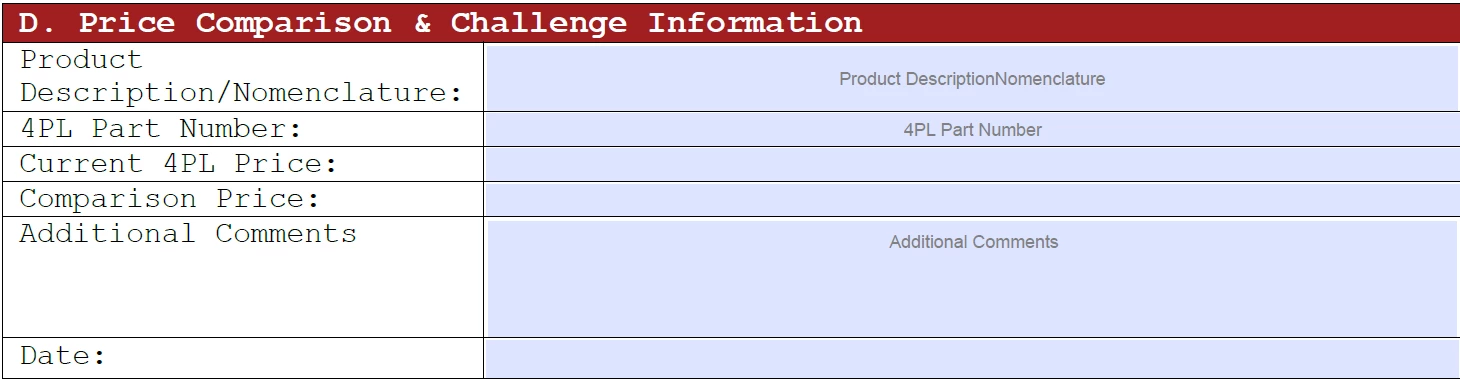
Thank you, once more.
 AdChoices