


- Home
- Acrobat
- Discussions
- Linking a dollar value to a Check Box
- Linking a dollar value to a Check Box

Copy link to clipboard
Copied
We are creating a pdf with a filable menu. If the meal choice is checked it will be added to the total. I want to link a dollar value to check box and the check box to a Text Field that totals the Check Boxes. I also have 2 Radio Buttons that I need "turned on" if Check Box is selected.




Copy link to clipboard
Copied
You need to set export value of checkboxes, set their export value to be the price you want except checkbox10,
also change "Radio button choice" to be price for that button and then use this script
as "Custom calculation script" of field "Total"
var total = 0;
var rb = 0;
if(this.getField("Check Box10").valueAsString != "Off" && this.getField("Banquet").valueAsString != "Off")
rb = Number(this.getField("Banquet").value);
for (var i=1; i<=9; i++) {
if (this.getField("Check Box"+i).valueAsString != "Off")
total += Number(this.getField("Check Box"+i).value);
}
event.value = total+rb;
Copy link to clipboard
Copied
Ok, lets say you have checkbox named "PayPal"
If checkbox is checked it will add 4% fee
In the code I gave you replace just last line
event.value = total+rb;with this:
if(this.getField("PayPal").valueAsString != "Off")
event.value = (total+rb)*1.04;
else event.value = total+rb;
Copy link to clipboard
Copied
If you don't want confusion with rb and checkbox, as Mouse UP event of "Check Box10" use this:
if(event.target.value == "Off"){
this.getField("Banquet").display = display.hidden;
this.getField("Banquet").value = "Off";}
else this.getField("Banquet").display = display.visible;
This will hide radio buttons until checkbox is checked and reset them.
(for first time only set rb hidden manually or just check and uncheck checkbox)
 9
Replies
9
9
Replies
9


Copy link to clipboard
Copied
What are names of checkboxes and how many is there?
You want to set price as checkbox export value to be added to total if checkbox is checked?
What are conditions to turn radio buttons on , any checkbox checked will turn them or? their names?
Copy link to clipboard
Copied
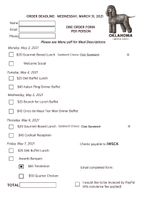
Check Box1, Check Box2, Check Box3....Check Box10 There are 10 checkboxes.
Yes, each Check Box is a meal and I would like the value of the checkmarked meal to be added to the total in the Text Field named TOTAL
Check Box10 is associated to text Awards Banquet
There are two Radio Buttons name Banquet with Radio Button Choice: Beef and Chicken (whickever Radio Button is chosen needs to become the value for the Banquet Check Box10 to be added to the TOTAL)
Copy link to clipboard
Copied
You need to set export value of checkboxes, set their export value to be the price you want except checkbox10,
also change "Radio button choice" to be price for that button and then use this script
as "Custom calculation script" of field "Total"
var total = 0;
var rb = 0;
if(this.getField("Check Box10").valueAsString != "Off" && this.getField("Banquet").valueAsString != "Off")
rb = Number(this.getField("Banquet").value);
for (var i=1; i<=9; i++) {
if (this.getField("Check Box"+i).valueAsString != "Off")
total += Number(this.getField("Check Box"+i).value);
}
event.value = total+rb;
Copy link to clipboard
Copied
I am a complete novice and totally lost. I appologize, I know what I want it to do but I'm not understanding how to make it do it.
Copy link to clipboard
Copied
I finally managed to get it all entered correctly and It all works! Thank you!!!
Only other question how would be... I would like it to add a 4% fee to the total if they choose to pay by PayPal.
Copy link to clipboard
Copied
Ok, lets say you have checkbox named "PayPal"
If checkbox is checked it will add 4% fee
In the code I gave you replace just last line
event.value = total+rb;with this:
if(this.getField("PayPal").valueAsString != "Off")
event.value = (total+rb)*1.04;
else event.value = total+rb;
Copy link to clipboard
Copied
That works perfect thank you!
How can I make the Radio Buttons for Chicken $50 (Banquet) or Beef $65 (Banquet) only active for selection if the Banquet (Check Box10) is Checked? Also, one RB is always checked how can I make the uncheckable?
Currently, the radio buttons each have an associated value that goes to the event total but does not get included if the banquet box is not checked. So if they select a meal option but forget to check the banquet box then their total will be wrong.
Copy link to clipboard
Copied
If you don't want confusion with rb and checkbox, as Mouse UP event of "Check Box10" use this:
if(event.target.value == "Off"){
this.getField("Banquet").display = display.hidden;
this.getField("Banquet").value = "Off";}
else this.getField("Banquet").display = display.visible;
This will hide radio buttons until checkbox is checked and reset them.
(for first time only set rb hidden manually or just check and uncheck checkbox)
Copy link to clipboard
Copied
Thank you!


Find more inspiration, events, and resources on the new Adobe Community
Explore Now
 AdChoices