Exit
  • Global community
    • Language:
      • Deutsch
      • English
      • Español
      • Français
      • Português
  • 日本語コミュニティ
  • 한국 커뮤니티
0

Open PDF file with Bookmarks Showing

New Here ,
Oct 07, 2008 Oct 07, 2008
Hi - forgive me if this is the wrong forum, but I can't find a topic called "how to use Acrobat"

I need to create a PDF that will open in Acrobat Reader with the bookmarks displayed. The file will be distributed as a PDF and will not be associated with a web page.

And, if everything was perfect, I'd like that file to be open at 100% instead of the current 150%.

Is there a way to set this up?

Karen
104.1K
Translate
Report
Community guidelines
Be kind and respectful, give credit to the original source of content, and search for duplicates before posting. Learn more
community guidelines
Community Expert ,
Oct 07, 2008 Oct 07, 2008
You don't need a script for this. Go to File, Document Options, Open Options (the name may differ slightly depending on your version) and there you can set all of these properties.
Translate
Report
Community guidelines
Be kind and respectful, give credit to the original source of content, and search for duplicates before posting. Learn more
community guidelines
New Here ,
Oct 07, 2008 Oct 07, 2008
That does it! Is there a way to make that a default setting?
Translate
Report
Community guidelines
Be kind and respectful, give credit to the original source of content, and search for duplicates before posting. Learn more
community guidelines
Community Expert ,
Oct 07, 2008 Oct 07, 2008
How do you mean? Like for all files?
Translate
Report
Community guidelines
Be kind and respectful, give credit to the original source of content, and search for duplicates before posting. Learn more
community guidelines
Guest
Dec 13, 2011 Dec 13, 2011

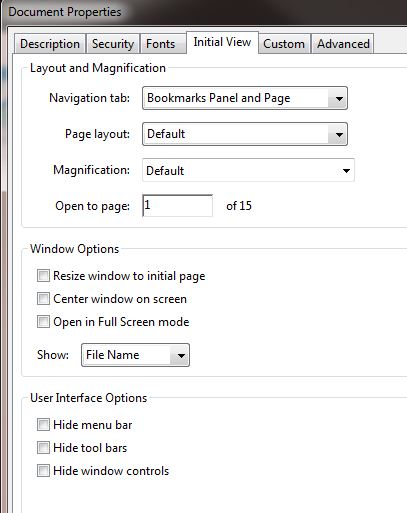
Good morning.  I was researching this same issue and found a solution for Adobe 9 Standard.  I went into File > Properties > Inital View tab.  On the first line, it says "Navigation tab:"  I selected "Bookmarks Panel and Page" from the drop-down selection.  Save your file, of course.  Now, whenever someone opens this file, the bookmarks will show on the left side of the page and the document to the right. 

Translate
Report
Community guidelines
Be kind and respectful, give credit to the original source of content, and search for duplicates before posting. Learn more
community guidelines
Guest
Dec 13, 2011 Dec 13, 2011
LATEST

Properties.jpg

Oops.  Forgot the screen shot.

Translate
Report
Community guidelines
Be kind and respectful, give credit to the original source of content, and search for duplicates before posting. Learn more
community guidelines