
PDF form table not exporting correctly to Excel
Hello,
Apologies if this is posted somewhere else. I have fillable forms that I am exporting to excel using the "Get Data" (Data query) function on Excel. I have been saving "print to file" so that the values in the form will transfer appropriately to excel, which has worked. The problem I am having is that if a column on the table is completely blank, then the column gets skipped in the transfer to excel, rather than producing a "null value", which it will do in other cells if at least one column value is present. Is there any way to save the PDF or tag it that will prevent it from skipping empty columns? I've attached a screenshot to better explain what I mean by empty column (in this case, the "S" and the "E" are both blank). I'm trying to do a mass conversion of PDF to excel for report purposes. Thanks to anyone who can offer some insight.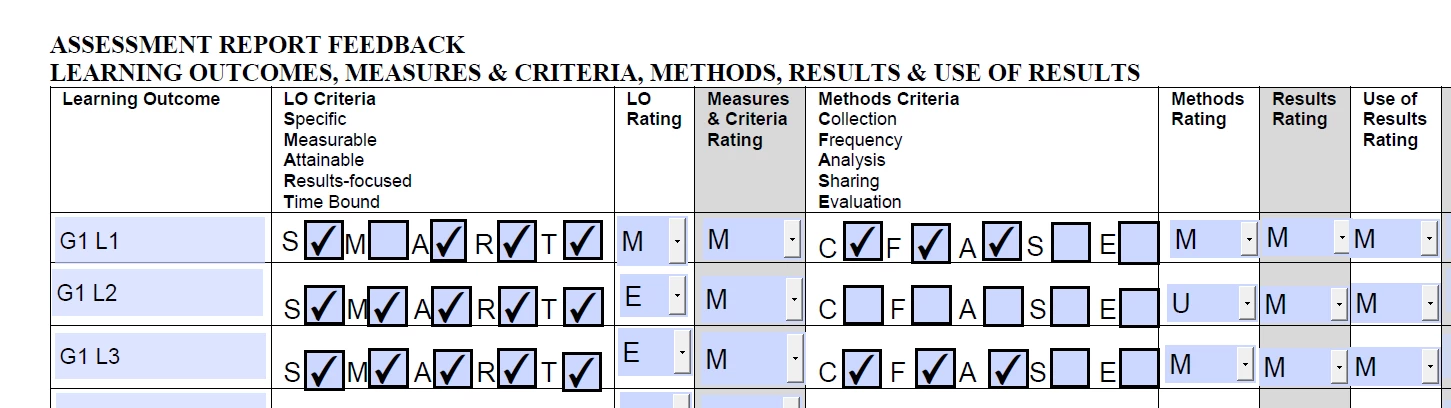
 AdChoices