February 3, 2011
Question

Printing Gibberish

  • February 3, 2011
  • 2 replies
  • 51230 views

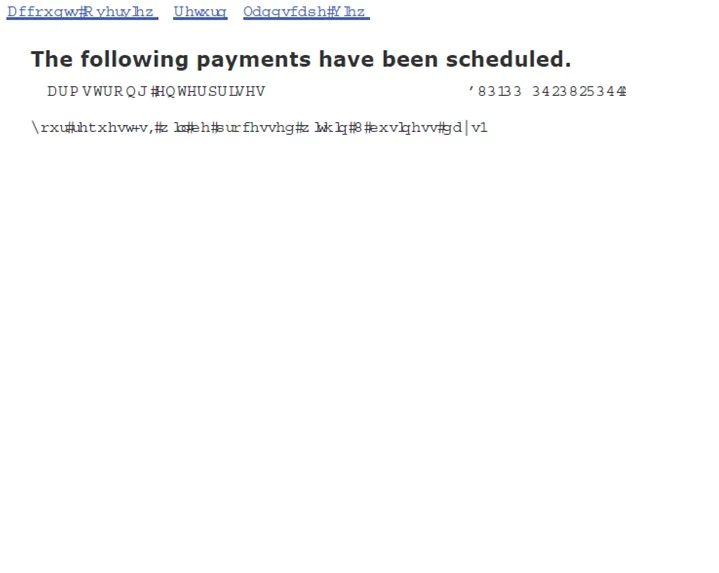
When I try to print a web page I get a lot of what I will call gibberish for lack of a better term.What is causing this?

An example would be where there should be numbers, it looks like this:
    This topic has been closed for replies.

    2 replies

    Adobe Employee
    February 14, 2011

    It is a known problem with IE9 and the workaround I have mentioned will solve your problem.

    Participant
    March 2, 2011

    I am having the same problem that's described here but I'm running Firefox 4.0b12.

    I had absolutely no problem with Firefox beta versions printing to a pdf file in the past, but I recently downloaded the trial version of Adobe Acrobat Professional X and the printing is a disaster.

    Initially, it would say there was a printer error (and documents would collect in the printer dialogue box) but the file would be generated anyway.  In these pdf files, the text display was fine from non-web programs but gibberish from Firefox.  I found a posting in the forum that suggested uninstallating the Printer, then Repairing the whole installation.  This seemed to take care of the error with printing but the gibberish persists.  I have just tried the suggestion posted here, but it doesn't help matters.

    I was planning to go ahead and upgrade to Acrobat X (even though it has a number of features that are unappealling compared to the prior version), but this printing problem is a deal breaker.  There is no way that I will pay money for an "upgrade" that won't let me print a webpage to a coherent pdf file.

    I would like to know if there are any other steps that I can take and also when Adobe might have this problem fixed.  (I was also rather shocked to discover that there is apparently no way to send a support email directly to Adobe on these sorts of issues and that the only option for assistance seems to be paying money out of pocket for a support phone call.)

    AbhigyanModi
    Community Manager
    Community Manager
    March 3, 2011

    That looks like a problem with Firefox beta and not Acrobat:

    http://support.mozilla.com/en-US/questions/787654

    Adobe Employee
    February 14, 2011

    Which browser are you using? Which website are you trying to print?

    Go to Printing Preferences... (Go to Printers and Faxes->Right click on Adobe PDF Printer->Printing Preferences...) and uncheck the check box 'Rely on System Fonts only; do not use document fonts". click OK. This will solve your problem.

    February 14, 2011

    In answer to your questions, I am using I.E. 9 RC, but was using the pre RC version at the time.

    The site was my bank site.

    I deactivated and re installed and all is well at this point.

    I did however take your advice as to unchecking the font box.

    Thanks

    John
