


- Home
- Acrobat
- Discussions
- Problem Extracting Pages in DC "Please enter a val...
- Problem Extracting Pages in DC "Please enter a val...
Problem Extracting Pages in DC "Please enter a valid page range"

Copy link to clipboard
Copied
I recently seemed to have lost the extract functionality in Adobe Acrobat DC
While trying to extract 1 page or multiple pages i get a prompt "Please enter a valid page range" and there is no place to enter this "page range"
I havent had issues with this in the past, Ive checked for updates and Im current, I repaired the installation all to no avail.
What could this possibly be?
Thanks


 18
Replies
18
18
Replies
18




Copy link to clipboard
Copied
Do the pages in this file have labels? If so, you might need to do those
instead of the physical page numbers.
Copy link to clipboard
Copied
The pages are numbered M.7001, M.7002 is that what you are referring to?
Also this Extract functionality worked in the not too distant past with this exact same PDF
Copy link to clipboard
Copied
Yes, that's what I mean. Try entering those values.
It's possible something changed with a recent upgrade, although I think it's a step backwards... You can always extract pages by selecting them in the Pages panel and then dragging them as a new file, though.
Copy link to clipboard
Copied
I see no place to these pages within the extract utility...
Where would I do that?
Copy link to clipboard
Copied
Instead of "1" enter "M.7001", or whatever.
Copy link to clipboard
Copied
I hear what you are saying, but again there is no place I can see while using the Extract command to enter pages with any sort of labels, be it numbers, letters or what have you..
Copy link to clipboard
Copied
I don't follow. Please post a screenshot of the "extraction utility" you're using.
Copy link to clipboard
Copied
Its the Extract Command withing Acrobat Pro DC
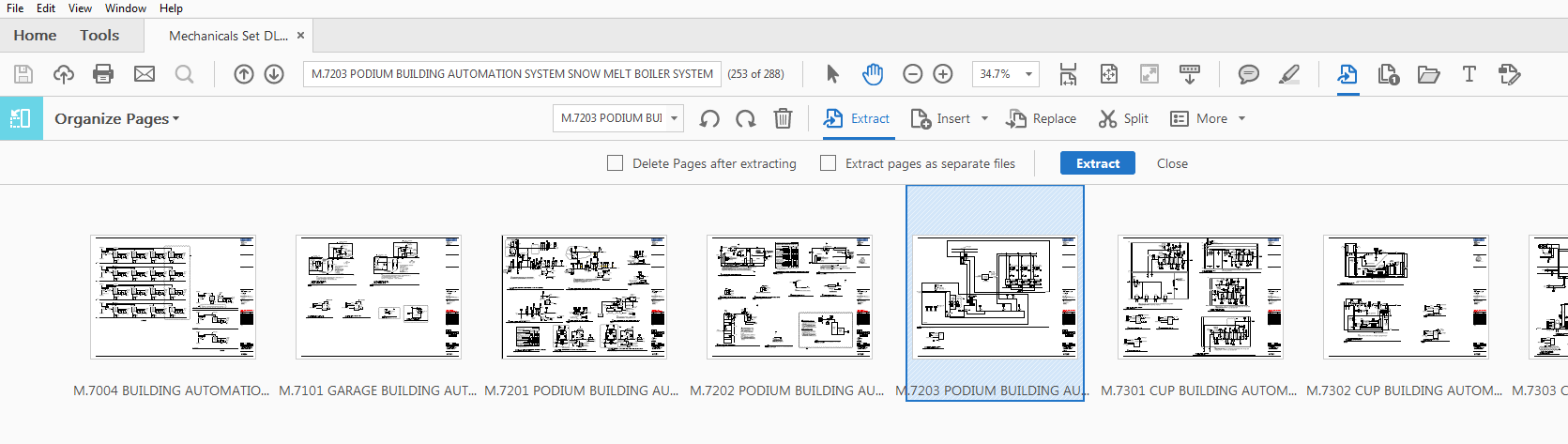
Copy link to clipboard
Copied
Click the first page, then Shift+Click the last page, and then click on Extract.
In earlier versions there was a dialog window that appeared where you could enter page numbers. It seems like that is no longer the case...
Copy link to clipboard
Copied
That is correct, and after you hit Extract, you now get the message to enter the valid page range, even though youve already selected the pages you wanted to extract, using shift click.
This broke recently.....
Copy link to clipboard
Copied
Ah ok, that makes more sense. So enter the page labels in that second
dialog.
Copy link to clipboard
Copied
??? What second dialog?
Copy link to clipboard
Copied
Sorry, I misunderstood. I don't use this version of Acrobat so I can't test it out for myself. Maybe someone else could...

Copy link to clipboard
Copied
The highlighted part on the image is the page field where you need to enter the page number that you want to extract.

Since you labeled the pages on your PDF as "M.xxxx", the page field auto-populates it with that instead of the page number.
So, you need to replace the page field with the actual page number. Make sure to click on "Extract" button before you enter the page number as it will reset it. Hope that helps!

Copy link to clipboard
Copied
The "second dialog box" is the box directly to the left of the counterclockwise arrow left of the trash can. I finally figured this out as Adobe is not smart enough to extract the highlighted pages anymore you have to enter a simple range using sequential integers (1, 2, 3) followed by a dash (1) followed by integers again.

Copy link to clipboard
Copied
Count the actual pages in the document say for instance you have 74 pages and you want to extract or delete pages 17 thru 26 enter the actual page number of the document 17-76 hit delete it asks if you are sure and then deletes them. i had teh same issue until i tried this method and it works for me....good luck

Copy link to clipboard
Copied
My workaround on this is as follows:
1. Organize Pages
2. on tool bar click "More" icon
3. select 'page labels'
4. select all pages
5. under numbering, select 1,2, 3, 4 etc
6. hit OK
this will renumber all the sheets in order then you can extract easily. Works well with architectural plans when they all have different numbering systems

Copy link to clipboard
Copied
It appears the problem has to do with the use or presence of sections in the page labeling. I have a set of construction drawings that has been updated several times with additional sets of sheets. Using the normal Extract function I am able to extract sheets from the original section, but I get the error message when trying to extract those from later (added) sections. Re-labeling the later sections permits me to extract the needed pages. I can also eliminate the problem by selecting the later pages, activating the Page Numbering tool (right-click and click on Page Labels...) and click the radio button next to "Extend numbering used in preceding section to selected pages". This approach may not work for you if your pages have complex page labels. In that case, use the approach described above by johnh87962111.


Get ready! An upgraded Adobe Community experience is coming in January.
Learn more
 AdChoices