


Exit
  • Global community
    • Language:
      • Deutsch
      • English
      • Español
      • Français
      • Português
  • 日本語コミュニティ
  • 한국 커뮤니티
0

Radio button determines which text fields in table are required

New Here ,
Apr 26, 2021 Apr 26, 2021

I have a radio button named group6. There are 3 options to choose from directorder, POR, buildandreplace.

Depending on which option you choose determines which columns of the table need to be filled out. If you select directorder or POR, then if you fill out an item code and you must enter the quantity in that row of the table. If you select billandreplace and all the columns in the order form are required. Below is an image of the order form.
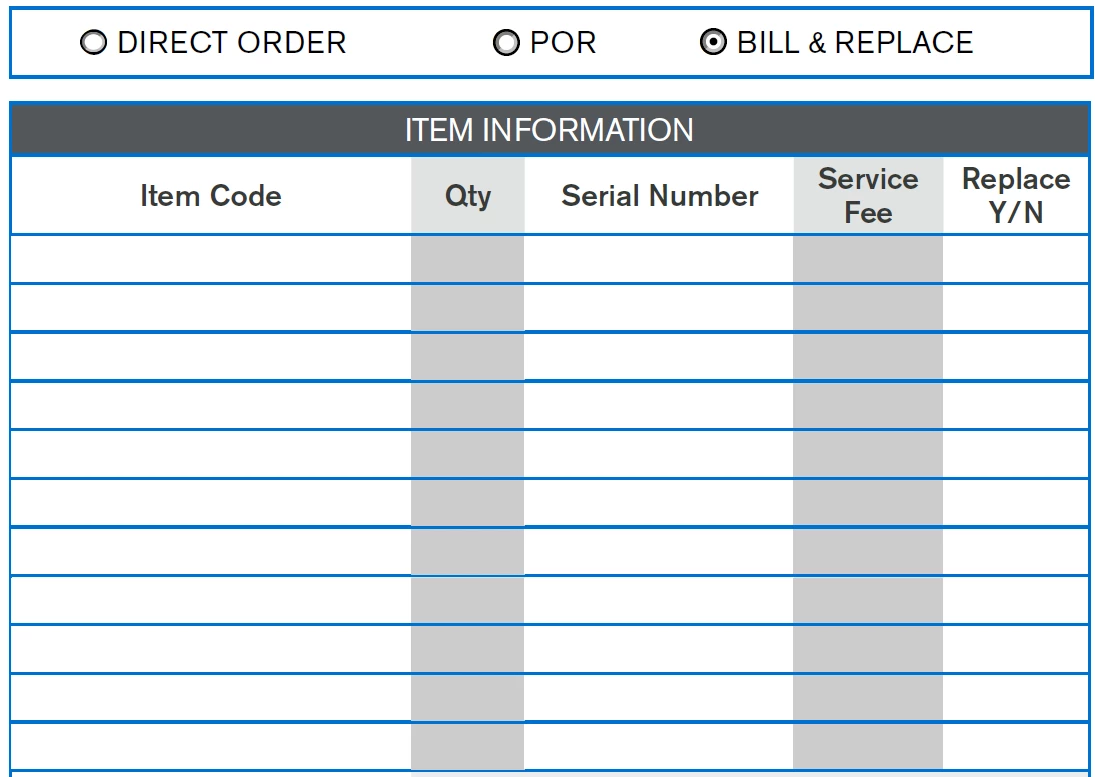
 

Screenshot 2021-04-26 115812.png

The 1st row the item code name is itemcode1.0. So the action for that field is set to mouse up and run JavaScript. Here is the script that I wrote:


if (event.value.length>0 && getField("group6").value == "directorder") {
this.getField("qty1.0").required = true;

}


I would repeat this code for each item code row. But it's not working. What am I doing wrong? I have it set so that the form validates prior to being submitted. It alerts the user of any required fields that are not filled in. If I enter an item code none of the required fields are mentioned in the alert.

TOPICS
JavaScript , PDF forms
3.2K
Translate
Report
Community guidelines
Be kind and respectful, give credit to the original source of content, and search for duplicates before posting. Learn more
community guidelines
1 ACCEPTED SOLUTION
Community Expert ,
Apr 26, 2021 Apr 26, 2021

Put this code as "calculation script" in one of the fields:

for( var i=0; i<=11; i++){
if(this.getField("itemcode1."+i).valueAsString != "" && (this.getField("group6").valueAsString == "directorder" || this.getField("group6").valueAsString == "POR")){
this.getField("qty1."+i).required = true;
this.getField("serialnumber1."+i).required = false;
this.getField("servicefee1 replace1."+i).required = false;}
else if(this.getField("itemcode1."+i).valueAsString != "" && this.getField("group6").valueAsString == "billandreplace"){
this.getField("qty1."+i).required = true;
this.getField("serialnumber1."+i).required = true;
this.getField("servicefee1 replace1."+i).required = true;}
else {
this.getField("qty1."+i).required = false;
this.getField("serialnumber1."+i).required = false;
this.getField("servicefee1 replace1."+i).required = false;}}


View solution in original post

Translate
Report
Community guidelines
Be kind and respectful, give credit to the original source of content, and search for duplicates before posting. Learn more
community guidelines
Enthusiast ,
Apr 26, 2021 Apr 26, 2021

Please share your file or show screenshot of field names.

Translate
Report
Community guidelines
Be kind and respectful, give credit to the original source of content, and search for duplicates before posting. Learn more
community guidelines
New Here ,
Apr 26, 2021 Apr 26, 2021

Screenshot 2021-04-26 122805.png

Translate
Report
Community guidelines
Be kind and respectful, give credit to the original source of content, and search for duplicates before posting. Learn more
community guidelines
Enthusiast ,
Apr 26, 2021 Apr 26, 2021

Ok, just quick question. If item code is filled and rb directorder or POR is selected only qty column is required, and if billandreplace is selected all fields are required?

Translate
Report
Community guidelines
Be kind and respectful, give credit to the original source of content, and search for duplicates before posting. Learn more
community guidelines
New Here ,
Apr 26, 2021 Apr 26, 2021

Yes, if direct order or POR is selected, then if a item code is entered then the only other required field in that row is qty. If billandreplace this is selected, then if an item code is entered then all of the fields are required in that row.

People can order as many items as they like, so the required fields are also contingent on if there is something entered in the item code.

Does that make sense? So if you're only ordering 2 items, it only affects the 1st 2 rows.

Translate
Report
Community guidelines
Be kind and respectful, give credit to the original source of content, and search for duplicates before posting. Learn more
community guidelines
Community Expert ,
Apr 26, 2021 Apr 26, 2021

Put this code as "calculation script" in one of the fields:

for( var i=0; i<=11; i++){
if(this.getField("itemcode1."+i).valueAsString != "" && (this.getField("group6").valueAsString == "directorder" || this.getField("group6").valueAsString == "POR")){
this.getField("qty1."+i).required = true;
this.getField("serialnumber1."+i).required = false;
this.getField("servicefee1 replace1."+i).required = false;}
else if(this.getField("itemcode1."+i).valueAsString != "" && this.getField("group6").valueAsString == "billandreplace"){
this.getField("qty1."+i).required = true;
this.getField("serialnumber1."+i).required = true;
this.getField("servicefee1 replace1."+i).required = true;}
else {
this.getField("qty1."+i).required = false;
this.getField("serialnumber1."+i).required = false;
this.getField("servicefee1 replace1."+i).required = false;}}


Translate
Report
Community guidelines
Be kind and respectful, give credit to the original source of content, and search for duplicates before posting. Learn more
community guidelines
New Here ,
Apr 26, 2021 Apr 26, 2021

When I entered that script as a custom calculation script, it automatically defaults back to the "value is not calculated" option. It won't except that code. Any thoughts on why?

Translate
Report
Community guidelines
Be kind and respectful, give credit to the original source of content, and search for duplicates before posting. Learn more
community guidelines
Community Expert ,
Apr 26, 2021 Apr 26, 2021

Can you share your file?

Translate
Report
Community guidelines
Be kind and respectful, give credit to the original source of content, and search for duplicates before posting. Learn more
community guidelines
New Here ,
Apr 26, 2021 Apr 26, 2021

It is a sales form. It is not done yet, but the table and radio button section will not change.

Translate
Report
Community guidelines
Be kind and respectful, give credit to the original source of content, and search for duplicates before posting. Learn more
community guidelines
Community Expert ,
Apr 26, 2021 Apr 26, 2021

I didn't have any problem inputing script into field.

Try now:

https://drive.google.com/uc?export=download&id=19wsY8qyNSi6Z_ZNez8je5MEHF2qoB7bA 

Translate
Report
Community guidelines
Be kind and respectful, give credit to the original source of content, and search for duplicates before posting. Learn more
community guidelines
New Here ,
Apr 26, 2021 Apr 26, 2021

Sorry to be a pain. Where exactly did you enter the code? That seems to be my problem. I'm not doing it in the right space.

Translate
Report
Community guidelines
Be kind and respectful, give credit to the original source of content, and search for duplicates before posting. Learn more
community guidelines
New Here ,
Apr 26, 2021 Apr 26, 2021

Nevermind I found it


Translate
Report
Community guidelines
Be kind and respectful, give credit to the original source of content, and search for duplicates before posting. Learn more
community guidelines
New Here ,
Apr 26, 2021 Apr 26, 2021
LATEST

I don't know why but that is where I would put it, and would click okay and it would not insert the code. Anyway, thank you so much for your help.

Translate
Report
Community guidelines
Be kind and respectful, give credit to the original source of content, and search for duplicates before posting. Learn more
community guidelines