
Participant
December 12, 2023
Answered

Radio button Javascript
  • December 12, 2023
  • 3 replies
  • 636 views


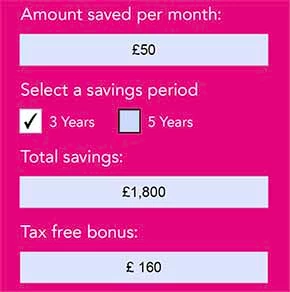
The 3year radio button value is 36 and 5year radio button value is 60. So the amount saved per month X period = Total saving Value it’s fine.


But in the tax free bonus if we select 3years it must be Save per month X 1.1


if we select 5years it must be Save per month X 3.2


I used this code

 

But it’s not working only the 5year value is reflecting not the 3 year.

This topic has been closed for replies.
Correct answer Nesa Nurani

Only the last condition is triggered in your script.

Use this:

if(this.getField("year").valueAsString === "36")
event.value = Number(this.getField("save_month").valueAsString) * 1.1;
else if(this.getField("year").valueAsString == "60")
event.value = Number(this.getField("save_month").valueAsString) * 3.2;
else
event.value = "";

3 replies

Nesa Nurani
Community Expert
Nesa NuraniCommunity ExpertCorrect answer
Community Expert
December 12, 2023

Only the last condition is triggered in your script.

Use this:

if(this.getField("year").valueAsString === "36")
event.value = Number(this.getField("save_month").valueAsString) * 1.1;
else if(this.getField("year").valueAsString == "60")
event.value = Number(this.getField("save_month").valueAsString) * 3.2;
else
event.value = "";
Bernd Alheit
Community Expert
Community Expert
December 12, 2023

What are the names of the radio buttons?

jane-e
Community Expert
Community Expert
December 12, 2023

@Sankaralingam24387454d8cr 


I've moved your post to the Adobe Acrobat forum for you. Can you show a screen shot that includes the other related fields?


Jane


Participant
December 12, 2023

Thanks but i sorted out, This is the code