


- Home
- Acrobat
- Discussions
- Re: Send for Signature Error Message: Could not Se...
- Re: Send for Signature Error Message: Could not Se...

Copy link to clipboard
Copied
Hi Tariq,
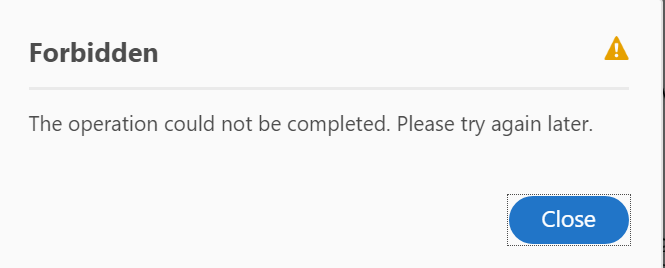
I have the same error message below when using my Acrobat Pro DC subscription to sign a document.
Below error appears, but the link you sent is asking to set up a free trial.
Please could you help?




Copy link to clipboard
Copied
Hi Drusso,
I am sorry for the delayed response and for the trouble you had, please sign out from Acrobat once and reboot the machine and check for any pending updates of Acrobat from help>check for updates, reboot the machine after updating and try again.
What is the current dot version of Acrobat installed? To identify the version, refer to the steps mentioned in the article Identify the product and its version for Acrobat and Reader DC
For testing purpose, connect the machine to a different network environment like a guest wireless network or to a mobile hotspot or try sending the file for signature on your mobile device using cellular data and check.
Are you getting the error message with all the PDF files or with one specific PDF file?
Would you mind posting a screenshot of the error message you are getting? To post a screenshot, please refer to https://forums.adobe.com/docs/DOC-7043#jive_content_id_How_do_I_attach_a_screenshot
Let us know how it goes and share your observation.
Thanks,
Anand Sri.
 10
Replies
10
10
Replies
10



Copy link to clipboard
Copied
Hi Marial,
As you have mentioned above, you get the error message when using Adobe Acrobat DC Pro to sign a document.
Could you please confirm if you are trying to add the signature to PDF or sending the document for signature.
Please share the exact steps you do that results in the error message.
Also, let us know the exact version of the Adobe application you are using.
Take help of the steps mentioned here Identify the product and its version for Acrobat and Reader DC to check the version.
Please provide the information as asked above.
We will be waiting for your response.
Regards,
Meenakshi

Copy link to clipboard
Copied
Good morning,
The same 'forbidden' message is occurring when I attempt to send for signature, using Acrobat Pro DC. The message pops up after inputting the email address for the recipient, and selecting 'continue'. After clicking continue, the screen shows "uploading", with a progress bar, the bar moves to 60% complete and then the "forbidden" message (shown in the thread above) appears.
I've tried with many different types of documents over the last two days, and am getting the same result. I've also made sure I'm running the latest updated version.
Additionally, I have logged out, closed all applications, shut down and re-started my computer, and am getting the same result.
Please let me know if there is some thing else I can try.
-Kyle

Copy link to clipboard
Copied
One of my users is having the same issue. We have tried all the same steps as Kyle with no luck. The online version works, but we would like the Application to work, since we are paying for it. I have also tried having him sign out of the application and removed and readded his license with no luck .
Copy link to clipboard
Copied
Hi Drusso,
I am sorry for the delayed response and for the trouble you had, please sign out from Acrobat once and reboot the machine and check for any pending updates of Acrobat from help>check for updates, reboot the machine after updating and try again.
What is the current dot version of Acrobat installed? To identify the version, refer to the steps mentioned in the article Identify the product and its version for Acrobat and Reader DC
For testing purpose, connect the machine to a different network environment like a guest wireless network or to a mobile hotspot or try sending the file for signature on your mobile device using cellular data and check.
Are you getting the error message with all the PDF files or with one specific PDF file?
Would you mind posting a screenshot of the error message you are getting? To post a screenshot, please refer to https://forums.adobe.com/docs/DOC-7043#jive_content_id_How_do_I_attach_a_screenshot
Let us know how it goes and share your observation.
Thanks,
Anand Sri.

Copy link to clipboard
Copied
I have read everything, tried all the steps discussed and I am still having this issue. I am about to pay for docusign. This is hurting my business!

Copy link to clipboard
Copied
Hi,
We regret the inconvenience caused and here to help you all the way.
Can we have a session to look at the machine to understand the issue better?
Write back to susoni@adobe.com.
-Regards
Sunil Soni
Acrobat DC team

Copy link to clipboard
Copied
Hi,
I am getting below error while sneding the documents for signiture.


Copy link to clipboard
Copied
Please try again later. If the issue persists, please contact

Copy link to clipboard
Copied
Hi, I'm having exact same issue. error message when i try to send out for signature. It's a brand new license downloaded a few days ago. if you could kindly advise. many thanks. Simon

Copy link to clipboard
Copied
Hope you are doing well. Sorry for the trouble, and the delayed response.
In such situations, you might want to check the online portal https://adobe.ly/3Pq9cwP to see if the feature works there.
If yes, trying an alternate network might work as an intermittent fix.
Also, you can keep a tab at our servers at https://adobe.ly/4gHSTYi to see if all the servers are working fine.
-Souvik


Get ready! An upgraded Adobe Community experience is coming in January.
Learn more
 AdChoices