


restoring last saved document

Copy link to clipboard
Copied
I need this for court. I typed a 46 page document. I clicked digitally sign now .... Some hourglass, hand kept flicking back and forth .... it kept doing it it asked to be saved and I saved it. Now it has 5 pages instead of 46. WTF! Your phone support spent 38 minutes getting me angry and I eventually hung up on him. How do I restore my last saved version before it told me to save over it. Before there was editable fields the works. I need this document
[Moderator deleted private information. Please do not post private information like e-mails and phone numbers]


 8
Replies
8
8
Replies
8




Copy link to clipboard
Copied
What program did you use to type the document? In Acrobat you do not type 46 pages.
Copy link to clipboard
Copied
Adobe Acrobat Reader DC
Copy link to clipboard
Copied
I had the document sent to me by Crown Office. It was a pdf doc name Notice of Civil Claim.pdf Within had add text or some green button. I clicked add more. I just want the 46 pages back. I have 5. I cant edit fields anything. It was all after I clicked digitally signed it said save and so i did and it saved over the one I did. I want to unsave it.
Copy link to clipboard
Copied
The entire document is blank after 5 pages
Copy link to clipboard
Copied
Copy link to clipboard
Copied
There is no "unsave" action unfortuneately, except if provided by your OS. You will need to go back to the original document and unfortuneately redo your edits. Prepare them in a text editor if you do not trust Acrobat anymore, so you can simply copy/paste them over. As those are court papers and they contain probably sensitive data, I cannot ask you to send a sample document, so that I can look into it.
I'm doing my tax declarations digitally on a pdf form. I never lost an edit. But that doesn't help you.
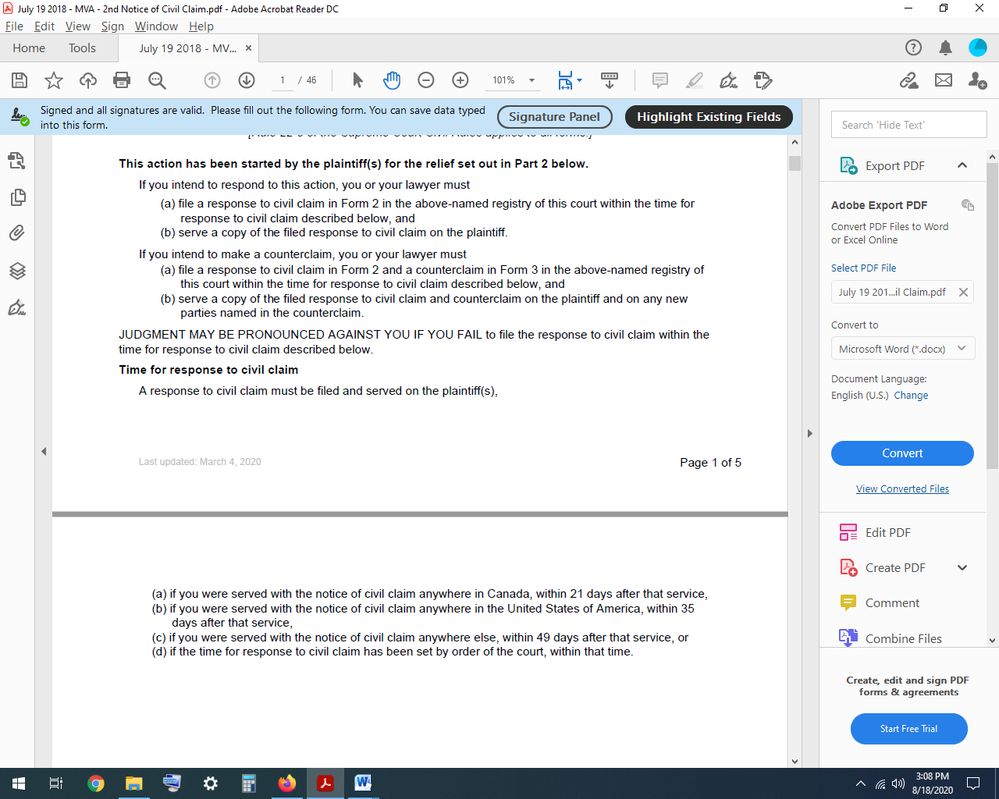
What I see is that the document says page 1 of 5. Was the original document 5 pages long?
Sorry that I can not be of more help.
Copy link to clipboard
Copied
Original document was 46 pages long. I have like 40 pages of blank white pages with nothing on it. How do I go back to the original document it was saved over once I digitally signed it. Some hand, hourglass thingy kept doing something.
I can send you in private mail. I can send you the document too. I refuse to send the more sesitive data on this open form.

Copy link to clipboard
Copied
You need to start again.


Get ready! An upgraded Adobe Community experience is coming in January.
Learn more
 AdChoices