


- Home
- Acrobat
- Discussions
- Save PDF File Name as Field Name in PDF
- Save PDF File Name as Field Name in PDF

Copy link to clipboard
Copied
Hi all,
I've read through this thread : https://acrobatusers.com/tutorials/how-save-pdf-acrobat-javascript and I still can't figure this out.
I want to have a custom save button on my fillable form PDF, and have it save the file name with the fields in my form. The field names are "RequestedBy" , "NameofEvent" , "EventStartmdyy"
so as an example, the pdf is filled out and returned to me with its default pdf name as "Event Request Form Update-1.pdf" , then I get it, and click the button, then it saves it as "DarinVegasTradeshowJune152015.pdf" and saves to a specific folder every time.
I read about getting trusted access and put it into a javascript either in the folder or on my computer? My co-worker and I will be the only person to save these, so it's only on two machines.
Hope you can assist.
Thank you


 Correct answer by
Underz
AUTHOR
Correct answer by
Underz
AUTHOR
Copy link to clipboard
Copied
I tried the following;
The correct syntax I got, based on the debugger for "this.path" returned
/HAUCACAM0007VS/Shares/Marketing_bridge/Darin/`MasterTracker/EventRequestForms/1/test.pdf
so I changed the code from this
// determine the directory path for the current document
var directory = this.path.substring(0, this.path.lastIndexOf('/') +1);
to this
// determine the directory path for the current document
var directory = "/HAUCACAM0007VS/Shares/Marketing_bridge/Darin/`MasterTracker/EventRequestForms/1/"
and it worked. I swear I tried that, and a few variations before.
Very interesting. I can send myself this PDF, open it without saving, click the save and it points to my directory I wanted.
Yay! Solved!
Thank you try67!
Again, for the sake of people googling how to do this...
---------------------------
I pasted this code into a text file, saved it as a javascript (.js file), in the following locations Program Files > Adobe > Acrobat > Javascript, I also pasted it into the folder where I will be saving the file.
- var mySaveAs = app.trustedFunction(
- function(oDoc, cPath, cFlName) {
- // Ensure path has trailing "/"
- cPath = cPath.replace(/([^/])$/, "$1/");
- try {
- app.beginPriv();
- oDoc.saveAs(cPath + cFlName);
- app.endPriv();
- } catch (e) {
- app.alert("Error During Save - " + e);
- }
- }
- );
Then, I created a button, added a javascript to it. the "this.getField's are looking for field names in my PDF, "RequestedBy" is a field in my PDF that has my sales managers name, it then adds a space beside it (+ " " +), then goes to the next field I want. so when I fill out the pdf, it then saves it as SalesManager EventName June 1 2015.pdf.
- // determine the directory path for the current document
- var directory = "/HAUCACAM0007VS/Shares/Marketing_bridge/Darin/`MasterTracker/EventRequestForms/1/"
- if (typeof(mySaveAs) == "function") {
- mySaveAs(this, directory, this.getField("RequestedBy").value + " " + this.getField("NameofEvent").value + " " + this.getField("EventStartmdyy").value + ".pdf");
- } else {
- app.alert("Missing Save Function. Please contact forms administrator ");
- }
Hope that helps anyone else looking to do this, it's fairly easy once you know where to save the javascripts (and what to put in it), then edit another javascript code to meet your needs.
Thank you!
 57
Replies
57
57
Replies
57


Copy link to clipboard
Copied
I did that too, tried with and without. I tried without quotations as well, but that gives me an error also.


Copy link to clipboard
Copied
Sorry, I can't help you beyond that. You need to debug the code until you find the source of the problem.
Copy link to clipboard
Copied
Thanks for trying... all debugger says is undefined. ;(
Copy link to clipboard
Copied
Did it work when you specified the path by accessing the path property? If so then there's something wrong with the way you defined the directory variable.
Did it work when you specified the file-name using a hard-coded string ("newFile.pdf")? If so then there's something wrong with the combined name from the form fields.
Copy link to clipboard
Copied
This code works perfectly, and takes my fields and uses them as the file name. So if I can't figure out how to save to a specific directory, it will be ok, but having things perfect is ideal!
Any other variation to the Path (which I want to be customized to point to 1 local directory) screws it up.
- // determine the directory path for the current document
- var directory = this.path.substring(0, this.path.lastIndexOf('/') +1);
- if (typeof(mySaveAs) == "function") {
- mySaveAs(this, directory, this.getField("RequestedBy").value + " " + this.getField("NameofEvent").value + " " + this.getField("EventStartmdyy").value + ".pdf");
- } else {
- app.alert("Missing Save Function. Please contact forms administrator ");
- }
Copy link to clipboard
Copied
Follow my instructions above to get the correct syntax for the folder name.
Correct answer by
Underz
AUTHOR
Copy link to clipboard
Copied
I tried the following;
The correct syntax I got, based on the debugger for "this.path" returned
/HAUCACAM0007VS/Shares/Marketing_bridge/Darin/`MasterTracker/EventRequestForms/1/test.pdf
so I changed the code from this
// determine the directory path for the current document
var directory = this.path.substring(0, this.path.lastIndexOf('/') +1);
to this
// determine the directory path for the current document
var directory = "/HAUCACAM0007VS/Shares/Marketing_bridge/Darin/`MasterTracker/EventRequestForms/1/"
and it worked. I swear I tried that, and a few variations before.
Very interesting. I can send myself this PDF, open it without saving, click the save and it points to my directory I wanted.
Yay! Solved!
Thank you try67!
Again, for the sake of people googling how to do this...
---------------------------
I pasted this code into a text file, saved it as a javascript (.js file), in the following locations Program Files > Adobe > Acrobat > Javascript, I also pasted it into the folder where I will be saving the file.
- var mySaveAs = app.trustedFunction(
- function(oDoc, cPath, cFlName) {
- // Ensure path has trailing "/"
- cPath = cPath.replace(/([^/])$/, "$1/");
- try {
- app.beginPriv();
- oDoc.saveAs(cPath + cFlName);
- app.endPriv();
- } catch (e) {
- app.alert("Error During Save - " + e);
- }
- }
- );
Then, I created a button, added a javascript to it. the "this.getField's are looking for field names in my PDF, "RequestedBy" is a field in my PDF that has my sales managers name, it then adds a space beside it (+ " " +), then goes to the next field I want. so when I fill out the pdf, it then saves it as SalesManager EventName June 1 2015.pdf.
- // determine the directory path for the current document
- var directory = "/HAUCACAM0007VS/Shares/Marketing_bridge/Darin/`MasterTracker/EventRequestForms/1/"
- if (typeof(mySaveAs) == "function") {
- mySaveAs(this, directory, this.getField("RequestedBy").value + " " + this.getField("NameofEvent").value + " " + this.getField("EventStartmdyy").value + ".pdf");
- } else {
- app.alert("Missing Save Function. Please contact forms administrator ");
- }
Hope that helps anyone else looking to do this, it's fairly easy once you know where to save the javascripts (and what to put in it), then edit another javascript code to meet your needs.
Thank you!
Copy link to clipboard
Copied
I think had two slashes at the start of the path before, which is probably
what prevented it from working correctly.

Copy link to clipboard
Copied
I get unterminated string literal at this line
if (typeof(mySaveAs) == "function") {
for some reason evan though I have the quotes.
Copy link to clipboard
Copied
The problem is probably in the line before that. Post your full code for help with it.

Copy link to clipboard
Copied
thanks for this thread! i applied this script and it works fine for me. however, i would like to apply an overwrite feature wherein another user can open and modify the file and save it again using the same filename.
i found this command >> this.saveAs({cPath:cMyPath, bPromptToOverwrite:true}); but just doesn't know how to apply it to my current script below:
// determine the directory path for the current document
var directory = "/P/common folder/ITUserForms/"
if (typeof(mySaveAs) == "function") {
mySaveAs(this, directory, this.getField("Name").value + " - IT Form" + ".pdf");
} else {
app.alert("Missing Save Function. Please contact forms administrator ");
}
appreciate your guidance on this. thanks!
Copy link to clipboard
Copied
This command will overwrite any existing files by default. You don't need to add anything for it to do that.
Copy link to clipboard
Copied
Thanks for the reply! It actually doesn't overwrite if a new user opens, modify and save the file. It shows this error:
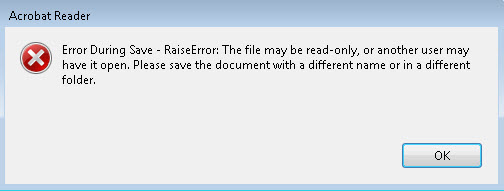
Copy link to clipboard
Copied
Of course, the file can't be open at the point you're trying to save over it... Setting the bPromptToOverwrite parameter to true or false won't change that, though.
Copy link to clipboard
Copied
Sorry I didn't make myself clear. The scenario are as follows:
1. I open the file and made some updates, then save using the "save" button created with the script. Then close I the file.
2. A user opens the file and modify it, but when he saves using the "save" button created with the script, he get's the error.
The file is only opened one at a time.
Copy link to clipboard
Copied
Does the user have full read/write permissions for this file (and the folder where it's located)?
Also, make sure that you disable the Preview option in Windows Explorer.
Copy link to clipboard
Copied
Yes everyone have read/write access to the file and to the folder where it was saved. Preview option is also disabled.
Copy link to clipboard
Copied
any ideas guys? thanks!
Copy link to clipboard
Copied
Ok this is not working anymore, my company upgraded to adobe acrobat 11, and now my error says "Missing Save Function, Please contact forms administrator"
any idea to get this working again? nothing changed except new program.
I put the javascript into the new adobe 11 javascript folder also.
thx all

Copy link to clipboard
Copied
The error message suggests that the function defined in the folder level script is not known, which means that the folder level script did either not execute, or that an error occurred while loading that script file and because of that, the execution of that script was stopped. Do you see any error messages in the JavaScript console? If not, make sure that your script is actually in the correct location. Take a look here for information about how to determine where a folder level script needs to be stored: https://acrobatusers.com/tutorials/print/entering-folder-level-scripts

Copy link to clipboard
Copied
After adding a folder level function requires a restart of Acrobat or Reader since the scripts in these files are only loaded into the memory used by Acrobat/Reader at the startup of the application and not updated as the contents of the folders are updated.

Copy link to clipboard
Copied
I am currently trying to achieve the same result. I used the script below in my Javascript folder:
var mySaveAs = app.trustedFunction(
function(oDoc, cPath, cFlName) {
// Ensure path has trailing "/"
cPath = cPath.replace(/([^/])$/, "$1/");
try {
app.beginPriv();
oDoc.saveAs(cPath + cFlName);
app.endPriv();
} catch (e) {
app.alert("Error During Save - " + e);
}
}
);
I then used this script for the button in LiveCycle:
var directory = "/c/temp/"
if (typeof(mySaveAs) == "function") {
mySaveAs(this, directory, this.getField("UNID").value + ".pdf");
} else {
app.alert("Missing Save Function. Please contact forms administrator ");
}
Nothing seems to happen. I don't get the error message telling me to contact the adminstrator and the file won't save to my temp folder on the c drive. Any ideas whats going on here?
Copy link to clipboard
Copied
You can't use scripts written for Acrobat files on LCD files. The objects, properties and methods are very different in both environments.
For questions about LCD files try the LCD forum: LiveCycle Designer
Copy link to clipboard
Copied
Thanks! I switched the button javascript from LCD to Acrobat which worked as I thought. My next task is try to figure out how to save a multipage document to different directories when the button is clicked. Any ideas where to start looking for that?
Copy link to clipboard
Copied
Do you mean split it to multiple folders, or just save multiple copies in various locations?


Get ready! An upgraded Adobe Community experience is coming in January.
Learn more
 AdChoices