Exit
  • Global community
    • Language:
      • Deutsch
      • English
      • Español
      • Français
      • Português
  • 日本語コミュニティ
  • 한국 커뮤니티
0

Saving FDF file giving Error

Explorer ,
Nov 13, 2022 Nov 13, 2022

Dear All,

I would like to save my acrobat form as FDF.

Through the code I found on this forum, I am getting error during saving the fdf file. Seeking your help about how to change the JavaScript code for this purpose?


Thanks in advance for your help.


Folder level javascript for Trusted Function

var myExportFDF = app.trustedFunction(

function(oDoc, cPath, cFlName) {

cPath = cPath.replace(/([^/])$/, "$1/");

try {

  app.beginPriv();
  

  oDoc.exportAsFDF({cPath: cPath + cFlName})
  
  
  app.endPriv();

     } catch (e) {

app.alert("Error During Save - " + e);

}
}
);

 Folder level javascript for Date

function myDateString() {

return util.printd("dd_mm_yy", new Date());

}


Script for Button in Acrobat form

var directory = "/Users/Me/Onedrive/Documents/FDF/"

if (typeof(myExportFDF) == "function") {

  myExportFDF(this, directory, this.getField("Reg").value + myDateString() + ".fdf");

} else {

  app.alert("Missing Save Function. Please contact forms administrator ");

}


When click the button it ends up with an error.
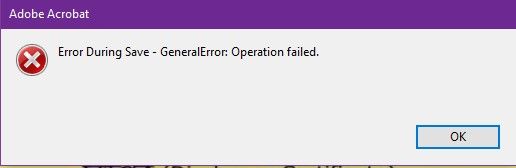
Error.jpg


I have tried my best to find out the  solution but failed. Now seeking for your kind help.

Thanks again!

 

1.5K
Translate
Report
Community guidelines
Be kind and respectful, give credit to the original source of content, and search for duplicates before posting. Learn more
community guidelines
1 ACCEPTED SOLUTION
Community Expert ,
Nov 16, 2022 Nov 16, 2022
LATEST

Then you need to start debugging the code. For example, use a simpler file name, such as "1.fdf", instead of the one you currently use. If that works, the issue is probably with the value of the field, etc.

View solution in original post

Translate
Report
Community guidelines
Be kind and respectful, give credit to the original source of content, and search for duplicates before posting. Learn more
community guidelines
Community Expert ,
Nov 15, 2022 Nov 15, 2022

Are you able to do it manually, without the use of a script?

Translate
Report
Community guidelines
Be kind and respectful, give credit to the original source of content, and search for duplicates before posting. Learn more
community guidelines
Explorer ,
Nov 15, 2022 Nov 15, 2022

Yes i can do it manually. Prepare form > More> Export Data>. It saves as fdf & opens correctly.

Translate
Report
Community guidelines
Be kind and respectful, give credit to the original source of content, and search for duplicates before posting. Learn more
community guidelines
Community Expert ,
Nov 16, 2022 Nov 16, 2022
LATEST

Then you need to start debugging the code. For example, use a simpler file name, such as "1.fdf", instead of the one you currently use. If that works, the issue is probably with the value of the field, etc.

Translate
Report
Community guidelines
Be kind and respectful, give credit to the original source of content, and search for duplicates before posting. Learn more
community guidelines

