Exit
  • Global community
    • Language:
      • Deutsch
      • English
      • Español
      • Français
      • Português
  • 日本語コミュニティ
  • 한국 커뮤니티
0

Send images fields to back or bring to front

Participant ,
Jan 21, 2021 Jan 21, 2021

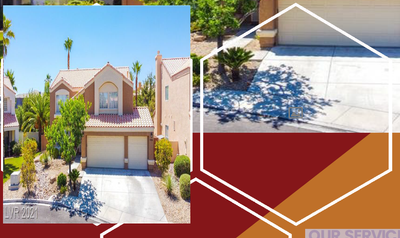
I am creating an open house template in pdf.  I have added a read-only image field in the background in png and I want to fit the new image that will be editable in front of that but to fit in white borders. See screenshot. Is this possible?

Screenshot (149).png


TOPICS
PDF forms
2.9K
Translate
Report
Community guidelines
Be kind and respectful, give credit to the original source of content, and search for duplicates before posting. Learn more
community guidelines
1 ACCEPTED SOLUTION
Community Expert ,
Jan 21, 2021 Jan 21, 2021

A form field is always rectangular.

The only possibility is to import images already clipped with transparency (PNG).


Acrobate du PDF, InDesigner et Photoshopographe

View solution in original post

Translate
Report
Community guidelines
Be kind and respectful, give credit to the original source of content, and search for duplicates before posting. Learn more
community guidelines
Participant ,
Jan 21, 2021 Jan 21, 2021

Images to be like this. Screenshot (150).png


Translate
Report
Community guidelines
Be kind and respectful, give credit to the original source of content, and search for duplicates before posting. Learn more
community guidelines
Community Expert ,
Jan 21, 2021 Jan 21, 2021

A form field is always rectangular.

The only possibility is to import images already clipped with transparency (PNG).


Acrobate du PDF, InDesigner et Photoshopographe
Translate
Report
Community guidelines
Be kind and respectful, give credit to the original source of content, and search for duplicates before posting. Learn more
community guidelines
Community Expert ,
Jan 21, 2021 Jan 21, 2021

No. Not only are fields always rectangular, and parallel to the page borders, they also don't have an explicit z-index value that you can set. They will always appear on top of all other content on the page (except for other fields).

Translate
Report
Community guidelines
Be kind and respectful, give credit to the original source of content, and search for duplicates before posting. Learn more
community guidelines
Participant ,
Jan 21, 2021 Jan 21, 2021
LATEST

Thank you for the clarification!!

Translate
Report
Community guidelines
Be kind and respectful, give credit to the original source of content, and search for duplicates before posting. Learn more
community guidelines