


Copy link to clipboard
Copied
Okay, here it goes. This is something very simple but I can't get it to work! I have a permit application form that I have made to self calculate. No problem. Except that some of my customers REFUSE to fill the form out online before printing it and therefore, all the "FEE" blanks had $0.00 where the customer was trying to write in their own totals. Easy fix. I scripted them to be null instead of zero. Got it, perfect.
Here's the rub...my Grand Total is no longer working. I can't use the sum function or even the simplified field notation because I have to be able to use the null instead of zero script. But when I add my script to the Custom Calculation...it stops totalling. Another issue that I think lends to this is I have one field that has a default value ($25.00) for every permit...no matter what. I tried writing the 25 into the script...not working. I tried adding that particular field into the sum script...not working. All it is doing is adding 25 to the end of my Grand Total. Example: Amount1 = $4.00, Amount2 = $4.00...Grand Total = $825.00...should be $33.00!!! Help. Here is my form.
And here are the scripts I have written in. (These fall under FEE)
event.value = ( this.getField("Text1").value * 2)
// if value is zero replace with null string
if(event.value == 0) event.value = "";
There is one of these for every line besides EL065 under miscellaneous, I created a yes button with the following script.
var a =""
if (this.getField("Check Box1").value == "Yes")
{
a="11"
}
event.value=a
These all work beautifully on their own. The problem comes with EL005 ($25.00). I have it set as a default value of $25.00 because it always gets charged...is this wrong? Should I do it another way?
Then the kicker, the Total line...I can't figure out why it is adding the 25 to the end instead of actually adding it to the sum. UGH.
event.value = this.getField("Amount1").value + this.getField("Amount2").value + this.getField("Amount3").value + this.getField("Amount4").value + this.getField("Amount5").value + this.getField("Amount6").value + this.getField("Amount7").value + this.getField("Amount8").value + this.getField("Amount9").value + this.getField("Amount10").value + this.getField("Amount11").value + this.getField("Amount12").value + this.getField("Amount13").value + this.getField("Amount14").value + this.getField("Amount15").value + this.getField("Amount16").value + this.getField("Amount17").value + this.getField("Amount18").value + this.getField("Amount19").value + this.getField("Amount20").value + this.getField("Amount21").value + this.getField("Amount22").value + this.getField("Amount23").value + this.getField("Amount24").value + this.getField("Amount25").value
// if value is zero replace with null string
if(event.value == 25) event.value = "";
Example:
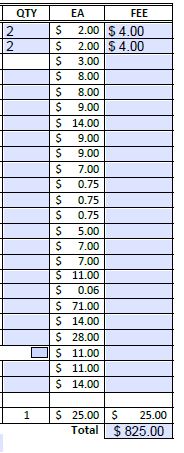
WHY?! Please help...I may be losing my grip on reality.




Copy link to clipboard
Copied
Use the function Number:
Number(this.getField("Amount1").value) + Number(this.getField("Amount2").value) + ...
 4
Replies
4
4
Replies
4


Copy link to clipboard
Copied
Use the function Number:
Number(this.getField("Amount1").value) + Number(this.getField("Amount2").value) + ...
Copy link to clipboard
Copied
Thank you so much! That worked like a charm. Sanity restored. 

Copy link to clipboard
Copied
Hi.
Sure you can use the Sum or the Simplified notation.
Instead of replacing zero by null I use to change its color to white (or any background color), so it cannot break further calculations and it's invisible (screen and printing).
This is done by a Validation script:
if (event.value == 0) {event.target.textColor = color.white;}
else {event.target.textColor = color.black;}
And, in your particular case, the Grand Total field turns to white when its value = zero or when its value = 25 :
if (event.value == 0 || event.value == 25) {event.target.textColor = color.white;}
else {event.target.textColor = color.black;}
There is also an On Blur script to avoid users filling a field with white text:
event.target.textColor = color.black;
See this sample PDF: Fichiers partagés - Acrobat.com
.
Acrobate du PDF, InDesigner et Photoshopographe
Copy link to clipboard
Copied
Thank you for replying! I did not know this so I'm sure it will come in handy in the future.


Get ready! An upgraded Adobe Community experience is coming in January.
Learn more
 AdChoices