Exit
  • Global community
    • Language:
      • Deutsch
      • English
      • Español
      • Français
      • Português
  • 日本語コミュニティ
  • 한국 커뮤니티
0

Strikethrough comments on Windows not showing on macOS

New Here ,
Mar 07, 2019 Mar 07, 2019

Hey everyone -

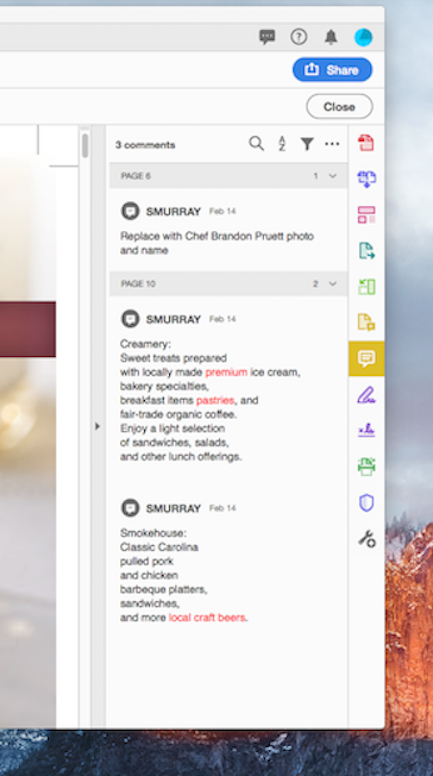
I am running into a strange Comments issue where a set of users in Windows can make strikethrough comments that display across all other Windows users but the Mac users cannot see the strikethroughs.  I have double checked the Comments preferences in both OS's and "Copy selected text into Highlight, Strikethrough... " is checked.  I have confirmed the macOS users are using Acrobat DC and not the Preview App.  In the image below are the Comments from the PC on the left vs macOS on the right.  Mixed environment of macOS from Sierra to Mojave and the issue appears across all OS's so I can't say it's just a flavor of macOS issue.  Acrobat DC versions vary but I replicate the issue even when I pair Windows 10, Acrobat 20.19.010.20098 and macOS Mojave, Acrobat 2019.010.20091.

It feels like I am running into a missed checkbox error here but I can't find it.  Help/thoughts!  Thanks!

Header 1Header 2
pc_comments.pngmac_comments.png
pc_prefs.pngmac_prefs.png
1.5K
Translate
Report
Community guidelines
Be kind and respectful, give credit to the original source of content, and search for duplicates before posting. Learn more
community guidelines
Community Expert ,
Mar 09, 2019 Mar 09, 2019

Hi Scott,

Is this all documents or only this one?

Can you post it using Dropbox or another file sharing service so we can examine it?

~ Jane

Translate
Report
Community guidelines
Be kind and respectful, give credit to the original source of content, and search for duplicates before posting. Learn more
community guidelines
New Here ,
Mar 20, 2019 Mar 20, 2019

Apologies on the very late response to this.  I had to get approval to share out one of the impacted PDFs.  The images in my original post are taken from the attached PDF.  Thanks for giving this a look and helping.

3327-MCJ Spring2019DiningGuide.pdf - Google Drive

Translate
Report
Community guidelines
Be kind and respectful, give credit to the original source of content, and search for duplicates before posting. Learn more
community guidelines
Community Expert ,
Mar 20, 2019 Mar 20, 2019
LATEST

Hi Scott,

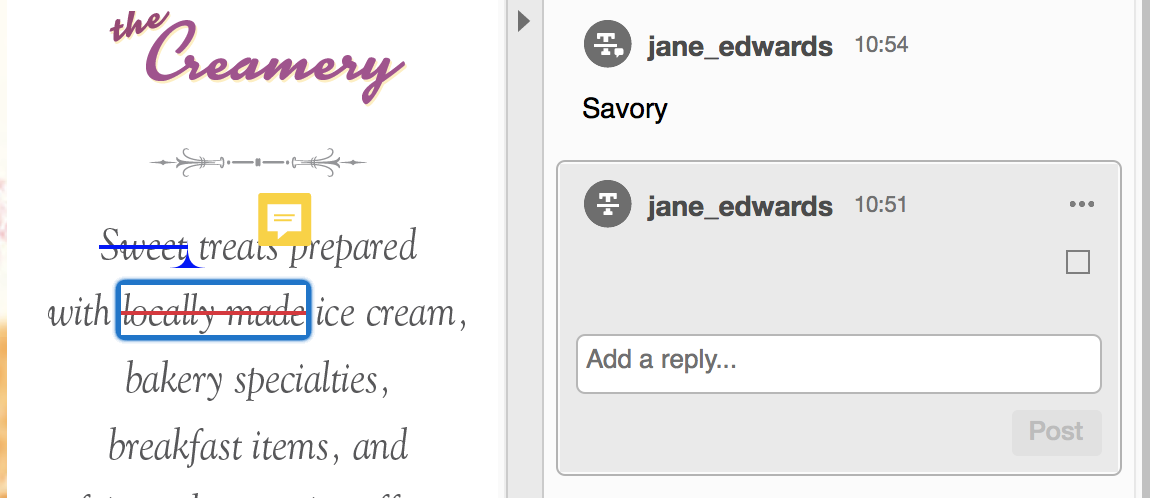
I think it's because the strikethroughs are made inside the Sticky Notes, which is not the typical way to do it. I am on a Mac and can confirm that I do not see the strikethoughs inside the Sticky notes.

My comments were made with the Strikethrough and the Replace Text tools. Can you get your Windows users to do it this way?

Jane

Translate
Report
Community guidelines
Be kind and respectful, give credit to the original source of content, and search for duplicates before posting. Learn more
community guidelines