Created a form in Acrobat ProDC. Followed instructions to add a button that, when clicked, will send the entire PDF via email.
When I open the form in Acrobat ProDC on the same laptop it was created on, the SUBMIT button works (opens a new email message in outlook, PDF is attached and filename is in Subject field, proper email address is in "To" field). When I open the form in Acrobat Reader on the same laptop it was created on, again the SUBMIT button works fine.
But if I send the form to my personal laptop, or to anyone else, the SUBMIT button either does nothing, or throws an error. There are 3 different behaviours:
1) If I choose “Desktop Email Application”, then I get “An error occurred”
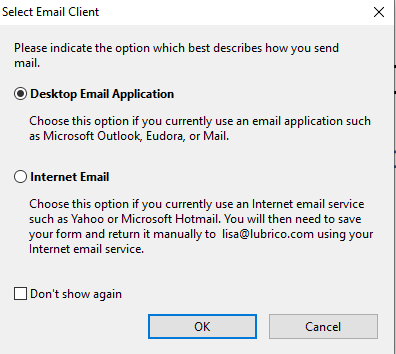

2)If I choose “Internal Email”, then it prompts me to save the PDF (presumably to attach to an email later on)


3) If I try to click the email icon and attach to an email, I get an error:


I've done lots of googling and reading over similar problems/solutions ... and it's NOT because the form is open in a web browser preview. I'm about ready to give up and am pretty frustrated ... why isn't it working?




 1
Reply
1
Reply





 AdChoices