Exit
  • Global community
    • Language:
      • Deutsch
      • English
      • Español
      • Français
      • Português
  • 日本語コミュニティ
  • 한국 커뮤니티
0

Submit button on iPad form won't work!

New Here ,
Apr 10, 2018 Apr 10, 2018

Hi All:

I created a form to be completed on an iPad in the field. There is a SUBMIT via email button. It works great when I complete the form on a laptop. I can not get the for to submit on an iPad.

All the other fields work great.... but won't submit.

Help!!!!

Pam

TOPICS
PDF forms
4.0K
Translate
Report
Community guidelines
Be kind and respectful, give credit to the original source of content, and search for duplicates before posting. Learn more
community guidelines
Community Expert ,
Apr 10, 2018 Apr 10, 2018

What is the PDF viewer you are using on the iPad? 

Similar issues to this one have come up many times. Here's a forum search:

https://forums.adobe.com/search.jspa?q=ipad%20submit%5D

Thom Parker - Software Developer at PDFScripting
Use the Acrobat JavaScript Reference early and often

Translate
Report
Community guidelines
Be kind and respectful, give credit to the original source of content, and search for duplicates before posting. Learn more
community guidelines
New Here ,
Apr 10, 2018 Apr 10, 2018

Adobe Acrobat Reader 18.03.31

Translate
Report
Community guidelines
Be kind and respectful, give credit to the original source of content, and search for duplicates before posting. Learn more
community guidelines
Community Expert ,
Apr 10, 2018 Apr 10, 2018

In my experience the built-in Submit Action using the "mailto:" URL prefix works on Adobe Reader on the iPad. The JavaScript "doc.mailForm()" and "doc.mailDoc()" functions do not. 

I believe Readdle PDF Expert does work with the JS functions.

Thom Parker - Software Developer at PDFScripting
Use the Acrobat JavaScript Reference early and often

Translate
Report
Community guidelines
Be kind and respectful, give credit to the original source of content, and search for duplicates before posting. Learn more
community guidelines
New Here ,
Apr 24, 2018 Apr 24, 2018

I am using the mail to urlprefix and it is still not working. Please help!

Translate
Report
Community guidelines
Be kind and respectful, give credit to the original source of content, and search for duplicates before posting. Learn more
community guidelines
Community Expert ,
Apr 25, 2018 Apr 25, 2018

What url do you use?

Translate
Report
Community guidelines
Be kind and respectful, give credit to the original source of content, and search for duplicates before posting. Learn more
community guidelines
New Here ,
Apr 25, 2018 Apr 25, 2018

mailto: my email address

Sent from my iPhone

Translate
Report
Community guidelines
Be kind and respectful, give credit to the original source of content, and search for duplicates before posting. Learn more
community guidelines
LEGEND ,
Apr 25, 2018 Apr 25, 2018

How is the submit set up? Attached action, JavaScript...?

Translate
Report
Community guidelines
Be kind and respectful, give credit to the original source of content, and search for duplicates before posting. Learn more
community guidelines
New Here ,
May 01, 2018 May 01, 2018

can you please help?

Translate
Report
Community guidelines
Be kind and respectful, give credit to the original source of content, and search for duplicates before posting. Learn more
community guidelines
New Here ,
Apr 30, 2018 Apr 30, 2018

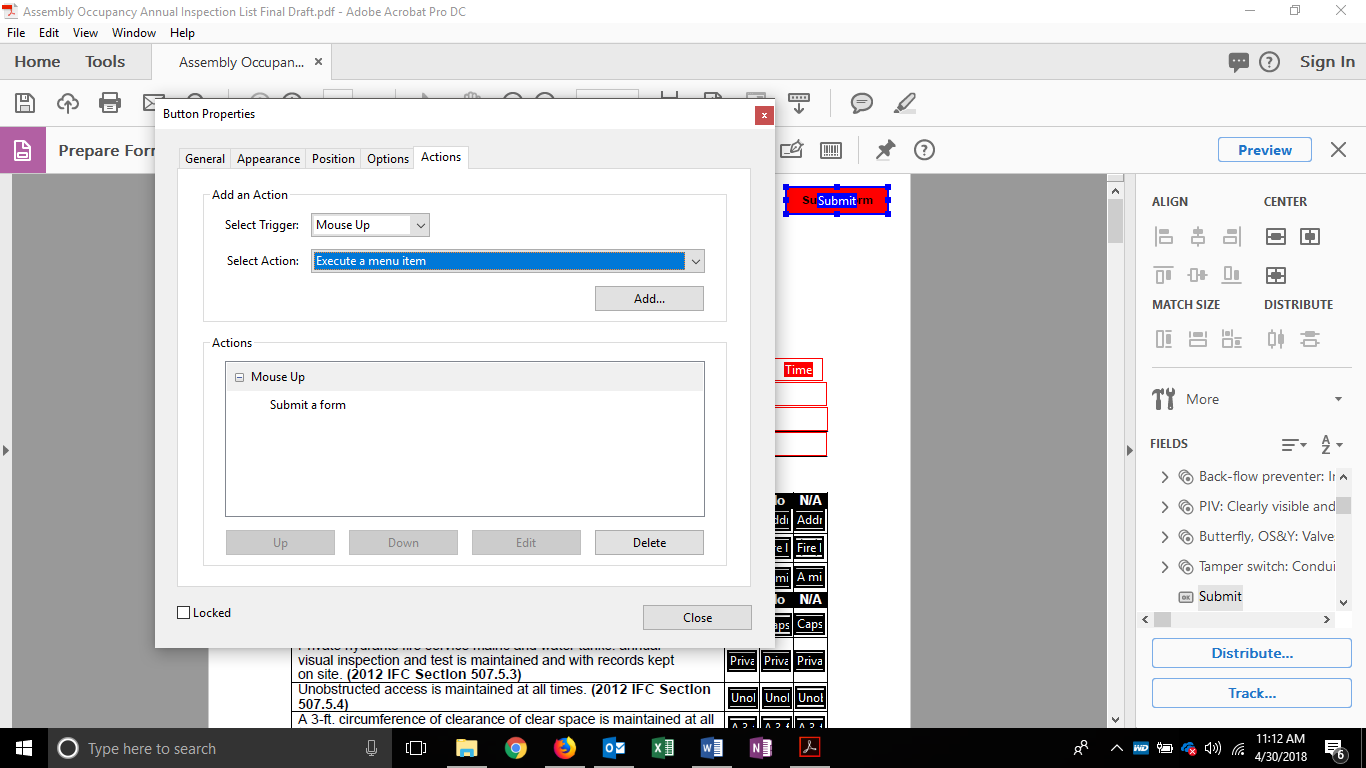
Is this correct?

Translate
Report
Community guidelines
Be kind and respectful, give credit to the original source of content, and search for duplicates before posting. Learn more
community guidelines
Community Expert ,
Apr 30, 2018 Apr 30, 2018

Remove the space after :

Translate
Report
Community guidelines
Be kind and respectful, give credit to the original source of content, and search for duplicates before posting. Learn more
community guidelines
New Here ,
Apr 30, 2018 Apr 30, 2018

This still doesn't work

Translate
Report
Community guidelines
Be kind and respectful, give credit to the original source of content, and search for duplicates before posting. Learn more
community guidelines
Community Expert ,
Apr 30, 2018 Apr 30, 2018

What happens when you use the form in Acrobat Reader on the iPad?

Translate
Report
Community guidelines
Be kind and respectful, give credit to the original source of content, and search for duplicates before posting. Learn more
community guidelines
New Here ,
Apr 30, 2018 Apr 30, 2018

It does nothing. The submit button is present, however, nothing happens. The form works fine on laptops.

Translate
Report
Community guidelines
Be kind and respectful, give credit to the original source of content, and search for duplicates before posting. Learn more
community guidelines
Community Expert ,
Apr 30, 2018 Apr 30, 2018

Can you share the form?

Translate
Report
Community guidelines
Be kind and respectful, give credit to the original source of content, and search for duplicates before posting. Learn more
community guidelines
New Here ,
Apr 30, 2018 Apr 30, 2018

How do I upload the form. I'm not seeing an upload option.

Translate
Report
Community guidelines
Be kind and respectful, give credit to the original source of content, and search for duplicates before posting. Learn more
community guidelines
Community Expert ,
Apr 30, 2018 Apr 30, 2018

In Adobe Acrobat use Send & Track and post the link.

Translate
Report
Community guidelines
Be kind and respectful, give credit to the original source of content, and search for duplicates before posting. Learn more
community guidelines
New Here ,
Apr 30, 2018 Apr 30, 2018
Translate
Report
Community guidelines
Be kind and respectful, give credit to the original source of content, and search for duplicates before posting. Learn more
community guidelines
Community Expert ,
Apr 30, 2018 Apr 30, 2018

The submit button works for me.

Translate
Report
Community guidelines
Be kind and respectful, give credit to the original source of content, and search for duplicates before posting. Learn more
community guidelines
New Here ,
May 01, 2018 May 01, 2018

When I fill out the from on my mobile device i.e. iphone and ipad. I can fill the form out, when the submit button is pushed nothing happens. It doesn't send the info back to me.

Translate
Report
Community guidelines
Be kind and respectful, give credit to the original source of content, and search for duplicates before posting. Learn more
community guidelines
Community Expert ,
May 01, 2018 May 01, 2018

I have no idea.

Translate
Report
Community guidelines
Be kind and respectful, give credit to the original source of content, and search for duplicates before posting. Learn more
community guidelines
LEGEND ,
May 01, 2018 May 01, 2018

Are you quite sure you’re opening in the Adobe app? Is it updated?

Translate
Report
Community guidelines
Be kind and respectful, give credit to the original source of content, and search for duplicates before posting. Learn more
community guidelines
New Here ,
May 01, 2018 May 01, 2018

Absolutley sure. I can fill out the form. I can reset the from with a button. When I press submit, it does nothing on iphone and ipad.

Translate
Report
Community guidelines
Be kind and respectful, give credit to the original source of content, and search for duplicates before posting. Learn more
community guidelines
Adobe Employee ,
May 10, 2018 May 10, 2018
LATEST

Hi Andrewb,

Sorry for the delay in response.

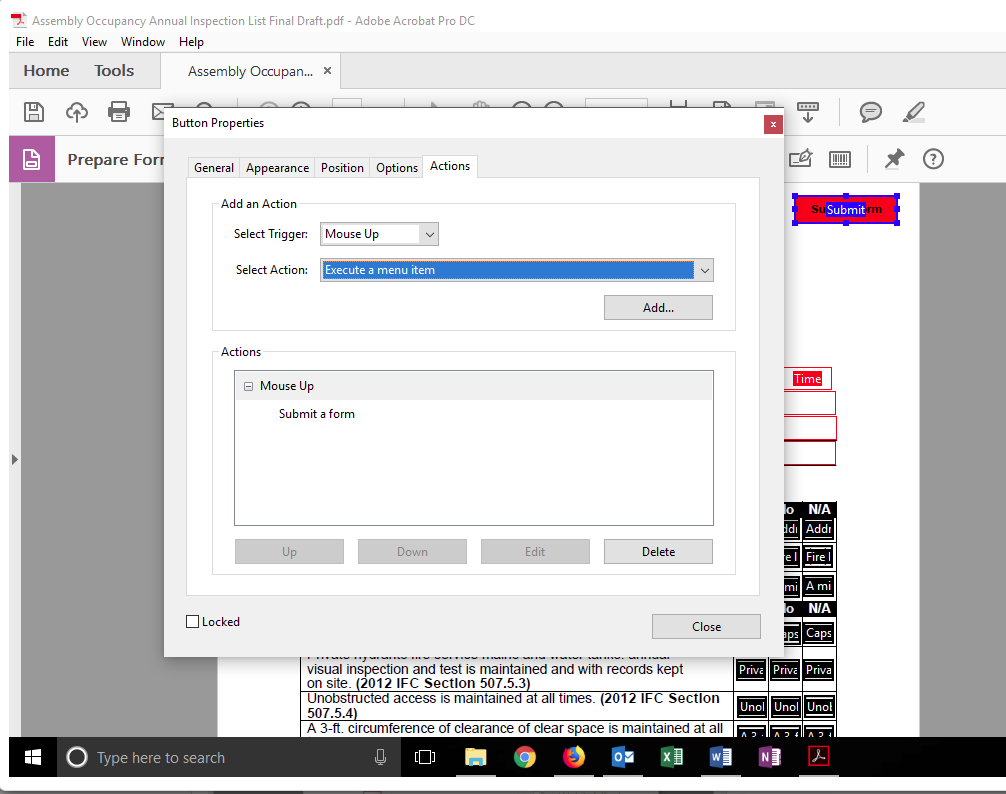
When you go to this point(screenshot attach) to choose an action, don't choose to "Execute a menu item." There is another option "Submit a form" try that and let us know if that helps. As @Bernd said this is working fine at our end.
-Tariq Dar

Translate
Report
Community guidelines
Be kind and respectful, give credit to the original source of content, and search for duplicates before posting. Learn more
community guidelines