Exit
  • Global community
    • Language:
      • Deutsch
      • English
      • Español
      • Français
      • Português
  • 日本語コミュニティ
  • 한국 커뮤니티
0

Text Box Copy/Paste Function Bug

New Here ,
Jan 03, 2017 Jan 03, 2017

My company recently switched from Adobe Acrobat XI to Adobe Acrobat Pro DC 2015. A very important function does not work in this new version: copy & paste.

Example:

1. Create text box

2. Copy a portion of text on the PDF page and paste into the text box.

3. Copy & paste this new text box. It replaces the text in the pasted version with xml code. For some reason it picks up all the formatting from the text. Note: typing freely into the text box does not produce the same issue. However, it is a requirement for us to copy/paste comments within the document.

Is Adobe working to fix this issue, or is there possibly a setting that could resolve the issue?
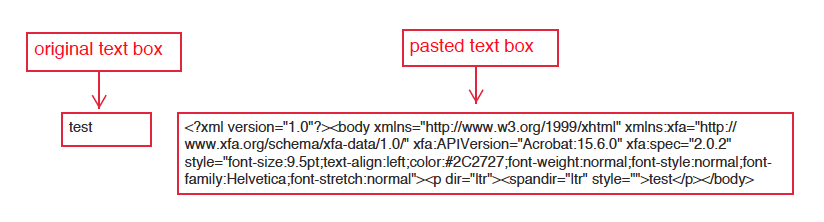
Screen Shot 2017-01-03 at 4.26.25 PM.png

System Background:

Adobe Acrobat Pro DC (2015)

MacOS Sierra 10.12.1

1.8K
Translate
Report
Community guidelines
Be kind and respectful, give credit to the original source of content, and search for duplicates before posting. Learn more
community guidelines
Community Expert ,
Jan 07, 2017 Jan 07, 2017

This XML paste bug happens to me with great regularity. It seems to be limited to when I paste into the body of the comment in the comments list on the right. Try pasting into the comment directly on the page, rather than into the comment list on the right.

This topic was discussed at length here: PDF comments change to XML after copying and pasting

Translate
Report
Community guidelines
Be kind and respectful, give credit to the original source of content, and search for duplicates before posting. Learn more
community guidelines
New Here ,
Jan 09, 2017 Jan 09, 2017
LATEST

Thank you for your suggestion and the link to the previous thread.

Unfortunately, I already do paste my text into the comment box directly on the page, never to the comments list on the right. Both methods produce the same xml results for me.

Is there a way to work with Adobe support about the issue? It says they do not offer any phone or email support for Acrobat DC, so there is no way to notify them to reach a resolution. 

Translate
Report
Community guidelines
Be kind and respectful, give credit to the original source of content, and search for duplicates before posting. Learn more
community guidelines