Copy link to clipboard
Copied
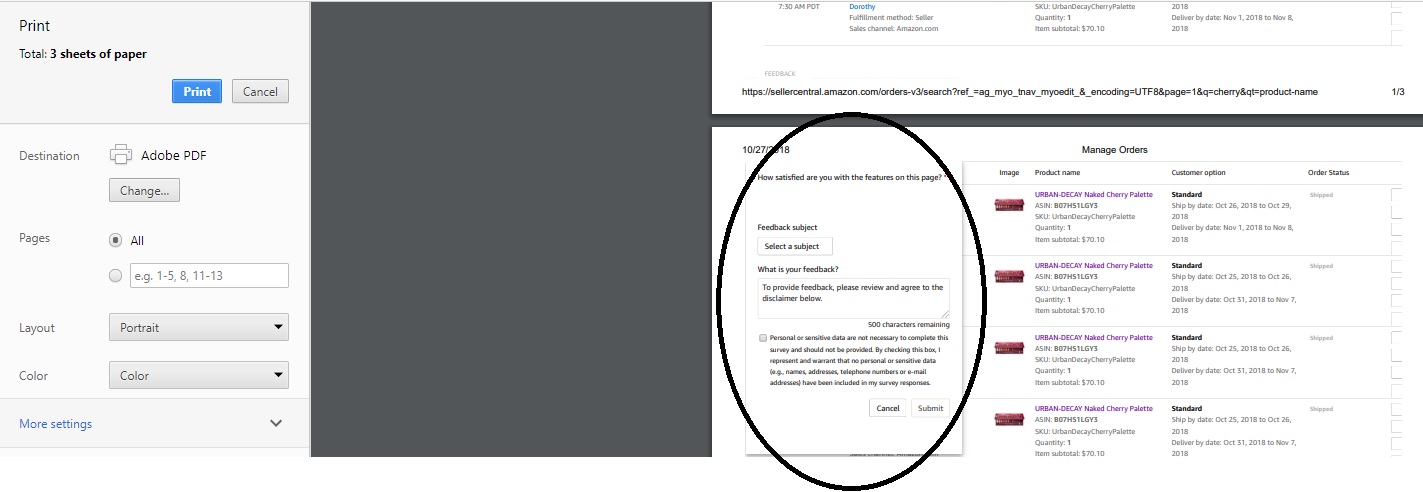
When I'm in Amazon Seller Central and listing products, choosing to write to pdf, I get a banner over the left upper part of the 2nd page, and it happens writing or saving to pdf. How would I be able to disable this?

Copy link to clipboard
Copied
To expand on what Test Screen Name​ said, when you create web pages, you can create a Print Stylesheet. This can include alternate formatting and it can include which sections are printed or not printed. This section (div) is included in their print stylesheet.
You can edit a PDF if you have the paid version of Acrobat, but not with the free Reader.

Copy link to clipboard
Copied
Nothing to do with PDF - you’d see the same thing on a printer (Right?) Amazon designed it to do that.
Copy link to clipboard
Copied
To expand on what Test Screen Name​ said, when you create web pages, you can create a Print Stylesheet. This can include alternate formatting and it can include which sections are printed or not printed. This section (div) is included in their print stylesheet.
You can edit a PDF if you have the paid version of Acrobat, but not with the free Reader.
Get ready! An upgraded Adobe Community experience is coming in January.
Learn more