
Exit
  • Global community
    • Language:
      • Deutsch
      • English
      • Español
      • Français
      • Português
  • 日本語コミュニティ
  • 한국 커뮤니티
0

Unable to Combine files using Acrobat

New Here ,
Feb 19, 2018 Feb 19, 2018

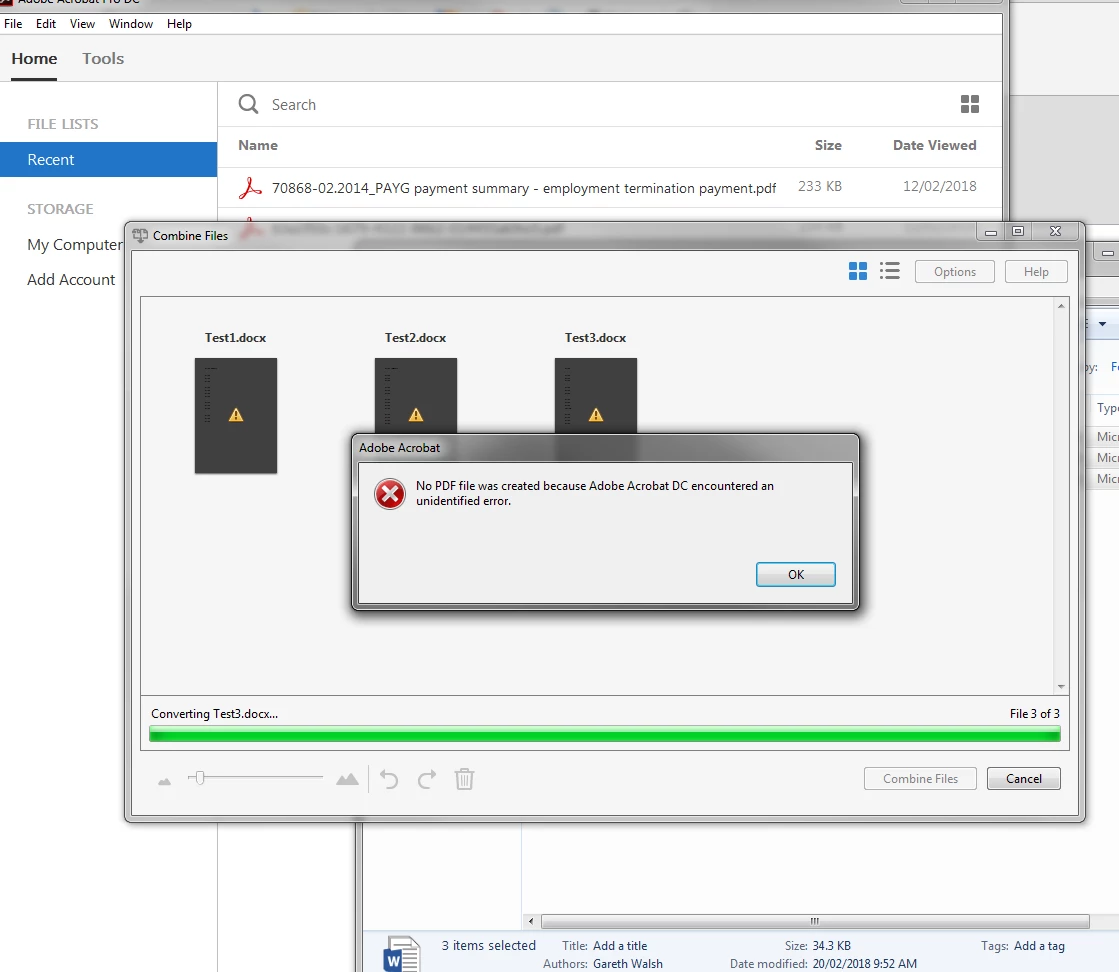
I have been able to replicate the issue with 3 word documents saved to a local drive and also a network drive.

This only started happening this week.

Adobe Acrobat Pro DC version 2015.006.30121

Windows 7 SP1 64-bit

"No PDF file was created because Adobe Acrobat DC encountered an unidentified error."

I have uninstalled the application and tried again to no avail.

Any ideas would be greatly appreciated.
TOPICS
Create PDFs
10.5K
Translate
Report
Community guidelines
Be kind and respectful, give credit to the original source of content, and search for duplicates before posting. Learn more
community guidelines
New Here ,
Feb 19, 2018 Feb 19, 2018

I installed the patch - Acrobat2015Upd1500630413 which seemed to work momentarily on my computer, but the issue persists. 

Translate
Report
Community guidelines
Be kind and respectful, give credit to the original source of content, and search for duplicates before posting. Learn more
community guidelines
New Here ,
Feb 19, 2018 Feb 19, 2018

After installing the patch, it looks like the error I'm receiving is slightly different now -

Capture2.JPG

Translate
Report
Community guidelines
Be kind and respectful, give credit to the original source of content, and search for duplicates before posting. Learn more
community guidelines
Adobe Employee ,
Feb 19, 2018 Feb 19, 2018

Hi cdosrun,

Sorry for the inconvenience.

By looking the error you mentioned, looks like file is open in application. Please do following step:

1. Closed all doc file you want to combine if it open in office. (you can verify it from Task manger)

2. Try your workflow of combine.

If issue still there, please try creating PDF from the same doc file . For this Launch Acrobat, Goto Tool->Create App->select the doc file and Create.

Let us know the output of the workflow.

Also mention the office version you are using.

Share some sample file if possible at [Moderator: Personal Information removed]

How to share a file using Adobe Document Cloud if the file is sensitive and will to share, you may send the link via private message: How Do I Send Private Message

Thanks.

mrraj
Translate
Report
Community guidelines
Be kind and respectful, give credit to the original source of content, and search for duplicates before posting. Learn more
community guidelines
New Here ,
Feb 20, 2018 Feb 20, 2018

Thank you for your response, however, the files are not open. The majority of the time I receive the initial error, the rest of the time the second.

It doesn't seem to matter which version of Office I'm using, it can be 2007, 2010 and 2013.

The files could be stored locally, on a network, it could be 2 files, 3 or 4, doesn't seem to matter.

I opposite click and highlight the required files - in this case (word doc) and select to combine files. It launches and fails.

Translate
Report
Community guidelines
Be kind and respectful, give credit to the original source of content, and search for duplicates before posting. Learn more
community guidelines
New Here ,
Feb 22, 2018 Feb 22, 2018

It is also worth noting the fact it occurs when converting a single file and emails in Outlook.

I have tried removing and re-adding PDFMaker, doing the same for Adobe Pro, all to no avail.

Confirming, it happens on Windows 7 Enterprise 32-bit and 64-bit, Office 2007, 2010 and 2013.

Translate
Report
Community guidelines
Be kind and respectful, give credit to the original source of content, and search for duplicates before posting. Learn more
community guidelines
Adobe Employee ,
Apr 10, 2018 Apr 10, 2018
LATEST

Hi Cdosrun,

Sorry for the delayed response.

Could you check if an update is available for Acrobat using "Check for updates" option under "Help" menu, reboot the machine after installing update and try again. You may also download updates from here: DC Release Notes — Release Notes for Acrobat DC Products , reboot the machine after installing update and try again.

If that doesn't work, try repairing the MS Office installation using the steps given here: Repair an Office application - Office Support

If issue still persists, try whitelisting the locations where the files are located using the steps given in this link: Trust Methods — Acrobat Application Security Guide and check if that works.

Thank You,

Shivam

Translate
Report
Community guidelines
Be kind and respectful, give credit to the original source of content, and search for duplicates before posting. Learn more
community guidelines