
Beenden
  • Globale Community
    • Sprache:
      • Deutsch
      • English
      • Español
      • Français
      • Português
  • 日本語コミュニティ
  • 한국 커뮤니티

Writing a simple Java Script to use in an Adobe pdf with radio buttons

Neu hier ,
Mar 17, 2024 Mar 17, 2024

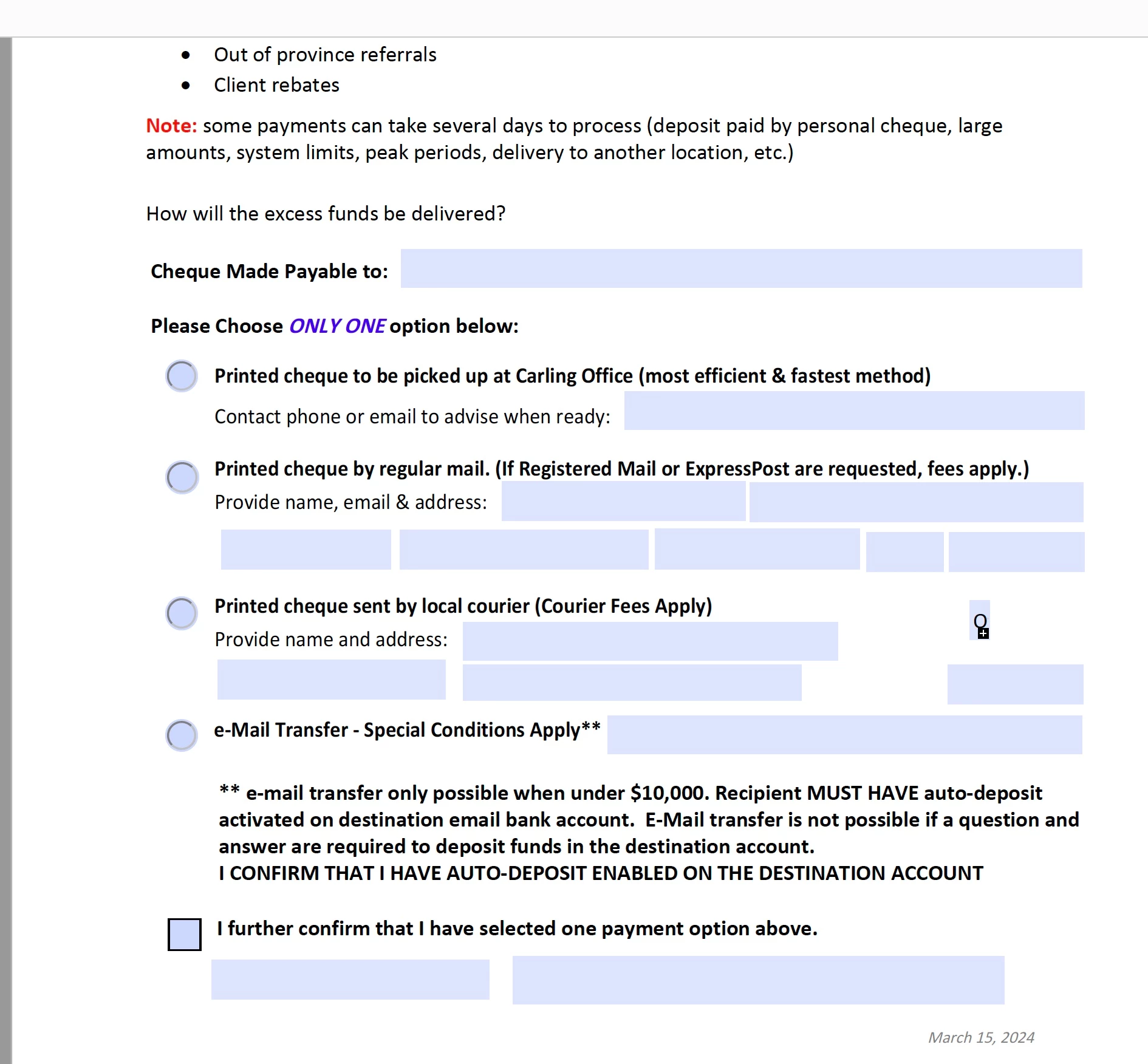
I have created a pdf form that uses radio buttons to select one of 4 options for payment.  Each option includes blank fillable sections if that button option was chosen.  The java script needs to be written so that once the radio button is selected, it goes to the fillable portions, then skips all the other choices and ends at a final checkbox spot to sign and submit the form.  


Any help would be appreciated.  Screenshot of the form is attached.4736DAB3-FEF1-4D95-9DE0-804679077A8A.jpeg
493
Übersetzen
Melden
Community-Richtlinien
Seien Sie freundlich und respektvoll, geben Sie die ursprüngliche Quelle der Inhalte an und suchen Sie vor dem Absenden Ihres Beitrags nach Duplikaten. Weitere Informationen
community guidelines
Community Expert ,
Mar 17, 2024 Mar 17, 2024

in the future, to find the best place to post your message, use the list here, https://community.adobe.com/

p.s. i don't think the adobe website, and forums in particular, are easy to navigate, so don't spend a lot of time searching that forum list. do your best and we'll move the post (like this one has already been moved) if it helps you get responses.


<"moved from using the community">
Übersetzen
Melden
Community-Richtlinien
Seien Sie freundlich und respektvoll, geben Sie die ursprüngliche Quelle der Inhalte an und suchen Sie vor dem Absenden Ihres Beitrags nach Duplikaten. Weitere Informationen
community guidelines
Community Expert ,
Mar 17, 2024 Mar 17, 2024
AKTUELL

You can use setFocus() to set focus to the field you wish to tab to.

Example:

Let's say you wish to jump from radio button to text field named "Text1", as Mouse UP action of radio button use this:

this.getField("Text1").setFocus();

Then let's say you wish to jump from that text field (if the field is not empty) to the checkbox named "Check Box1", as 'On Blur' action of that text field use this:

if(event.target.value != "")
this.getField("Check Box1").setFocus();

Übersetzen
Melden
Community-Richtlinien
Seien Sie freundlich und respektvoll, geben Sie die ursprüngliche Quelle der Inhalte an und suchen Sie vor dem Absenden Ihres Beitrags nach Duplikaten. Weitere Informationen
community guidelines