


changing margins

Copy link to clipboard
Copied
I have a file that was created in an earlier version of adobe and edited in the current version of dc pro. I need to figure out what the margins are and possibly change them, but I can't find a way to do that. Crop pages does nothing and nowhere does it identify the page setup.


 4
Replies
4
4
Replies
4



Copy link to clipboard
Copied
Hi ,
I hope you are following the correct steps to crop the pages and change the margin setting.
Crop Pages>Select the area you need to crop>Once selected you would see the area is highlighted by a box>Double click on the box>Next dialog box would give you various options where you would see the margin dimension and would be able to customize it.
I guess you did not try that.
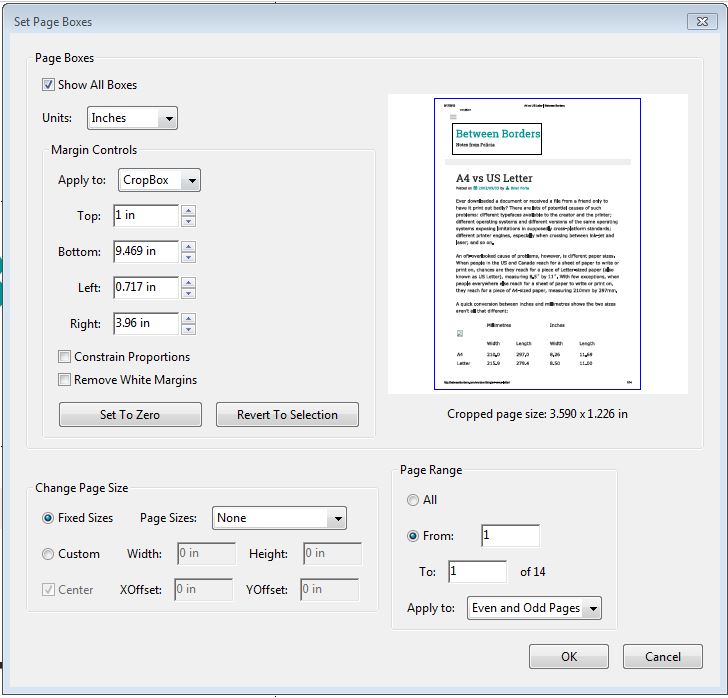
This is what you would see.
Regards
Sukrit Dhingra
Copy link to clipboard
Copied
Thanks. Crop pages did not bring up a dialog box no matter how many
times I clicked. Any suggestions?
Copy link to clipboard
Copied
Hi ,
You would need to select crop pages>you would need to highlight the area that you need to crop>then you would need to double click the box in order to view this dialog box.
Regards
Sukrit Dhingra
Copy link to clipboard
Copied
Did that. Didn't work. Plus I need to know and change the margins for
the entire document and the most this would do was a page at a time.

Get ready! An upgraded Adobe Community experience is coming in January.
Learn more
 AdChoices