
Known Participant
March 5, 2020
質問

Dropdown list with changeable text field value

  • March 5, 2020
  • 返信数 1.
  • 1455 ビュー

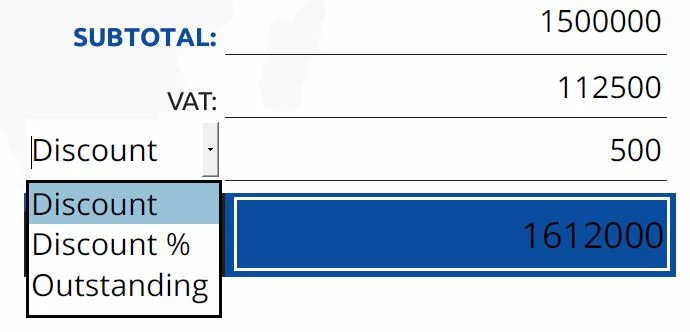
Hi, please I have been searching for how to do the following but I have not been able to get any workable answer for the topic below, I have a field with its description by the side of it,

Now, I want the field description, which is by the side of it, to be a dropdown list, with selectable options, such that once a particular option of description is selected, it will affect the input result on the main field beside it.


For Example:


I have a list of:

| 1. Discount by amount

| 2. Discount by percentage

| 3. Outstanding amount.


If I select Discount by amount from the dropdown list as the description by the side of the text field; any amount I entered in the text field would be the discounted amount which will affect the “Due Amount” under it, by subtracting that entered discount amount from the “Due Amount”, if it is the Discount by percentage I selected on the dropdown as the text field description, any number I entered in the field would the percentage of the discounted amount, which will, in turn, affect the “Due Amount” by subtracting that percentage from the “Due Amount”  while if its Outstanding amount option I selected from the dropdown list, it means that the amount I will enter into the text field would be added to the supposed “Due Amount”


Picture:
Please i will really appreciate any assistance in the above illustration. Thanks

このトピックへの返信は締め切られました。

返信数 1

Thom Parker
Community Expert
Community Expert
March 5, 2020

Here's an article on exactly this topic:

https://acrobatusers.com/tutorials/change_another_field/


Thom Parker - Software Developer at PDFScriptingUse the Acrobat JavaScript Reference early and often
Known Participant
March 6, 2020

Hi, Thom_Parker, i so much appreciate the work you did in the above link in breaking down those steps, but please can you provide me with a little assistant on how i can personalize that to my above illustration, am kind of new in this steps. Thank you.

--------------------------------------------------------------------------------------------------------------------------------------------------------


if you don't mind, i will also like to use this opportunity to ask your assistance on one of your earlier posts, https://acrobatusers.com/tutorials/formatting_text_fields/  on the custom currency symbol, in which you explained how to set the custom currency script, and you went further to give an example for pounds as follows: 

event.value = String.fromCharCode(0x0A3) + event.value;

i have now tried to use the same script by changing it to: 

event.value = String.fromCharCode(0x20A6) + event.value;

 for Naira currency symbol but all i kept getting is a circle like bullet sign, like the following:


instead of this:


Known Participant
March 6, 2020

Hi, Thom_Parker, thank you, the Naira sign has worked now, i found out it works with selected fonts, in my case i had to use "Tahoma" font-type. However, there is one more thing here concerning that, please how can I introduce separator to the figures, instead of straight digits as it is now, I will like it to read as amount with commas, like N10,000.00 instead of N10000, please I need help to fix that. Thank you so much.


Also, i still need your help on the drop challenge i posted above, i will really appreciate the support, thank you so much.