


- Home
- Acrobat SDK
- Discussions
- Highlight smallest value in green and highest valu...
- Highlight smallest value in green and highest valu...
Highlight smallest value in green and highest value in red

Copy link to clipboard
Copied
Dear all ,
My form has 5 fields (field #1 - field #5) with numbers (prices). Is there any javascript, with which I can identify the lowest price (automatically highlighted in green color and the highest in red color? Important if one field value is empty = 0, than 0 should be not considered as number.
In addition the script should populate the lowest vaue in field #6, the average value in field #7 and the highest field value in field #8.
I would be greatfull for any ideas and comments.
BR
Florian


 23
Replies
23
23
Replies
23


Copy link to clipboard
Copied
Very similar to my answer to your other question, but a lot easier because we are working with field values that are straight up numbers, and don't have to first be converted to date objects.
//make an array of date values
var valArray = [[], []];
var total = 0;
for (var i = 1; i < 6; i++) {
var Nm = "field #" + i, fld = this.getField(Nm);
fld.textColor = color.black; //reset all the field colours
if (fld.value && !isNaN(fld.value)) {
valArray[0].push(fld.value);
total += fld.value;
valArray[1].push(Nm);
}
}
//get the max value
var maxVal = Math.max.apply(null, valArray[0]);
var maxIndex = valArray[0].indexOf(maxVal);
var maxFld = this.getField(valArray[1][maxIndex]);
if (maxFld) maxFld.textColor = color.green;
this.getField("field #8").value = maxVal;
//get the min value
var minVal = Math.min.apply(null, valArray[0]);
var minIndex = valArray[0].indexOf(minVal);
var minFld = this.getField(valArray[1][minIndex]);
if (minFld) minFld.textColor = color.red;
this.getField("field #7").value = minVal;
//get the average value
var avgVal = total / valArray[0].length;
this.getField("field #6").value = avgVal;
Copy link to clipboard
Copied
Hello ZoPaars,
firstly many thanks for your support. Unfortunately not working correctly.
As I understod I need to make an Custom calculation script of following:
- //make an array of date values
- var valArray = [[], []];
- var total = 0;
- for (var i = 1; i < 6; i++) {
- var Nm = "field #" + i, fld = this.getField(Nm); //Here I need to put the filed names, which need to be cpalculated? I tried "PreisA11", "PreisB11", etc.
- fld.textColor = color.black; //reset all the field colours
- if (fld.value && !isNaN(fld.value)) {
- valArray[0].push(fld.value);
- total += fld.value;
- valArray[1].push(Nm);
- }
- }
Do I need to put this in textfields calcualtion?
- //get the max value
- var maxVal = Math.max.apply(null, valArray[0]);
- var maxIndex = valArray[0].indexOf(maxVal);
- var maxFld = this.getField(valArray[1][maxIndex]);
- if (maxFld) maxFld.textColor = color.green;
- this.getField("field #8").value = maxVal;
- //get the min value
- var minVal = Math.min.apply(null, valArray[0]);
- var minIndex = valArray[0].indexOf(minVal);
- var minFld = this.getField(valArray[1][minIndex]);
- if (minFld) minFld.textColor = color.red;
- this.getField("field #7").value = minVal;
- //get the average value
- var avgVal = total / valArray[0].length;
- this.getField("field #6").value = avgVal;
Copy link to clipboard
Copied
I tried this...But for sure there is a mistake...
//make an array of date values
var valArray = [[], []];
var total = 0;
for (var i = 1; i < 6; i++) {
var Nm = ("PreisA11,PreisB11","PreisC11","PreisD11")+ i, fld = this.getField(Nm);
fld.textColor = color.black; //reset all the field colours
if (fld.value && !isNaN(fld.value)) {
valArray[0].push(fld.value);
total += fld.value;
valArray[1].push(Nm);
}
}
//get the max value
var maxVal = Math.max.apply(null, valArray[0]);
var maxIndex = valArray[0].indexOf(maxVal);
var maxFld = this.getField(valArray[1][maxIndex]);
if (maxFld) maxFld.textColor = color.green;
this.getField("MAX1").value = maxVal;
//get the min value
var minVal = Math.min.apply(null, valArray[0]);
var minIndex = valArray[0].indexOf(minVal);
var minFld = this.getField(valArray[1][minIndex]);
if (minFld) minFld.textColor = color.red;
this.getField("MIN1").value = minVal;
//get the average value
var avgVal = total / valArray[0].length;
this.getField("AV1").value = avgVal;
Copy link to clipboard
Copied
You are probably best of adding this as a document level JavaScript function. To do that, search for the "Document JavaScripts" tool in the 'Tools' tab of Adobe Acrobat Pro DC. Note that if you have Adobe Acrobat Reader, you can't add any JavaScript.
Your code is almost right, but you should put the names of your fields in an array. I assumed that your fields were named "Field #1", "Field #2" etc. But your field names do not include any incremental enumeration, thus the loop won't work unless you have an array with the field names that you loop through.
I would recommend putting the following function as a document-level JavaScript:
function calcFields() {
//make an array of the numbers and the field names that correspond with them
var valArray = [[], []];
var total = 0;
var NamesArr = ["PreisA11, PreisB11", "PreisC11", "PreisD11"];
for (var i = 0; i < NamesArr.length; i++) {
var Nm = NamesArr, fld = this.getField(Nm);
fld.textColor = color.black; //reset all the field colours
if (fld.value && !isNaN(fld.value)) {
valArray[0].push(fld.value);
total += fld.value;
valArray[1].push(Nm);
}
}
//get the max value and make it red
var maxVal = Math.max.apply(null, valArray[0]);
var maxIndex = valArray[0].indexOf(maxVal);
var maxFld = this.getField(valArray[1][maxIndex]);
if (maxFld) maxFld.textColor = color.red;
this.getField("MAX1").value = maxVal;
//get the min value and make it green
var minVal = Math.min.apply(null, valArray[0]);
var minIndex = valArray[0].indexOf(minVal);
var minFld = this.getField(valArray[1][minIndex]);
if (minFld) minFld.textColor = color.green;
this.getField("MIN1").value = minVal;
//get the average value
var avgVal = total / valArray[0].length;
this.getField("AV1").value = avgVal;
};
I only see four field names in your other comments, but you can add as many as you want to the NamesArr.
Then you need the fields to call upon this function as soon as somebody 'commits' the value to the field.
You can do this by running the code below from the JavaScript console in Acrobat (open it with Ctrl+J).
//Add the formula to the four fields. Only run this code once, from the console!
var NamesArr = ["PreisA11, PreisB11", "PreisC11", "PreisD11"];
for (var i = 0; i < NamesArr.length; i++) this.getField(NamesArr).setAction("OnBlur", "calcFields();");
Copy link to clipboard
Copied
Hello ZoPaars, many thanks for your quick reply. Still facing with pproblems.
In my opinion the root problem is, that I dont know how to work with Arrays....
- valArray = [[], []]; Do I need to ofill in the fildnames, where user puts in variable prices? Following way correct? var valArray = [["PreisA11"], ["PreisB11"], ["PreisС11"], ["PreisD11"]];
Do do I need
- var NamesArr = ["PreisA11", "PreisB11", "PreisС11", "PreisD11"]; Correct?
Copy link to clipboard
Copied
Hello ZoPaars, I got it. However the calculation is not working after changing values of fields "PreisA11", "PreisB11", "PreisС11", "PreisD11". Do you have any idea?
var NamesArr = ["PreisA11", "PreisB11", "PreisC11", "PreisD11"];
for (var i = 0; i < NamesArr.length; i++) this.getField(NamesArr).setAction("OnBlur", "calcFields();");
this.calculateNow() Didn`t help.
Copy link to clipboard
Copied
The minimum value evaluation is not working for me only maximum. Any idea, whats the reason for the problem.
Thanks in advance!
Copy link to clipboard
Copied
Interesting that, if the difference of price value is rising the evaluation works.


Copy link to clipboard
Copied
Comparison doesn`t work if values are all below 0,...
Copy link to clipboard
Copied
Validation doesnt work with 0,... zero decimal places
Copy link to clipboard
Copied
The calculation should happen every time you enter something in one of the four fields "PreisA11", "PreisB11", "PreisC11", "PreisD11" and click outside of those fields. This is the "OnBlur" event, when you leave a field by tabbing out of it or clicking out of it and it is committed.
In the image you give it looks like the field values might be calculated via some other way. If this is the case, then the OnBlur event won't happen so you'll need to trigger the calculation some other way.
I don't know if you already got this, but you should keep the "var valArray" like it is, and only put the field names in the "var NamesArr". And your correction of the NamesArr is right, I forgot some quotation marks.
I just made a quick sheet for myself and everything seems to be working. What did you set for your fields on the "Format" tab? Numbers with two decimal places and a currency symbol? Because that works for me, but if you didn't set the Format tab to numbers, your fields probably contain a bit more than just a number...
Copy link to clipboard
Copied
ZoPaars, good morning. Thanks for your reply. Maybe there is still a mistake from my side.
- For all 4 price fields I set calculation script as follows:
var PreisA1 = this.getField("PreisA1").value;
var temp = this.getField("temp").value;
event.value = PreisA1/temp;
if (temp==0)
event.value = "0";
var NamesArr = ["PreisA11", "PreisB11", "PreisC11", "PreisD11"];
for (var i = 0; i < NamesArr.length; i++) this.getField(NamesArr).setAction("OnBlur", "calcFields();");
- For document javascript I set following script:
function calcFields() {
//make an array of the numbers and the field names that correspond with them
var valArray = [[1],[2],[3],[4]];
var total = 0;
var NamesArr = ["PreisA11","PreisB11","PreisC11","PreisD11"];
for (var i = 0; i < NamesArr.length; i++) {
var Nm = NamesArr, fld = this.getField(Nm);
fld.textColor = color.black; //reset all the field colours
if (fld.value && !isNaN(fld.value)) {
valArray[0].push(fld.value);
total += fld.value;
valArray[1].push(Nm);
}
}
//get the max value and make it red
var maxVal = Math.max.apply(null, valArray[0]);
var maxIndex = valArray[0].indexOf(maxVal);
var maxFld = this.getField(valArray[1][maxIndex]);
if (maxFld) maxFld.textColor = color.red;
this.getField("MAX1").value = maxVal;
//get the min value and make it green
var minVal = Math.min.apply(null, valArray[0]);
var minIndex = valArray[0].indexOf(minVal);
var minFld = this.getField(valArray[1][minIndex]);
if (minFld) minFld.textColor = color.green;
this.getField("MIN1").value = minVal;
//get the average value
var avgVal = total / valArray[0].length;
this.getField("AV1").value = avgVal;
};
Copy link to clipboard
Copied
"Format" tab set to Numbers with 2 decimals with currency symbol
Copy link to clipboard
Copied
Hello ZoPaars, the valida-tion is working, however not working for comparison of ZERO numbers for example: 0,1; 0,3; 0,45, 0,6;
In this the ithe MIN value is shown in the right way (in green color), however the MAX value is not shown in red color and also in the field "MAX1" only value=1.
I would be grateful for any idea or comments on problem solution.
BR
Florian
Copy link to clipboard
Copied
Now I got it "var valArray" has been changed. Thats`s why it has not been working. As the fields values of "PreisA11", "PreisB11", "PreisC11", "PreisD11" are not values which are directly entered, but are the result of a calculation (from source fileds) and only readable, the OnBlur is not working. Is there any posiblility to place it into the source text field?
Copy link to clipboard
Copied
If there are several rows of prices, which need to be validated seperately, accordingly how to adapt the script?
Copy link to clipboard
Copied
In the document-level JavaScript, you should keep the var ValArray like it was: "var valArray = [[], []];". The ONLY thing you should change in the document-level JavaScript is the NamesArr and the names of the fields you want to put the max, min, and average in. Because you had entered a 1 in the first of the arrays inside valArray, that 1 was the highest number.
As you are calculating the fields, you shouldn't put code in them that goes off on an OnBlur event, that won't work. Instead, set the call to the function in the calculation of the last field that will be calculated (see calculation order of your fields). So remove the JavaScript on event from your fields. And remove the following from you field calculations:
var NamesArr = ["PreisA11, PreisB11", "PreisC11", "PreisD11"];
for (var i = 0; i < NamesArr.length; i++) this.getField(NamesArr).setAction("OnBlur", "calcFields();");
Instead, write in the last of the calculations a call to the function, like this: "calcFields();" (without the quotation marks obviously).
You can change the order of calculations in Adobe Acrobat when you are editing the form-fillable fields using the "More" button >> "Set Field Calculation Order".
If you want these calculations to work for every line in your document, I would suggest calling the function with arguments corresponding to the field names to look for and changing the function accordingly.
Copy link to clipboard
Copied
Hello ZoPaars, Merry Christmas  ...now its working perfectly for one row. Many thanks for your support. In case of validating values for other rows, how to change to funtion? I tried to set one more calculation script and changed the filed names, but not working.
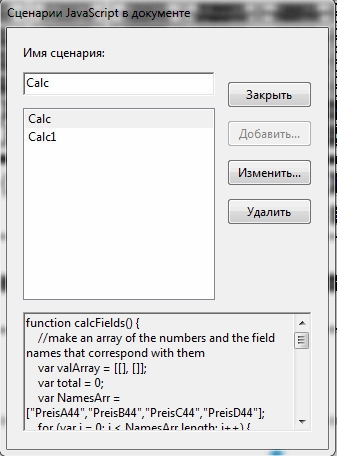
Or maybe it is done in one calculation script, like this? Not working...
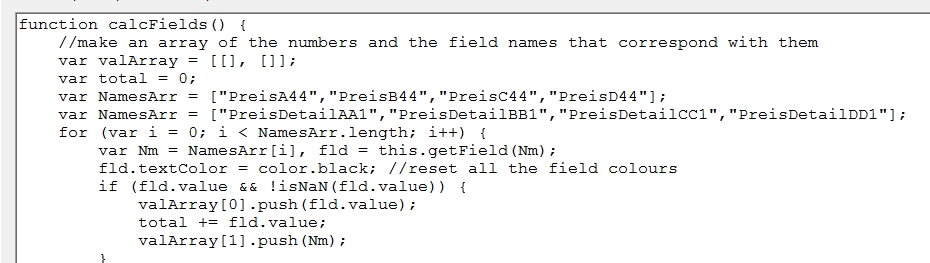

Copy link to clipboard
Copied
You need to use the optional "parameter/s" of the function definition to pass the specific field names you want to be processed.
Copy link to clipboard
Copied
Hello Gkaiseril,
Thanks for your reply. How to change the paramters of the funtion based on a concrete example?
For each row i have 4 different prices.
BR
Copy link to clipboard
Copied
I would be greatful for any recommendations.
Copy link to clipboard
Copied
Has anybody an idea how to change the parameters correctly?
Copy link to clipboard
Copied
Pretty hard to tell what is going on when you only provide a image of part of your code.
If one declares a function one needs to call the function. I do not see the calling of your function.
Can you post a link to your form or a sample form?
Example of a function and passed parameters:
function Sample(parameter0, parameter1, parameter2, parameter3)
{
console.println("parameters passeed: " + parameter0 + ", " + parameter1 + ", " + parameter2 + ", and " + parameter3);
console.println("parameter1: " + parameter0 + " has a type of " + typeof parameter0);
console.println("parameter2: " + parameter1 + " has a type of " + typeof parameter1);
console.println("parameter3: " + parameter2 + " has a type of " + typeof parameter2);
console.println("parameter2: " + parameter3 + " has a type of " + typeof parameter3);
return;
} // end of funcation Sample;
Sample("one", "1", 2, "three 3");

Get ready! An upgraded Adobe Community experience is coming in January.
Learn more
 AdChoices